Kangaroo™ Connect Enteral Feeding Pump | 13
Table of Contents
Section 6 — User Screen
The pump comes with the following default setting:
Default Settings Settings
Continuous (Rate) Mode On
Screen Brightness Level 3 of 4
Feed Rate 0 mL/hr
Preparing for a feed
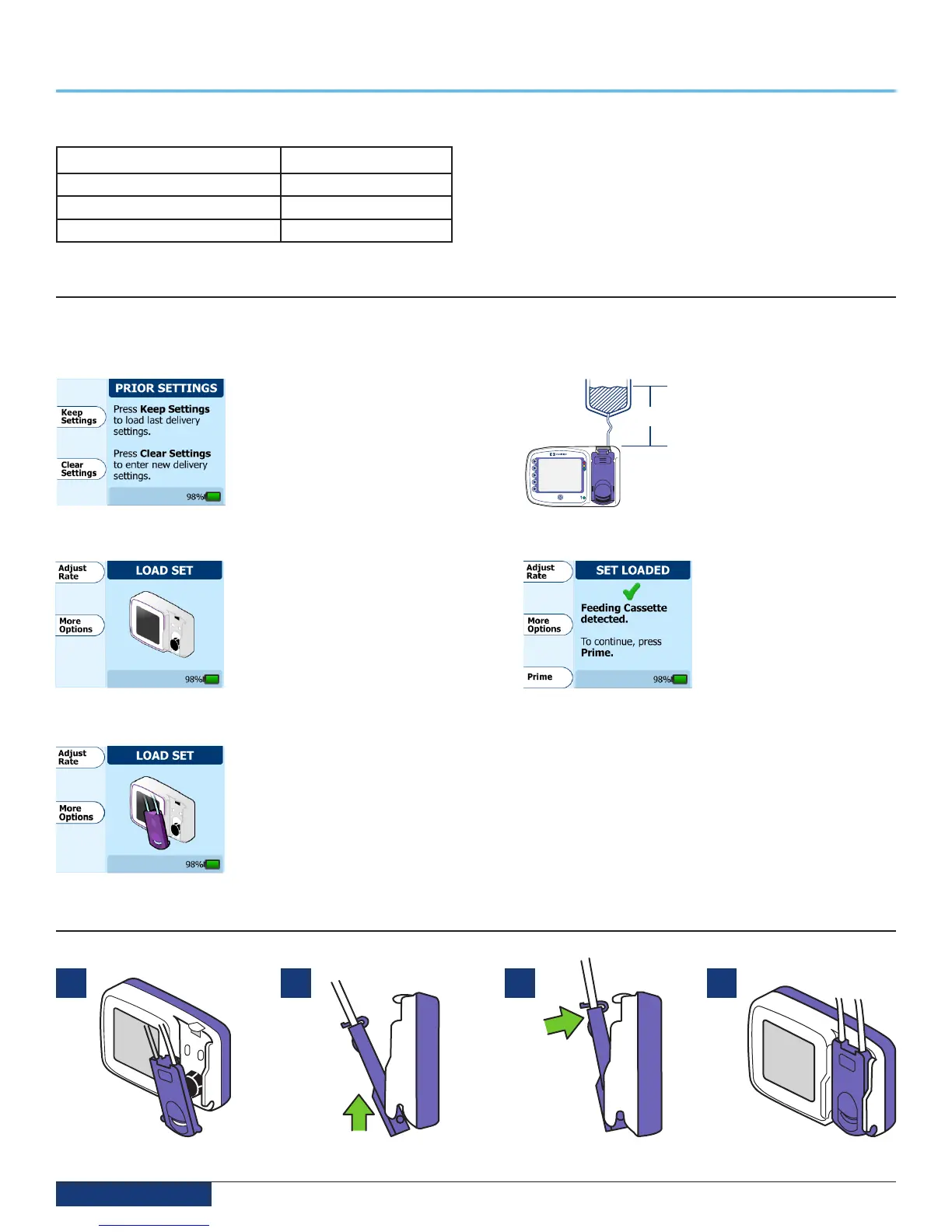
Step 1: Ensure the cassette portion of the feeding set is not loaded on the pump.
Step 2: Press the Power button to power up the pump.
Step 3:
If you have used the pump
previously, your last settings
were automatically retained
for you. Press Keep Settings
to keep the settings from the
last feeding, otherwise, press
Clear Settings.
Step 6:
10”
(25.4 cm)
Hang the feeding set bag
or fluid container so the
starting volume of fluid is
10” (25.4 cm) above the top
of the pump as shown.
Step 4:
Upon power up, you will see
the Load Set screen. Press
More Options to adjust pump
preferences -OR- Press Adjust
Rate to input feeding settings
prior to loading the set -OR-
Load a feeding set on the pump
to continue.
Step 7:
The Set Loaded screen
will confirm that pump
has correctly identified the
feeding set. You will now be
ready to prime the feeding
set. Press the Prime button
to continue.
Step 5:
To load the cassette portion of
the feeding set onto the pump,
follow the animated instructions
on the screen.
Cassette Loading Sequence
1 32 4


 To Next Page