Kangaroo™ Connect Enteral Feeding Pump | 15
Table of Contents
Section 6 — User Screen
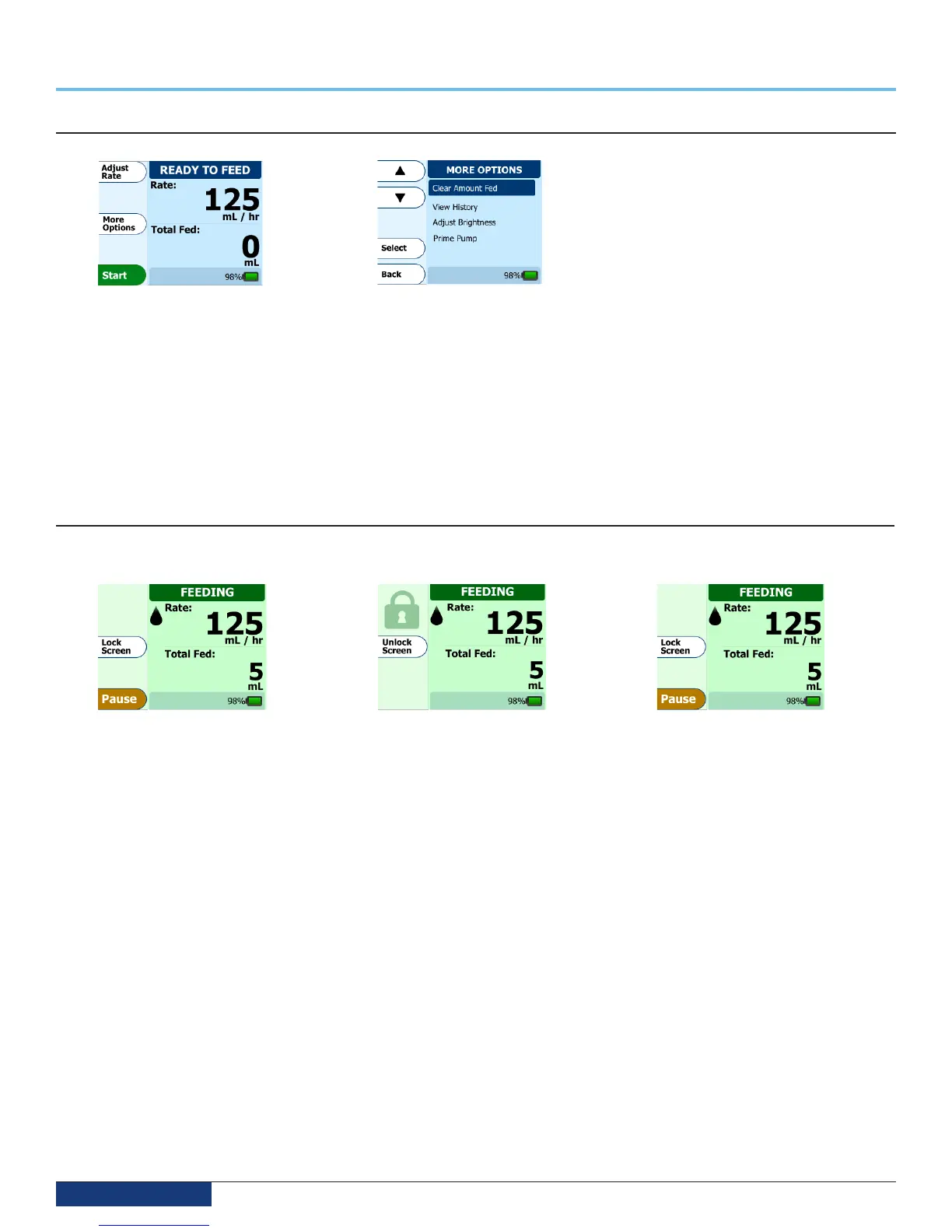
More Options (Clear Amount Fed, History, Airplane Mode, Brightness)
To access the features of Clear Amount
Fed, Airplane Mode, View History, Adjust
Brightness, or Prime Pump, press the More
Options button. Use the arrow keys to
highlight the feature you want to activate. Once
highlighted, press the Select button to activate
the highlighted feature. Hit the Back button to
resume feeding.
The following is a summary of each feature:
• Clear Amount Fed = Resets the feeding counter to zero for starting a new patient or a new feeding
• View History = Allows the user to retrieve the last 72 hours of pump history
• Airplane Mode = Allows the user to disable the wireless connectivity of the pump
• Adjust Brightness = Allows the user to configure the brightness of the display backlight
• Prime Pump = Allows the user to prime the pump after initial setup.
How to lock/unlock the input screen
The pump allows the user to lock the input screen to prevent accidental button presses during portable use. This is especially helpful when
transporting the pump in a backpack.
To use the Lock Screen option, press
and hold the Lock Screen button for
5 seconds. A countdown will appear to
show how long to hold the button.
Once activated, a Lock symbol will appear
on the Feeding screen, showing that the
buttons are disabled.
To disable the Lock Screen so the buttons
can be re-activated, press and hold the
Unlock Screen button for 5 seconds.
When pressing the Unlock Screen
button, a countdown will once again
appear to indicate how long to hold
the button.
The screen should then appear as
seen above. The buttons will now
be re-enabled.


 To Next Page