Kangaroo™ Connect Enteral Feeding Pump | 19
Table of Contents
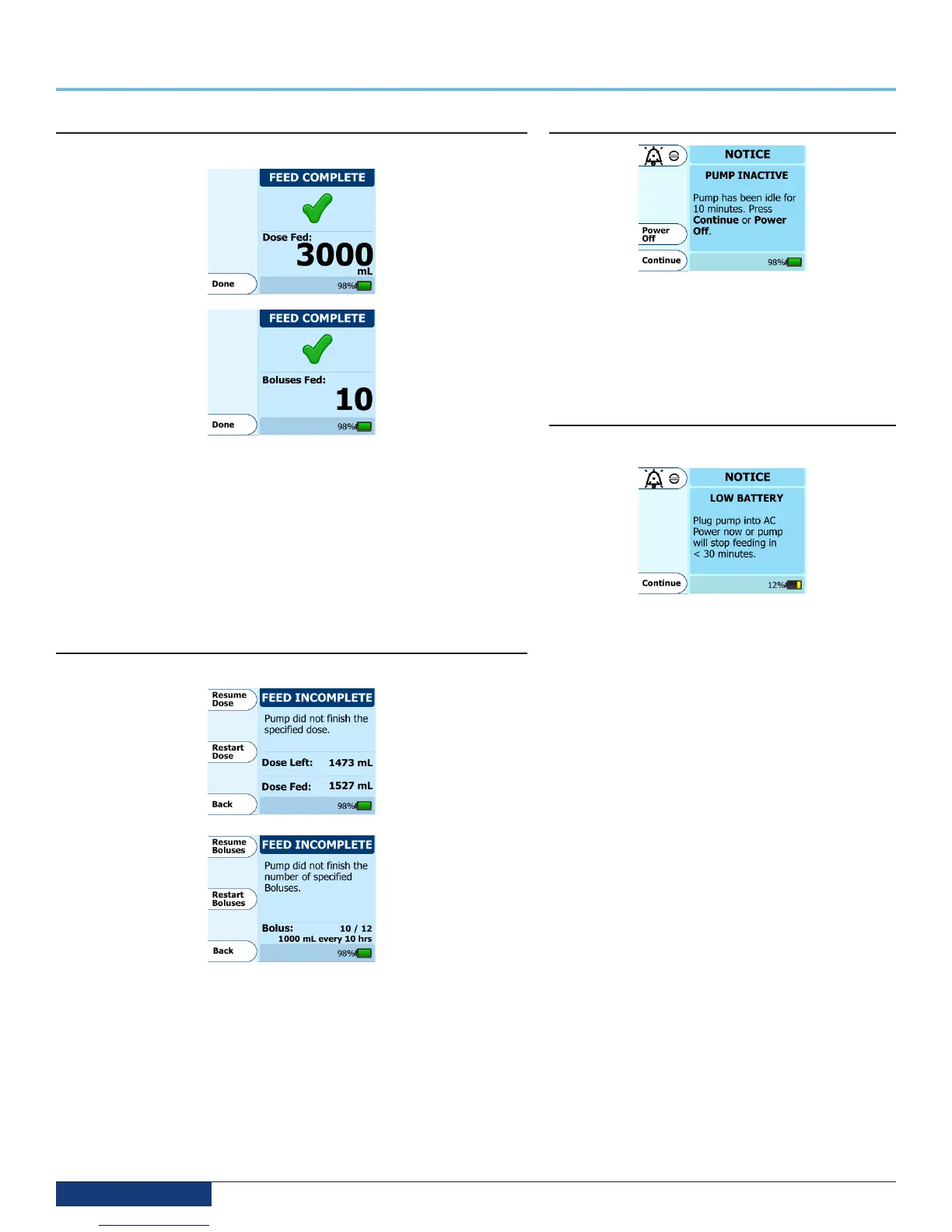
FEED COMPLETE Notification
LED Indicator: blinking green
The FEED COMPLETE screen will appear if a Dose or Bolus feeding meets the
specified amount. In the pictures above, you will see two different screens that
may appear in this case. The screen on the top shows a completed Dose. The
screen on the bottom shows a completed Bolus. Note that during continuous
feeds (no dose, no bolus), you will not receive a feeding complete notification.
Since this is only a notification and not an alarm, no beep will sound to avoid
disturbing the patient. If a sound indication is desired, you can enable feed
complete audio in the More Options menu.
Press Done to clear the notification.
FEED INCOMPLETE Notification
LED Indicator: blinking green
The FEED INCOMPLETE screen will appear if a Dose or Bolus feeding is
interrupted prior to completion of the allocated amount. In the pictures,
you will see two different screens that may appear in this case. The screen
on the top shows an Incomplete Dose. The screen on the bottom shows an
Incomplete Bolus.
Press Resume Dose or Resume Boluses to continue feeding from the current
pump state. This often is needed if the pump was temporarily interrupted and
the user wants to complete the feed that they started with. If needed, press
Restart Bolus or Restart Dose if you are beginning a new, full feeding regimen.
PUMP INACTIVE Alarm
The pump inactive error screen will appear if the pump has
been without input for more than 10 minutes.
Press Continue to return to the previous screen.
Detection of this alarm condition may take up to ten
minutes to occur under normal operating conditions.
LOW BATTERY Alarm
LED Indicator: solid yellow
The LOW BATTERY screen appears and the alarm beeps
continuously when the battery needs to be recharged.
There is approximately 30 minutes of battery life remaining
when this screen appears
Plug the power adapter in to a wall outlet to begin
charging. The pump will automatically return to the screen
that was active prior to the error. The battery will charge
continuously whenever the pump is plugged into a wall
outlet. The pump will continue to operate normally while
the battery in the pump is recharging. 7 hours of charging
is required to fully recharge the battery pack.
If this screen appears while the power adapter is plugged
in to the pump, check to make sure the power adapter plug
is pushed all the way in so it fully inserted into the side of
the pump.
If this screen appears while the pump is attached to
the WCH, check to make sure the power adapter plug is
pushed all the way in so is fully inserted into the back of
the WCH and ensure that the pump is fully seated into the
base to resume charging the pump.
Detection of this alarm condition may take up to 30
minutes to occur under normal operating conditions.
Section 9 — Alarms and Troubleshooting


 To Next Page