1
Welcome to the next wave of multimedia
computing! Fully Sound Blaster compatible,
your audio card supports these features:
❑ Compliance with the Plug and Play (PnP)
ISA specification version 1.0a
❑ Compression algorithms such as A-law,
Mu-law, CTADPCM, and IMA-ADPCM
❑ Full duplex operation
❑ Creative 3D Stereo Enhancement
Technology
Read this leaflet to know the components and
settings of your audio card. Read the
Getting
Started
manual to find out how to install and
use your new audio card.
On the Audio Card
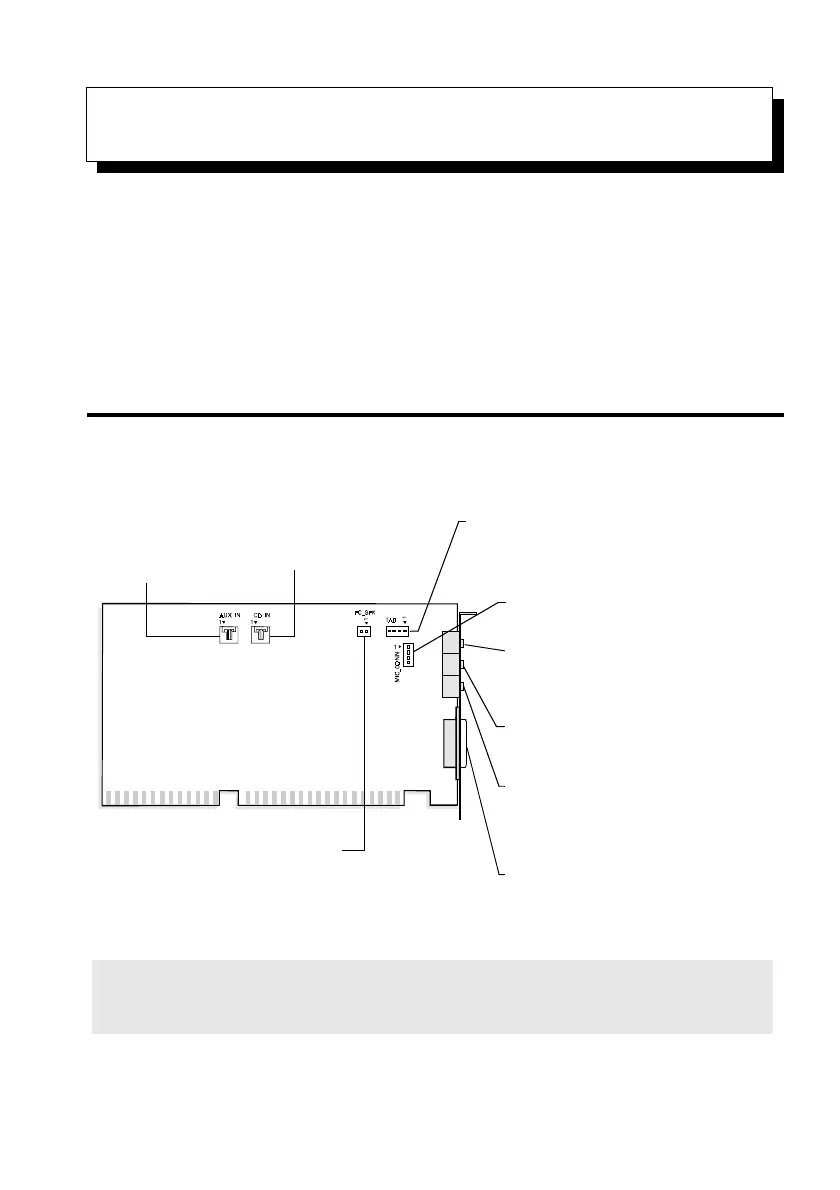
Your audio card has these jacks and connectors which allow you to attach other devices:
Note: Jacks are one-hole connecting interfaces whereas connectors consist of many pairs of
pins. Refer to the online
User’s Guide,
“Hardware Information”, for details on connector pin
assignments.
Speaker Out / Line Out jack
Connects non-powered speakers by
default. Also connects powered speakers
and an external amplifier when built-in
amplifier is disabled.
Figure 1: Jacks and connectors on your audio card.
CD Audio connector
Connects a CD-ROM drive
using a CD audio cable.
Joystick/MIDI connector
Connects a joystick or a MIDI device. You can
buy an optional MIDI kit that allows you to plug
in the joystick and MIDI device simultaneously.
Telephone Answering Device connector
Provides a mono connection from a standard
voice modem, and transmits microphone
signals to the modem.
AUX connector
Connects an internal audio
source, such as a TV
Tuner or an MPEG card.
Line In jack
Connects an external device (such
as a cassette, DAT, or Minidisc
player) for playback or recording.
Microphone In jack
Connects an external
microphone for voice input.
Microphone connector
Connects internal condenser microphone.
PC Speaker connector
Connects to your motherboard’s speaker
connector. (See “PC Speaker Connector
Pin Assignments” as provided online.)
Knowing Your Audio Card
This manual downloaded from http://www.manualowl.com



 To Next Page