Crestron DMPS-100/200/300-C/300-C-AEC DigitalMedia Presentation System
Operations Guide – DOC. 7219D DigitalMedia Presentation Systems: DMPS-100/200/300-C/300-C-AEC • 23
Connectors, Controls & Indicators (Continued)
# CONNECTORS
1
,
CONTROLS &
INDICATORS
DESCRIPTION
17 OUTPUTS (3) Push buttons and red LEDs, select outputs 1,
PROG, AUX 1 destination(s), for DMPS-100-C
(5) Push buttons and red LEDs, select outputs
1 – 2, PROG, AUX 1 - 2 destination(s), for
DMPS-200-C
(7) Push buttons and red LEDs, select outputs
1 – 4, PROG, AUX 1 - 2 destination(s), for DMPS-
300-C
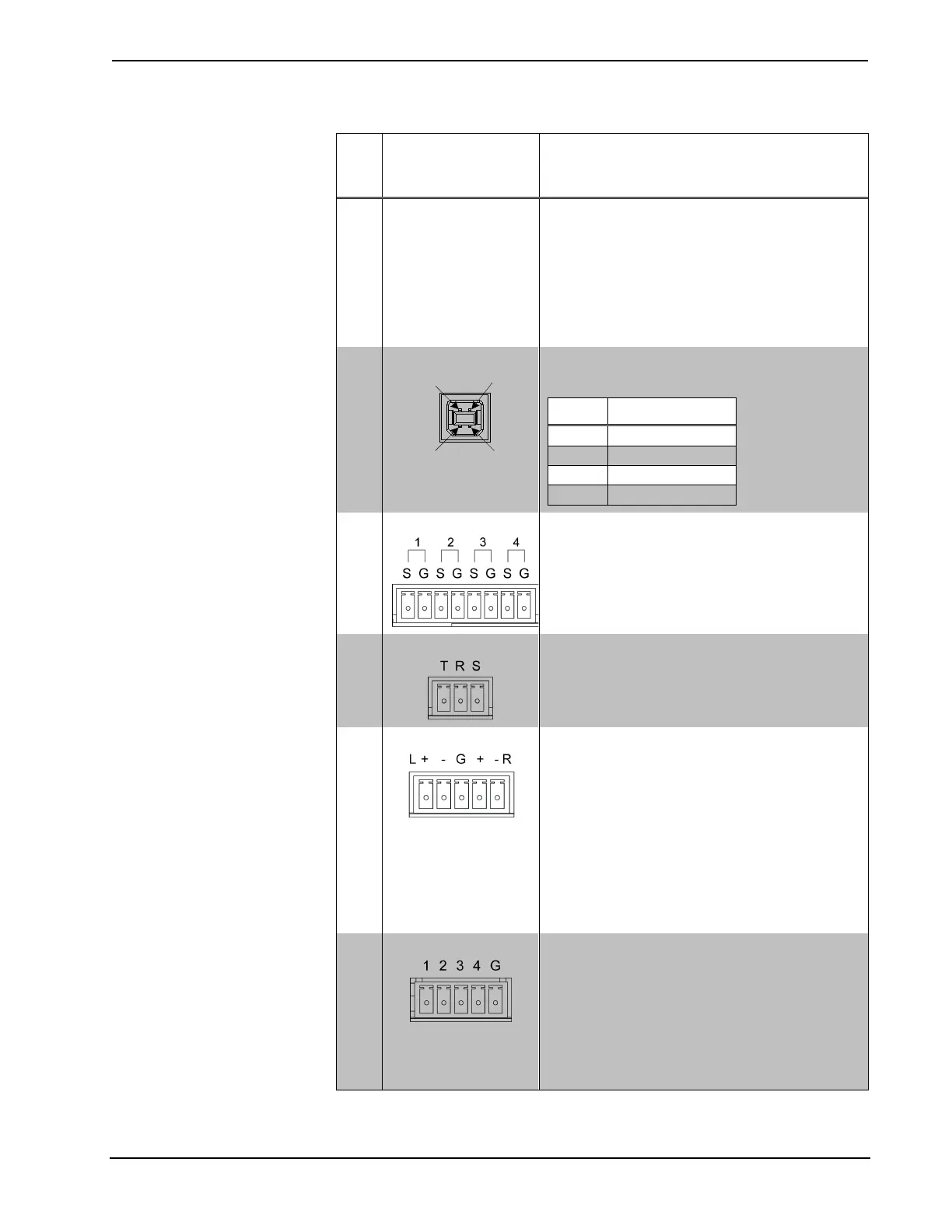
18 COMPUTER
(1) USB Type B female
USB computer console port (cable included)
PIN DESCRIPTION
2 Data -
19 IR – SERIAL OUT
(4) 2-pin 3.5 mm detachable terminal blocks,
IR/Serial output ports;
IR output up to 1.2 MHz;
1-way serial TTL/RS-232 (0-5 volts) up to 9600
baud
20 IR IN
(1) 3-pin 3.5 mm detachable terminal block;
For connection of the CNXRMIRD IR Receiver
2
;
Allows control from IR wireless remotes using
RC-5 command set
21 AUD IN
(4) for DMPS-100-C; (5) for DMPS-200-C and
DMPS-300-C; 5-pin 3.5 mm detachable terminal
blocks;
Balanced/unbalanced stereo line-level analog
audio inputs;
Input impedance: 24k Ω balanced/unbalanced;
Maximum input level: 4 Vrms balanced, 2 Vrms
unbalanced
NOTE: Analog audio inputs 1-5, S/PDIF input 5,
and HDMI inputs 1-5 are mutually exclusive;
HDMI and S/PDIF override analog audio when
using the auto-switching feature
22 INPUT
(1) 5-pin 3.5 mm detachable terminal block;
Comprises (4) programmable digital inputs;
Input voltage range: 0 to 24 volts dc, referenced
to GND;
Logic threshold: 2.5 volts dc nominal with 1 volt
hysteresis band;
Input impedance: 10k Ω @ >5 volts, 1M Ω @ <5
volts;
Pull-up resistor: 2.2k Ω per input
(Continued on following page)


 To Next Page