Supplemental Guide – DOC. 7844E CCS-UC-1: Crestron Mercury Tabletop Conference System • 55
Note the following when connecting a Bluetooth phone to the CCS-UC-1.
• The CCS-UC-1 cannot access the Bluetooth phone’s contacts or other information.
• The CCS-UC-1 automatically drops and forgets the connection to the Bluetooth
phone when a call ends. To make another call, the phone must be reconnected to
the CCS-UC-1.
• If a call is not made within five minutes of connecting to a Bluetooth phone, the
CCS-UC-1 automatically drops and forgets the connection to the Bluetooth phone.
To make a call, the phone must be reconnected to the CCS-UC-1.
To make a call with a Bluetooth phone, follow this procedure:
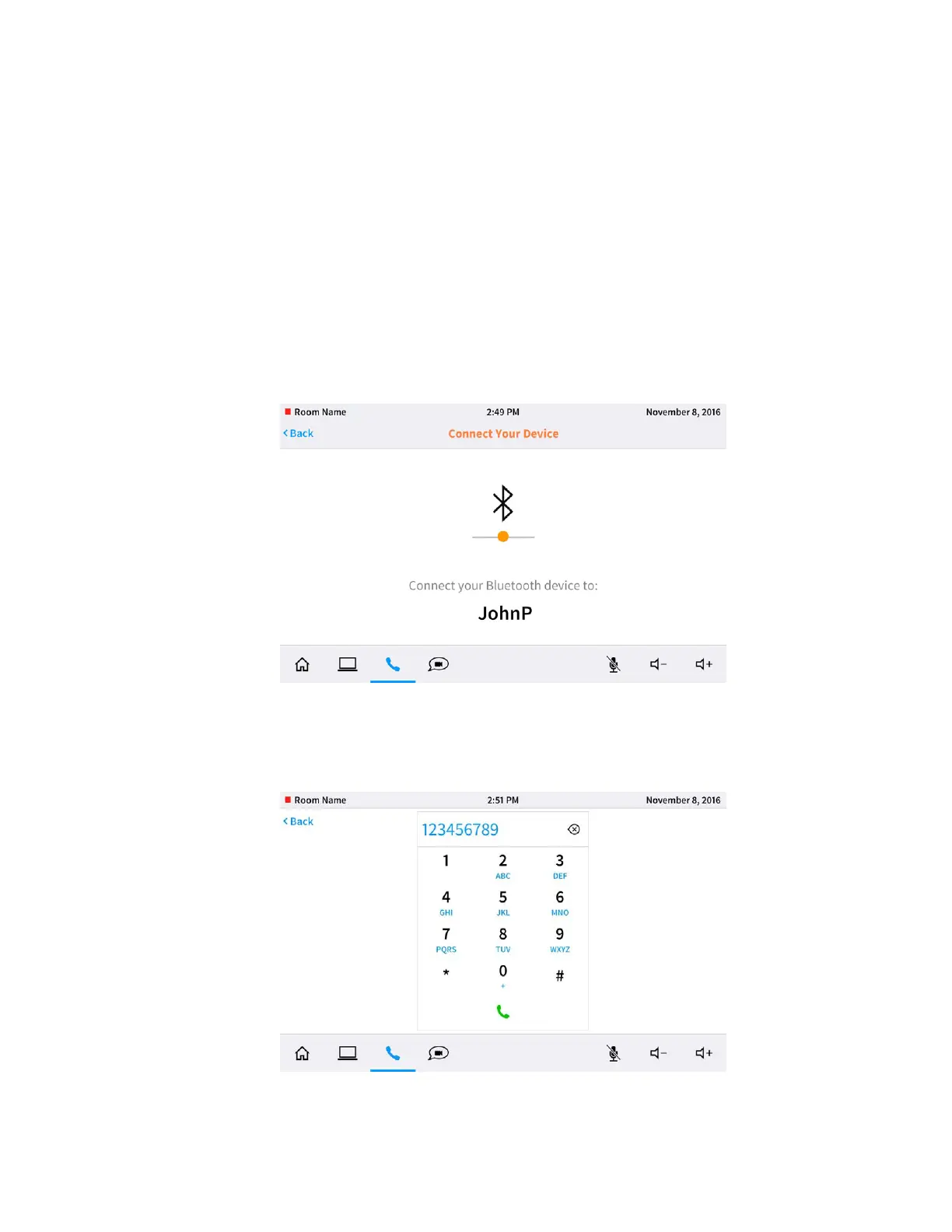
1. Tap Bluetooth. The Connect Your Device screen is displayed, indicating the
Bluetooth name of the CCS-UC-1.
Connect Your Device Screen
2. On the Bluetooth phone, connect to the Bluetooth device matching the Bluetooth
name of the CCS-UC-1. The CCS-UC-1 indicates that it is connecting with a
Bluetooth device and then displays the dialing screen.
Dialing Screen



 To Next Page
 Loading...












