Camera
You can take photos and record videos. Photos and videos are stored to the
phone’s memory card or to the phone’s internal storage. You can copy them
to your computer or access them in the Gallery app.
Capturing a photo
eht sserP .1 Home key > .
.stnemtsujda yrassecen yna ekam dna tcejbus eht ta aremac eht miA .2
AUTO camera mode is used by default.
Note:
zoom out before taking a picture.
eht tel ro ,sucof ot aremac eht tnaw uoy erehw neercs eht no aera eht paT .3
camera autofocus on the center of the image.
paT .4 or press the Volume key to take a photo.
Warning!
toward the eyes of people or animals.
66
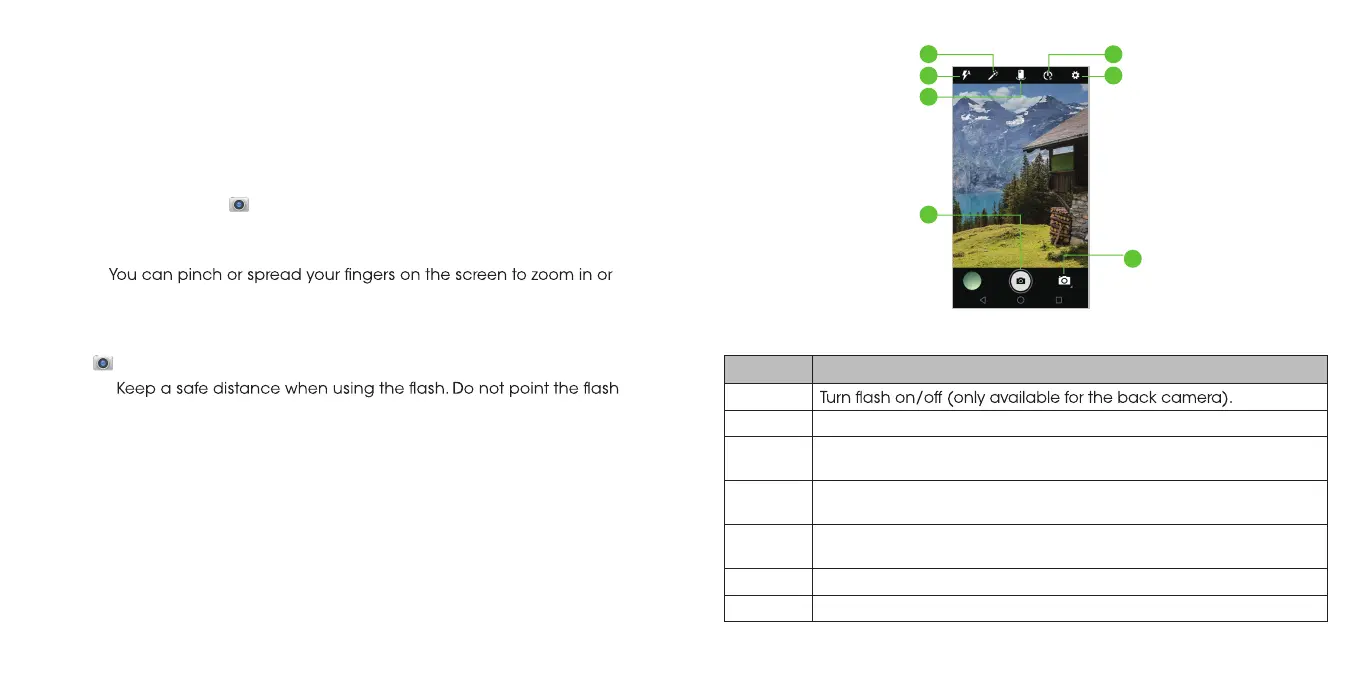
Number Function
1
2 Change the camera settings.
3 Countdown: open or select 2 seconds, 5 seconds, 10 seconds.
4
Capture a photo.
5
Switch between the front and the back cameras.
6 Select a special effect for pictures and videos.
7
Camera ,Recording Video and panorama mode change.
6
3
2
1
5
4
7
9
67



 To Next Page