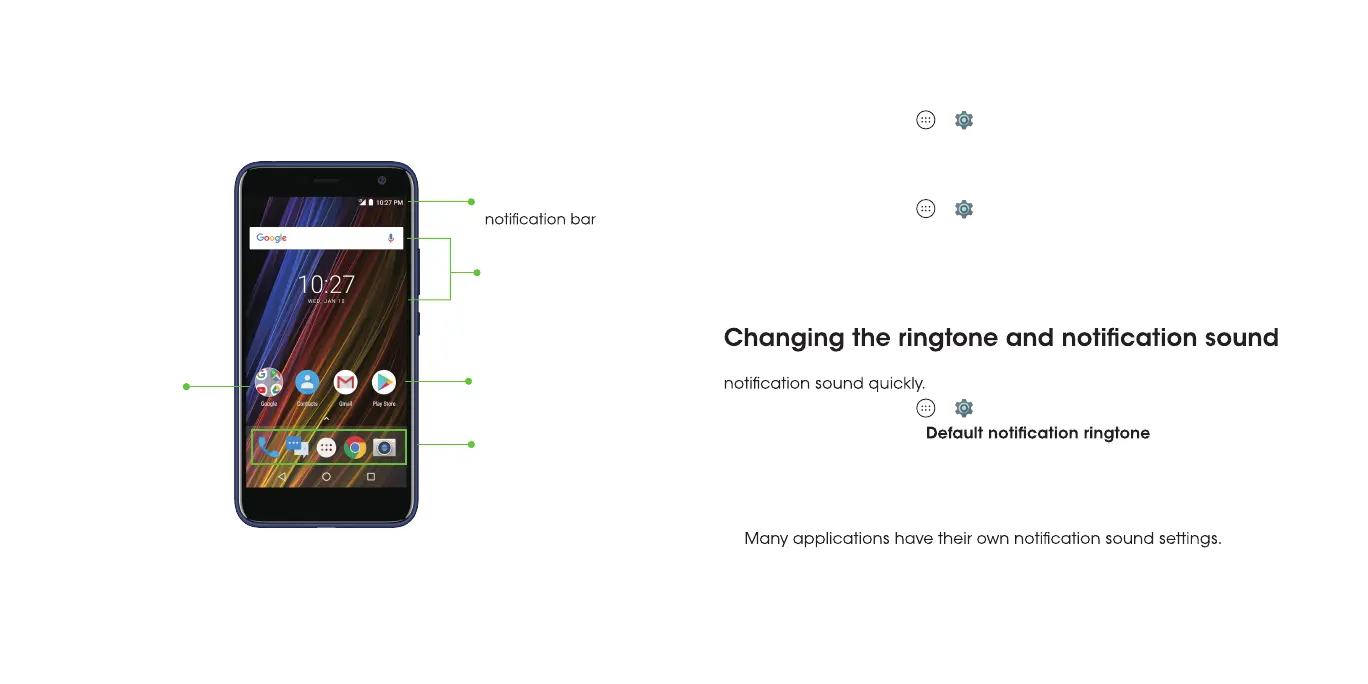
Getting to know the home screen
The home screen is the starting point for your phone’s applications, functions,
and menus. You can customize your home screen by adding shortcuts,
folders, widgets, and more.
Folder
Primary shortcuts
Shortcut
Status and
Widgets
Personalizing
Changing the system language
eht sserP .1 Home key > > > Languages & input > Languages.
2. Select the language you need.
Setting the date and time
eht sserP .1 Home key > > > Date & time.
paT .2 Automatic date & time or Automatic time zone to manually set the
date, time, and time zone.
paT .3 Set date, Set time, or Select time zone to change each setting.
pat , emit eht fo tamrof eht tsujda oT .4 Use 24-hour format.
You can customize the default ringtone for incoming calls and the default
eht sserP .1 Home key > > > Sound
paT .2 Phone ringtone or
.
.esu ot ekil d’uoy enotgnir eht tceles dna tsil eht hguorht llorcS .3
paT .4 OK.
Notes:
•
• See Contacts – Editing contacts – Setting a ringtone for a contact for how
to assign a special ringtone to an individual contact.
14 15



 To Next Page