PASTE.
Google Voice typing
Google Voice typing uses the Google voice recognition service to convert
speech to text. You must have a data connection on a mobile or Wi-Fi network
to use it.
paT .1 or
to access the voice-typing feature.
2. When you see the microphone image, speak what you want to type.
3. You can continue entering text to keep it or to delete it.
Tip: Say “comma,” “period,” “question mark,” “exclamation mark,” or
“exclamation point” to enter punctuation.
Editing text
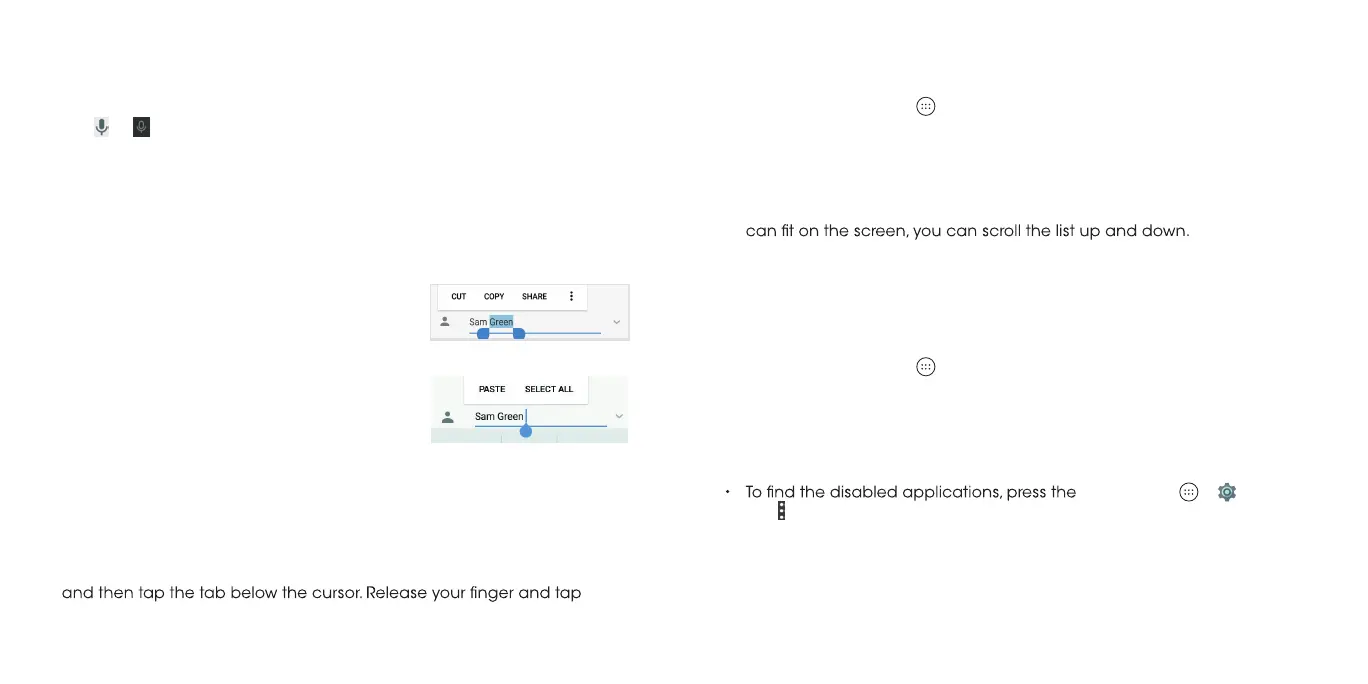
• Cut or copy: Select the text you want to manipulate. Then tap CUT or
COPY
to cut or copy the text to the clipboard.
• Replace text with the clipboard text: Select the text you want to
replace. Then tap PASTE.
• Insert text from the clipboard: Move the cursor to the insertion point
• Move the insertion point: Tap where you want
to type. The cursor blinks in the new position,
and a tab appears below it. Drag the tab to
move the cursor.
•
within the text. The nearest word highlights,
with a tab at each end of the selection.
Drag the tabs to change the selection, or
tap
selection.
SELECT ALL
to highlight all words for
Select text: Press and hold or double tap
Opening and switching apps
Opening an app
1. Press the Home key > .
.ti nepo ot ppa na pat dna neercs eht no nwod ro pu .2
Switching between recently opened apps
eht sserP .1 Recent apps key. A list of the names and thumbnails of apps
you’ve recently used opens. If you’ve been using more apps recently than
.ppa taht nepo ot lianbmuht a paT .2
Note: You can swipe a thumbnail left or right to remove it from the list, or tap
CLEAR ALL to remove all thumbnails.
Uninstalling or disabling an app
eht sserP .1 Home key > to open the application list screen.
2. Press and hold an application icon and drag the icon to X Remove or
Uninstall at the top of the screen.
Notes:
• Pre-installed apps may not be uninstalled.
Home key >
> > Apps.
Tap > Reset app preferences > RESET APPS to restore disabled apps and
reset app preferences.
Swipe
28 29



 To Next Page