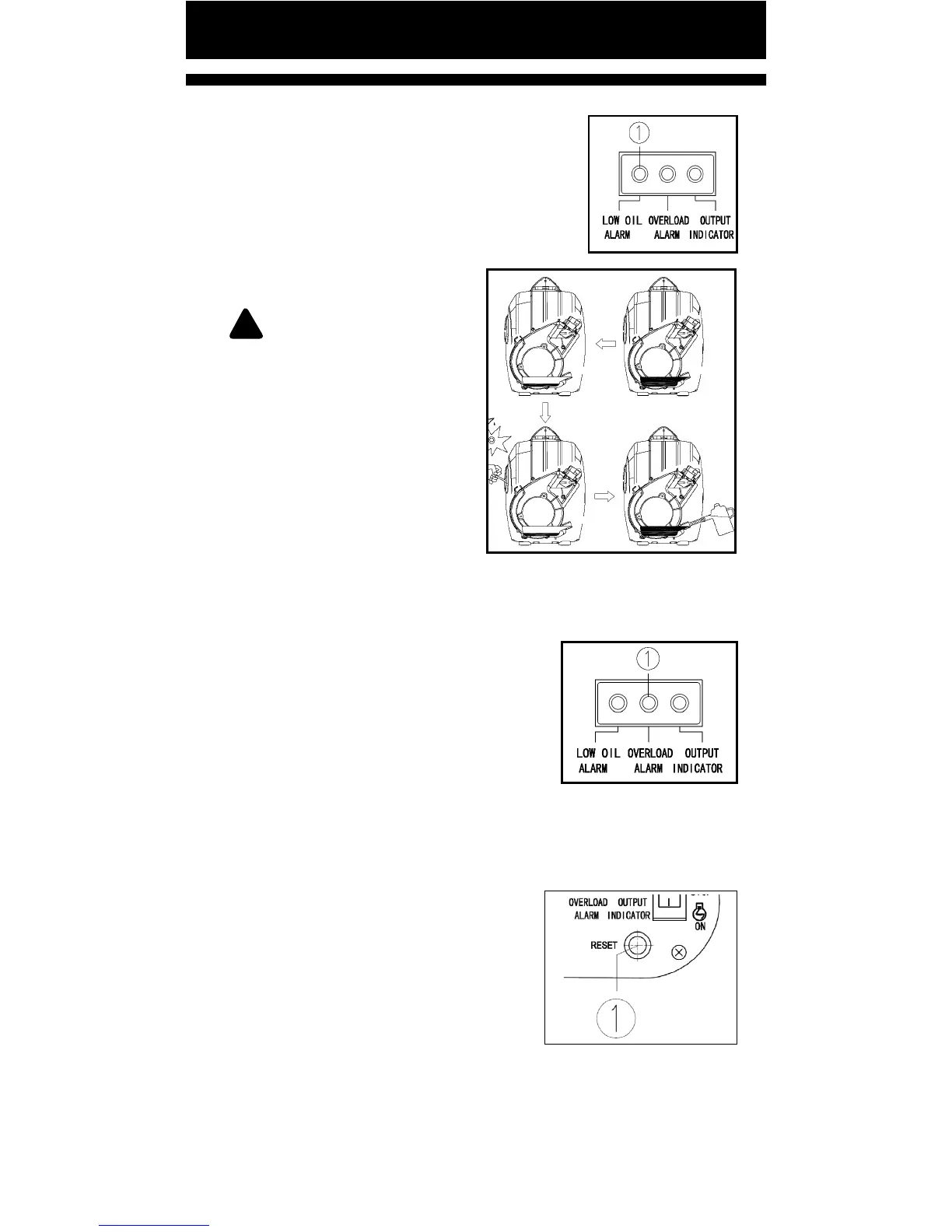
LOW OIL ALARM (YELLOW)
If engine oil level falls below the lower
level, the low oil alarm will turn on, and
the engine will stop automacally. Rell
engine oil, otherwise engine will not start.
① Engine Oil Alarm
!
NOTE: If engine won’t
start, turn the main switch
to ON posion, then pull
the recoil starter. If low oil
alarm light ickers for a few
seconds, it means engine oil
is insucient. Add engine oil
and retry.
OVERLOAD ALARM (RED)
Overload Alarm is Blinking - The overload alarm light
(RED) ① will turn ON and blink when the total power of
connected electrical devices is close to
rated power.
Overload Alarm is ON - The overload
alarm light will turn ON when it detects
an overload of power to all connected
devices. The electrical breaker will
acvate and stop the generator in order to protect it and
connected devices. The AC output indicator (Green) will be
o, and the overload alarm light (red) will stay on and the
generator will not stop running.
When overload light is ON proceed
as follows:
1. Disconnect all devices and press
the reset buon ①.
2. Reduce total waage of electric devices below the
output range
3. Check for blockages around cooling air inlet and control
unit. If blocked, clear it.
Pg. 14


 To Next Page