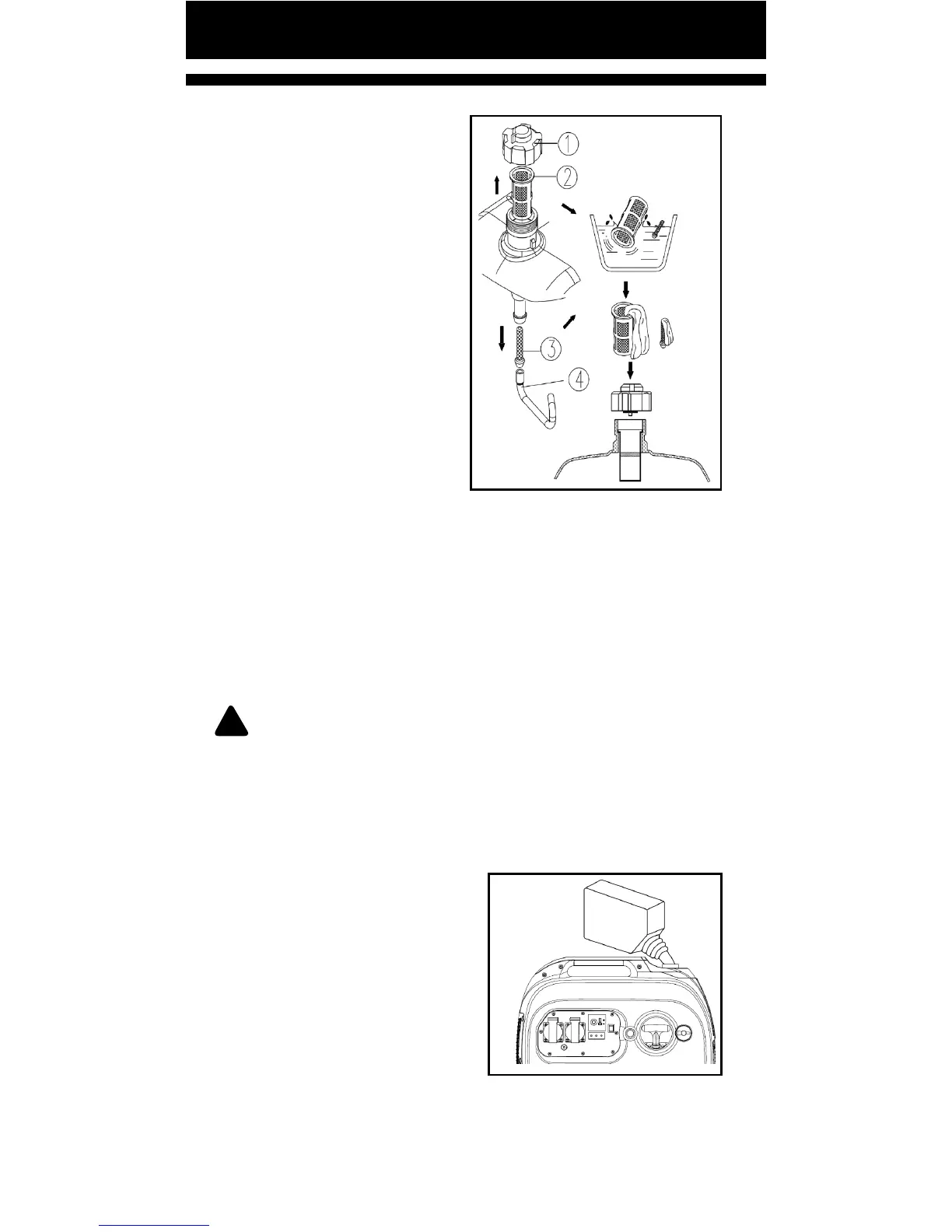
FUEL TANK FILTER
1. Open fuel tank cap, and
take out inlet lter screen.
Remove fuel outlet line and
take out fuel outlet lter
screen.
① Fuel tank cap
② Fuel lling lter screen
③ Fuel outlet pipe, fuel
tank
④ Fuel outlet lter screen
2. Clean the fuel lling
lter screen and fuel outlet
screen with gasoline.
Replace it if damaged.
3. Wipe fuel intake lter screen and outlet lter screen,
and install them into fuel tank intake port and outlet port.
4. Install fuel tank cap and ghten it. Assemble fuel outlet
pipe in correct posion and ghten it with clamp.
!
WARNING: Make sure to ghten fuel tank cap, and
fuel pipe clamp.
TROUBLESHOOTING
ENGINE WILL NOT START
1. No fuel supplied to
combuson chamber.
• There is no fuel in tank:
Add fuel
• There is some fuel in tank:
Check vent knob on fuel
tank cap, and turn it to
posion ON.
• Clogged fuel line: Clean fuel line.
• Clogged carburetor: Clean carburetor.
Pg. 29


 To Next Page