4. Restart the engine aer checking.
!
NOTE: The generator output automacally resets
when engine is stopped and then restarted.
!
NOTE: The overload indicator light may be ON for
a few seconds at rst when using electric devices that
require a large starng current, such as air condioner,
air compressor, submersible pump, or high-power DC
equipment. This is not a malfuncon.
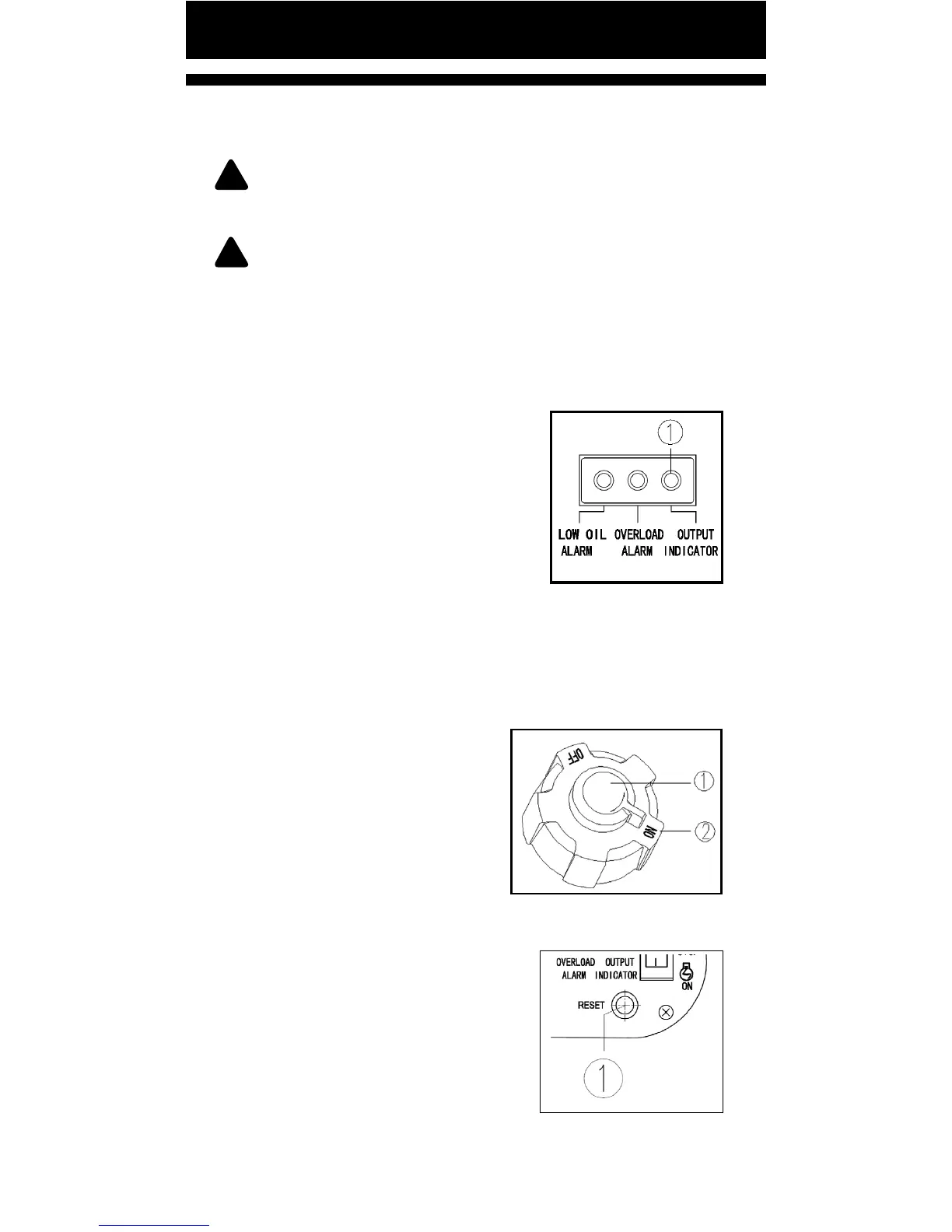
OUTPUT INDICATOR (GREEN)
When the engine is started the output
indicator turn ON (Green).
① Output indicator
FUEL TANK CAP VENT KNOB
The fuel tank cap has a vent to balance inner and outer
pressure of fuel tank, and stop fuel ow. Turn vent knob
clockwise from OFF to ON to allow fuel to ow into
carburetor to allow the generator to start.
When generator is OFF or moved,
ensure to turn vent knob counter
clockwise from ON to OFF to avoid
possible fuel overow or vapor.
① Vent knob ② Fuel tank cap
RESET BUTTON
If the generator stops output due to
an overload, disconnect all devices,
reduce total waage to within the
applicaon range, and press the reset
buon ①. The generator will
recover to output.
Pg. 15


 To Next Page