AIR FILTER REPLACEMENT
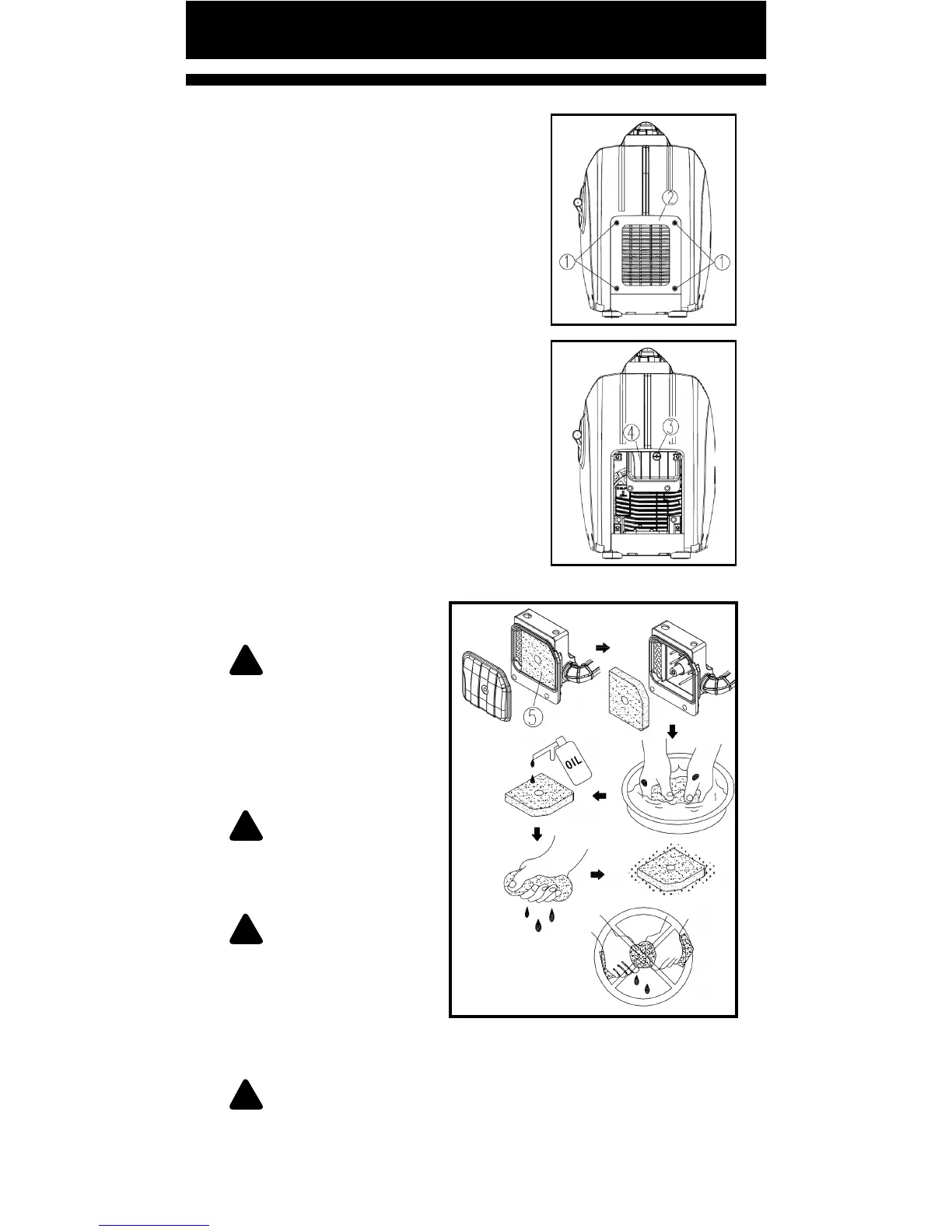
1. Loosen screws and remove air
intake cover.
① Screw
② Air intake cover
2. Loosen screw, remove air lter
cover, and take out lter element.
③ Screw
④ Air lter cover
⑤ Filter element
3. Wash the lter element in
solvent and dry it.
4. Add a small ammount of engine
oil to element and squeeze out any
excess oil. The element should be
wet, but not dripping.
Recommended lter oil:
Foam-air-lter oil or
SAE#20 lubricant oil.
!
NOTICE: Do not
'wring out' the element
sponge or may get
damaged.
5. Insert the element
into air lter.
!
NOTE: Be sure the
element sealing surface
matches the air lter so
as to not leak air.
!
NOTICE: Never run
the engine without
element or it may cause
excessive poisonous gas
and cylinder wear.
6. Install air lter cover, and ghten it with screws.
!
NOTE: When installing air lter cover, check and place
the sealing strip on air lter correctly.
7. Assembly air intake cover, and ghten screws.
8. Install the mainenance door with the screw
Pg. 28



 To Next Page