Introduction
20
Tabbed Menu
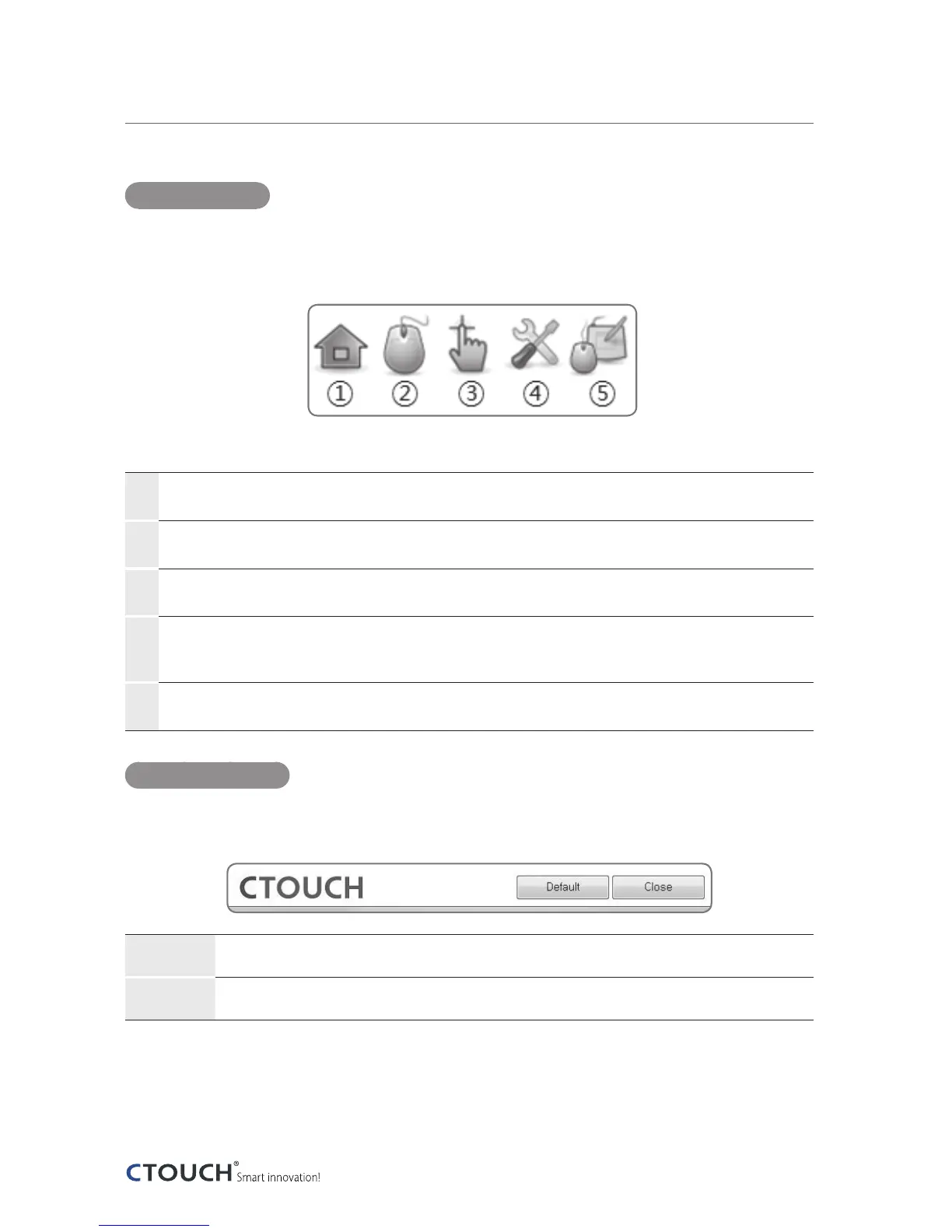
When one goes into one of the Mouse, Calibration, Sensor Settings, or General Settings menus,
one is provided with five different buttons (six if one has Softkey installed) on the top right
whereby the selection of which will give the user access to its specific settings.
①
Home
Access to the menus in a wider named format. One can also see the firmware version of the device.
②
Gesture
Setting the Touch Gesture Profiles.
③
Touch Coordinate Calibration
To calibrate the touch coordinates and settings of the area to touch.
④
Sensor Settings
Enabling and disabling touch functionality; turning the sound on and off; shortcut keys for calibrating and
enabling / disabling touch; and a diagnostic tool for the sensors.
⑤
General Settings
Language settings and the input mode for touch functionality.
Control Buttons
On the bottom of each menu window are keys to go to the default, to refresh the settings from
the sensors, and terminate the program.
Default
Change values to the manufacturing defaults.
Exit
Terminate the program.
The following is the detailed explanation of each function of the CTOUCH tools software.


 To Next Page