Getting Started
8
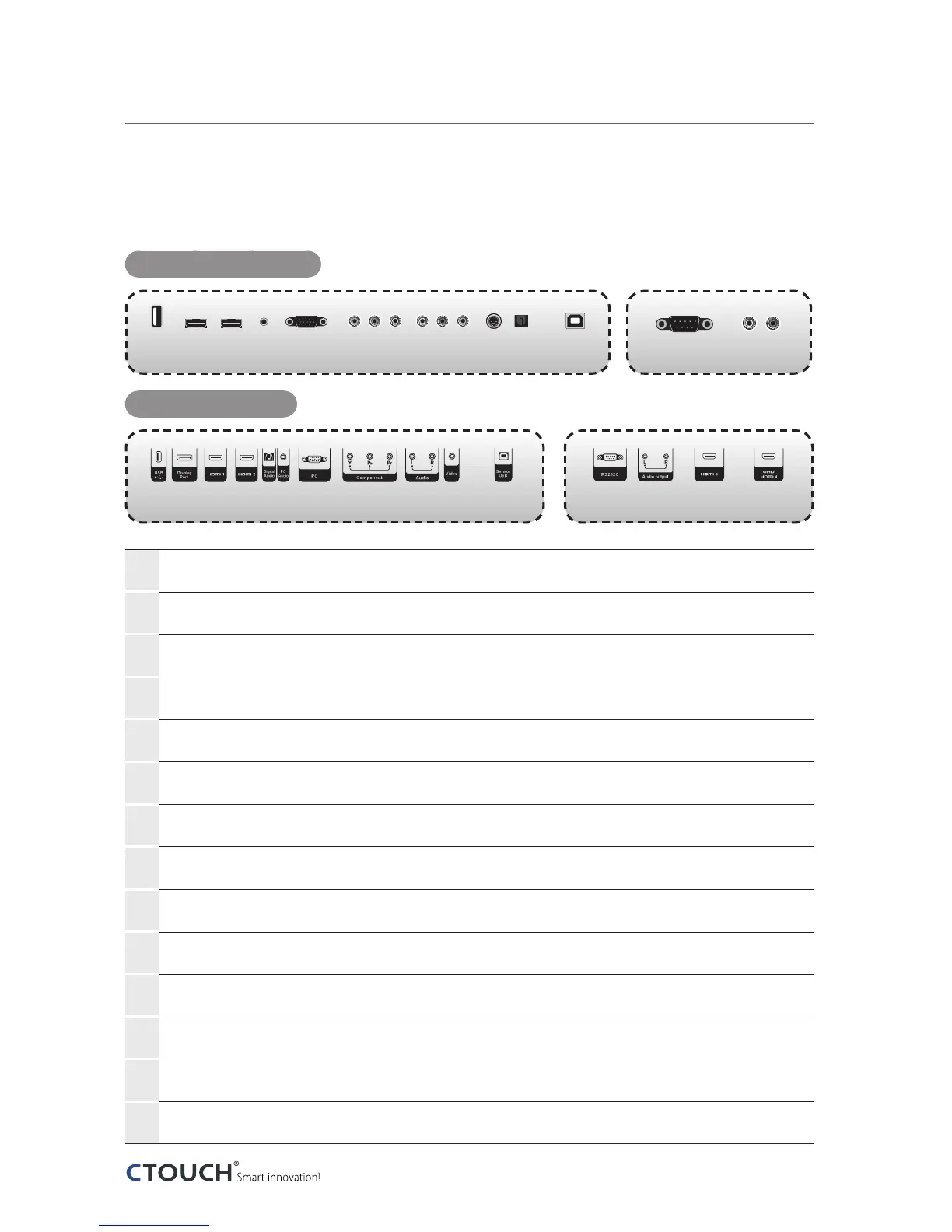
Viewing the connection panel
For Full HD Display
For UHD Display
①
USB Connect USB memory for MP3 or JPEG.
②
HDMI Connect an HDMI device to this jack.
③
PC Audio Audio input for PC.
④
PC Connect a video from a computer to this jack.
⑤
Component Connect a component video device to this jack.
⑥
Audio Audio input for component, video and S-Video.
⑦
Video Connect a video device to this jack.
⑧
S-Video
Connect a S-Video device this jack. (Option)
⑨
Digital Audio output Optical digital audio output.
⑩
Sensor USB Connect PC USB for touch screen.
⑪
RS232C Connect the controller.
⑫
Audio output Connect to external audio amplifier.
⑬
HDMI 4 (UHD)
Connect an HDMI device for UHD to this jack.
(Option)
⑭
Display Port
Connect a Display Port device to this jack. (Option)
①
① ⑭
②
② ⑬②
③
③
④
④
⑤
⑤
⑥
⑥
⑧⑦
⑦
⑨
⑨
⑩
⑩
⑪
⑪
⑫
⑫


 To Next Page