Calibration
33
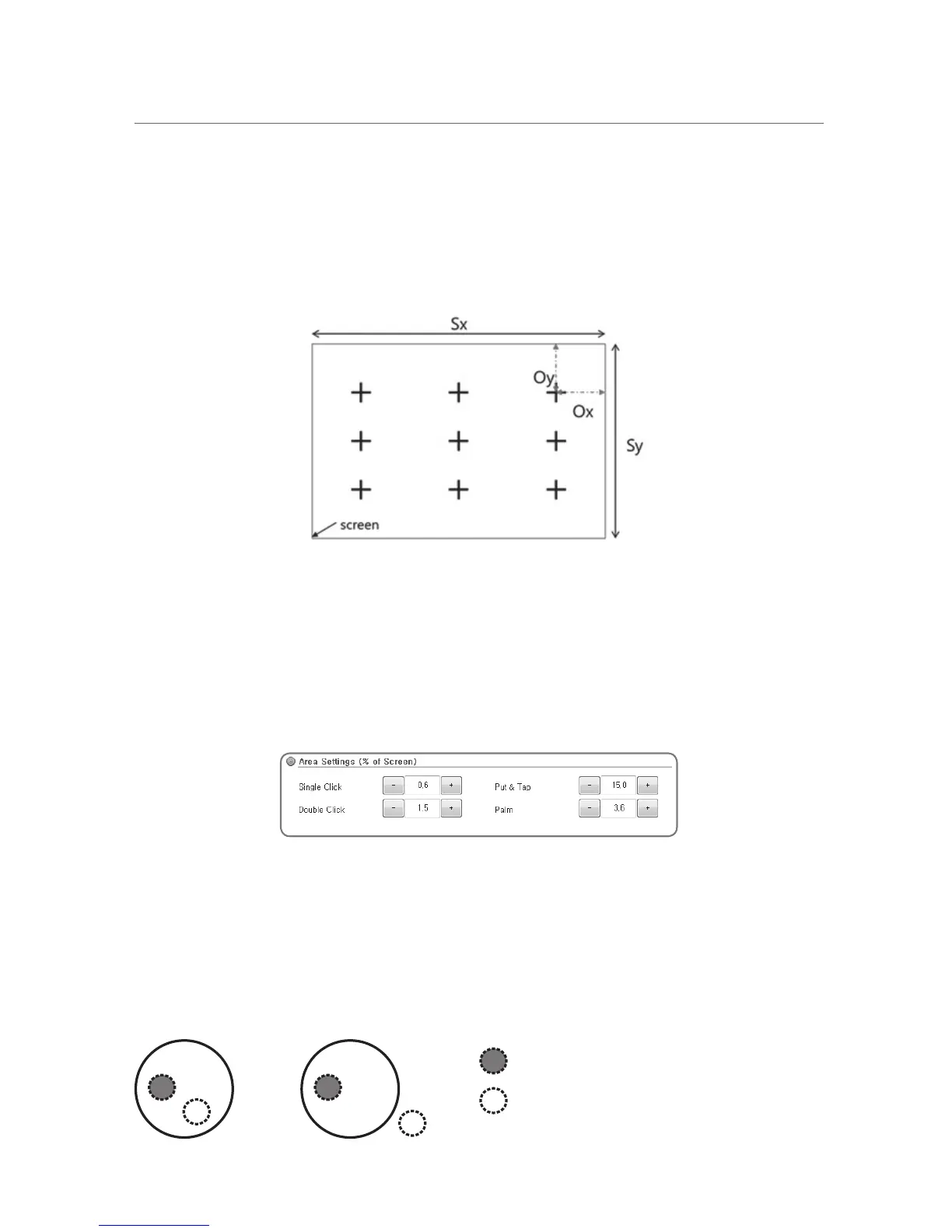
Screen Margin
The screen margin is for the value of determining the cross hair position for screen coordinates
of the calibration position. Entered the numerical input value is percentage of the proportion
number of margin in the display screen.
Screen Margin = Ox / Sx * 100
Area Settings
This is to place a limit on the area for a single click, double click, Put & Tap, and the palm.
Changing values in the Area Settings may cause the Tap, Double Tap, Put & Tap, or the Palm
functionalities to malfunction. Use it at one’s own discretion.
When a person taps on a surface, there are two things that she does. One is that she touches
the surface or simply Touch, and the other is she lifts the finger from the surface or Lift.
Click Area:
This is the area where the user Touches and Lifts.
If the area where the user Touches and Lifts is not within the bounds set, touch is not recognized.
Touch
Lift
A. Valid Click B. Invalid Click


 To Next Page