2412 • 8.914-384.0 • Rev. 5/12
21
AUTOMATIC PARTS WASHER Maintenance Guide
SECTION 5: MAINTENANCE AND REPAIR
Thermostat
Required Tools and Equipment
•5/16”wrenchorsocket
•mediumphillips-headscrewdriver
•largeat-headscrewdriver
Replacement Procedure
Step 1:
Disconnect power to the machine.
Step 2:
Remove the rear panel from the machine (ten screws;
use a 5/16” wrench or socket).
Step 3:
Detach the power leads.
Step 4:
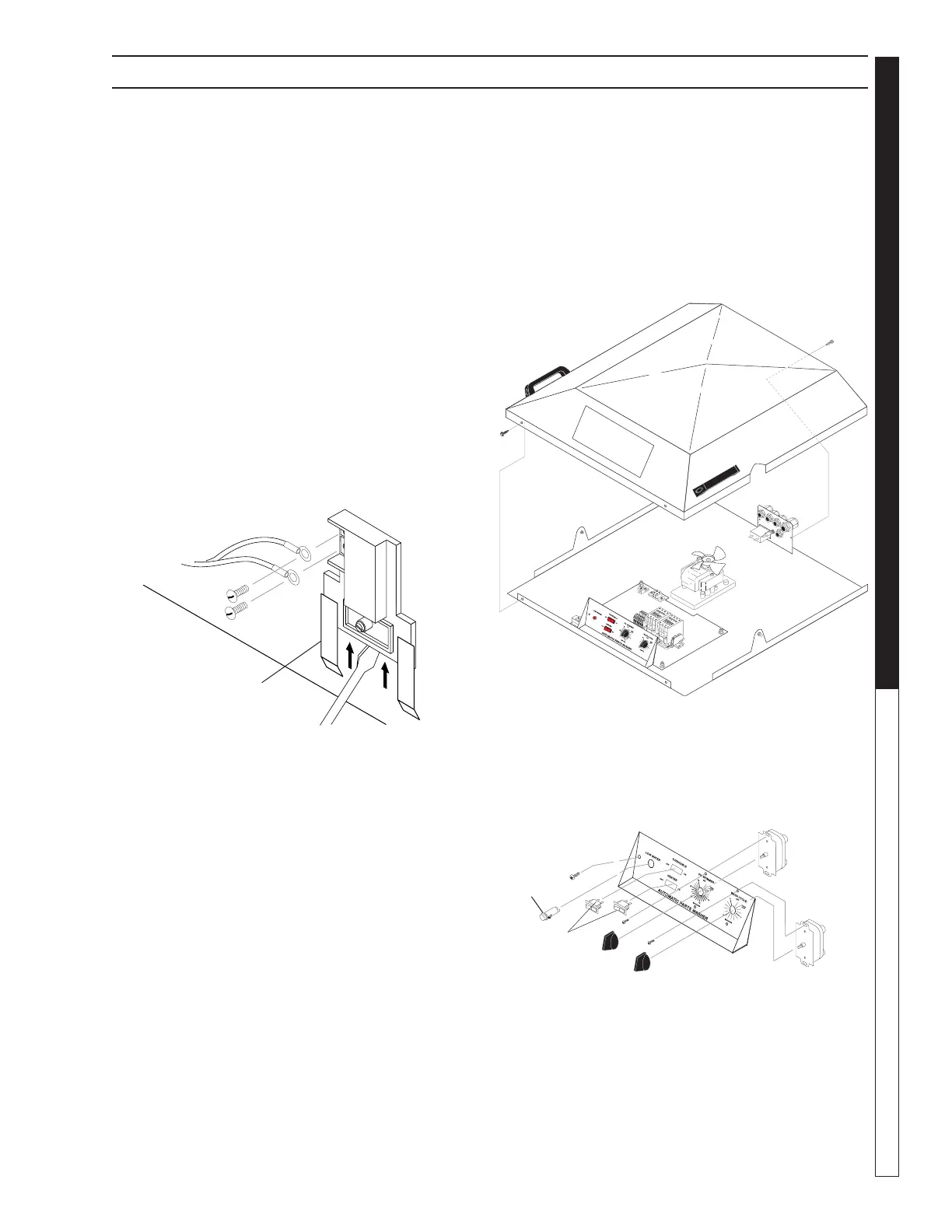
Using a large flat-head screwdriver, pry the thermostat
out of the mounting bracket, then remove it from the
machine (See Figure Below).
Step 5:
Install the new thermostat. Installation is the reverse
of removal.
NOTE: When you install the thermostat make sure
you press it firmly into the mounting bracket. In order
to operate correctly, the thermostat must be in direct
contact with the rear wall of the sump chamber.
Timers and Switches on the
Control Panel
Required Tools and Equipment
•5/16"wrenchorsocket
•1/2"wrenchordeepsocket
•smallphillips-headscrewdriver
•smallat-headscrewdriver
Replacement Procedure
Step 1:
Disconnect power to the machine.
Step 2:
Close the lid.
Step 3:
Remove the lid cover (four screws use a 5/16” wrench
or socket – See Figure Below).
Step 4:
From the rear of the control panel, remove the power
leads from the component you wish to replace, then
remove the component (See Figure Below).
Step 5:
Replace the component, then reassemble
the lid cover.
Step 6:
Ensure thermostat is set to 180°F.
Screwdriver
Mounting
Bracket
AUTOMATIC PARTS WASHER
89143840-6
Screw
Screw
89143840-7
Low Water
Indicator
Wash Cycle
Timer
Switches
Oil Skimmer
Timer


 To Next Page