Cuda 2412 • 8.914-384.0 • Rev. 5/12
AUTOMATIC PARTS WASHER Maintenance Guide
22
Torque Limiter
The torque limiter prevents the turntable motor from
burning out in case a part falls off the turntable and
obstructs rotation. The torque limiter is pre-set at the
factory, but you may need to adjust it if the turntable
begins to slip or bind.
Adjusting the Torque Limiter
To adjust the torque limiter, perform the following
procedure;
Step 1:
Raise the lid.
Step 2:
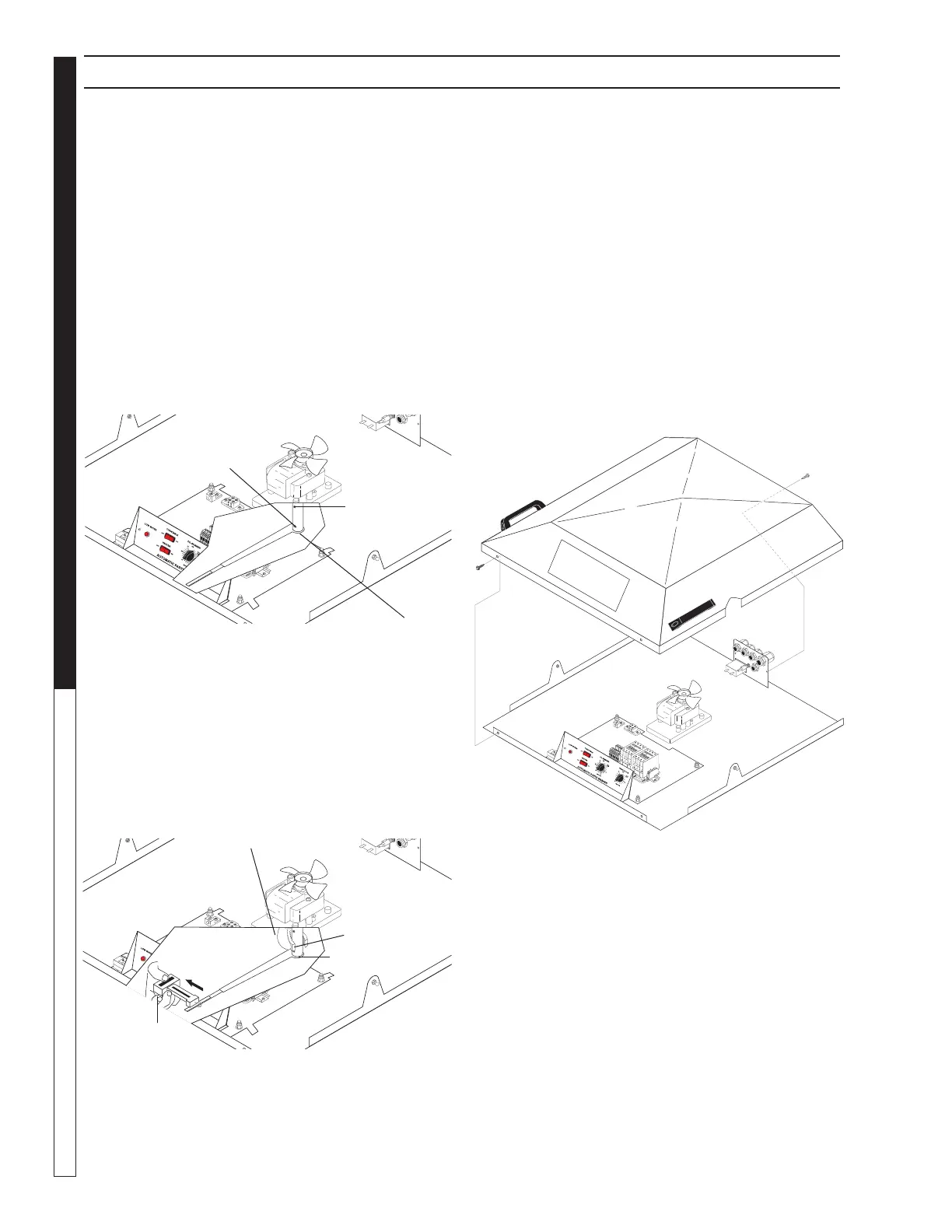
Loosen the torque limiter set screw (use a 1/8” allen
wrench – See Figure Below).
Step 3:
Rotate the torque arm 180°
Step 4:
Clamp the hub against the top spray arm with a
pair of locking pliers, then use a spring scale on the
end of the torque arm to measure the torque setting
(See Figure Below).
The torque arm should begin to slip at 7 pounds. If
it slips at less than 7 pounds, tighten the adjusting
bolt. If it slips at greater than 7 pounds, loosen the
adjusting bolt.
SECTION 5: MAINTENANCE AND REPAIR
Step 5:
Remove the locking pliers from the hub, then tighten
the set screw.
Turntable Motor
The turntable motor is located near the main electrical
panel beneath the lid cover. To replace the turntable
motor, perform the following procedure:
Step 1:
Disconnect power to the machine.
Step 2:
Close the lid.
Step 3:
Remove the lid cover (four screws use a 5/16” wrench
or socket – See Figure Below).
Step 4:
Raise the lid.
Adjusting Bolt
Set Screw
Torque
Limiter
Locking Pliers
Adjusting Bolt
Spring Scale
Torque Limiter
AUTOMATIC PARTS WASHER
89143840-6
Screw
Screw


 To Next Page