CUH CUH CUH CUH CUH CUH CUH
CUH CUH CUH CUH CUH CUH CUH CUH CUH CUH CUH CUH CUH CUH CUH CUH CUH CUH CUH CUH CUH
CUH CUH CUH CUH CUH CUH CUH CUH CUH CUH CUH CUH CUH CUH CUH CUH CUH CUH CUH CUH CUH
CUH CUH CUH CUH CUH CUH CUH CUH CUH CUH CUH CUH CUH CUH CUH CUH CUH CUH CUH CUH CUH
CUH CUH CUH CUH CUH CUH CUH CUH CUH CUH CUH CUH CUH CUH CUH CUH CUH CUH CUH CUH CUH
CUH CUH CUH CUH CUH CUH CUH CUH CUH CUH CUH CUH CUH CUH CUH CUH CUH CUH CUH CUH CUH
CUH CUH CUH CUH CUH CUH CUH CUH CUH CUH CUH CUH CUH CUH CUH CUH CUH CUH CUH CUH CUH
CUH CUH CUH CUH CUH CUH CUH CUH CUH CUH CUH CUH CUH CUH CUH CUH CUH CUH CUH CUH CUH
CUH CUH CUH CUH CUH CUH CUH CUH CUH CUH CUH CUH CUH CUH CUH CUH CUH CUH CUH CUH CUH
2
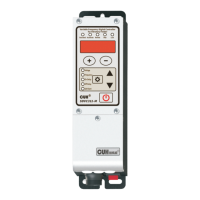
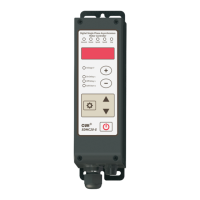
External Parts Explanation
CUH
1 3
2
CUH
1 3
2
CUH
N
L
PE
CUH
创优虎
Variable Frequency Digital Controller
for Vibratory Feeder
Saturated Accelerate
Remote
Stop
Lock
Vol
tage
Frequency
On Delay
Off Delay
Soft Start
SDVC31-
M
Output Voltage Indicator:
The indicator lights up as the
controller enters Output
Voltage Adjusting status.
Saturation Indicator:
The indicator lights up when
the preset Output Voltage
value exceeds Input Voltage
value so much that the
controller can’t sustain.
Acceleration Indicator:
The indicator lights up as the
Acceleration function takes
effect when the Output
Voltage value exceeds Input
Voltage value.
Output Frequency Indicator:
The indicator lights up as the
controller enters Output
Frequency Adjusting status.
Startup Delay Indicator:
The indicator lights up as the
controller enters Startup
Delay Time Adjusting status.
Shutdown Delay Indicator:
The indicator lights up as the
controller enters Shutdown
Delay Time Adjusting status.
Soft Startup Indicator:
The indicator lights up as the
controller enters Soft Startup
Time Adjusting status.
Increase & Decrease Buttons
Output Voltage can be adjusted by
these two buttons.
When the keypad locking function is
on, these two buttons lose efficacy.
Up & Down Buttons
The values of basic parameters and
advanced parameters can be
adjusted by these two buttons .
Setting Button
Enter editing state of basic or
advanced parameter by this button.
Output ON/OFF Button
Start or stop output of the
controller, or lock/unlock keypad
by this button.
Stop Indicator:
The indicator lights up as the
controller halts its output by
external signal or error signal,
and flash by On/Off button.
Remote Speed Control Indicator:
The indicator lights up when
Remote Speed Control signal is
available as the + and - buttons
loses efficacy.
LED Displayer:
Display symbol and value
of parameters.
Output Power Socket
Input Power Socket
Power Switch
1.2 Indicators, Buttons and External Parts Explanation
SDVC31 Series
Variable Frequency Digital Controller for Vibratory Feeder
SDVC31SMSEN_4.012023-08
Lock Indicator:
The indicator lights up as the
controller being locked.
When in the locked state, the
operation button does not respond
and this indicator flashes.



 To Next Page
 Loading...