67
4
Setting ash RATIO.
• Press Function Button 3
<
GR
>.
• Turn the Select Dial to set
the amount of ash ratio
and press< SET > button to
conrm.
5
Taking the picture.
• The slave units will ash
according to the ash ratio.
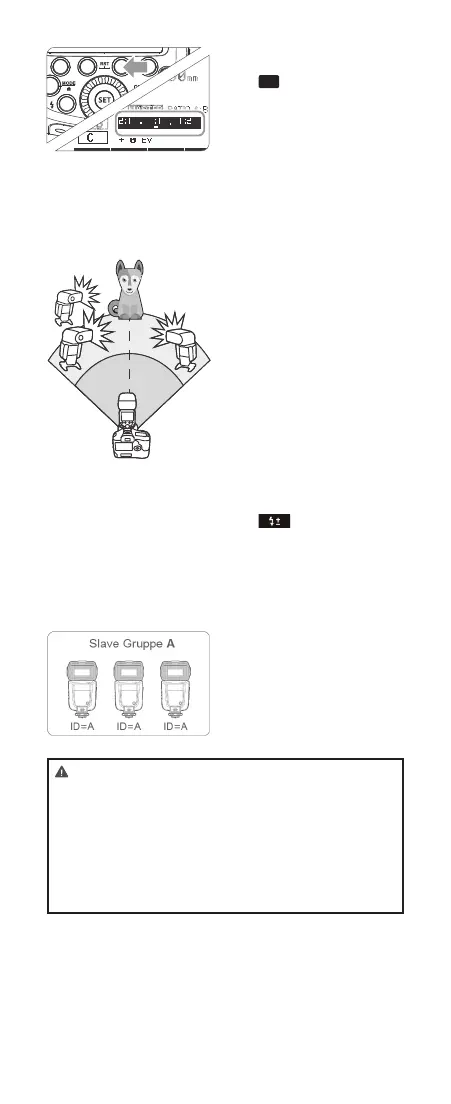
Auto Flash Shooting with Three Slave Unit
1
Setting the slave group
<C>.
• Use the same method of
step 1 (Page 66) to set the
slave unit of ash
2
Setting <RATIO A:B C>.
• Use the same method of
step 1 and step 3 (Page 66)
to set the master unit as
< RATIO A:B C >.
3
Setting ash exposure
compensation.
• Use the same method of
step 1 (Page 66) to set
the slave unit of ash
group< C >.
• Press Function Button 2
< >. Turn the Select
Dial to set the amount of
ash exposure compen-
sation and press < SET >
button to conrm.
About Slave Group Control
If three slave units are all set to
< A > in terms of slave ID, these
slave units will be controlled as
if they were one camera ash in
slave group A.
• When setting < RATIO A:B C >, group A, B and C will re
a ash synchronously; when setting < RATIO A:B >, group
C will not re a ash.
• If shooting under the situation that group C is toward the
main shooting subject, over exposure might occurred.
• In some EOS lm cameras that support E-TTL autoash,
you cannot perform multiple ash wireless shooting with
a ash ratio setting.
Using Fully Automatic Wireless Flash
The FEC and other settings that set on the master unit will also be
appeared on the slave unit automatically. The slave unit does not
need any operation. Use the following settings to make wireless
flashes according to the same methods with normal flash shooting.
● Flash Exposure Compensation ( Page 48)
● Flash Exposure Bracketing ( Page 48)
● Flash Exposure Lock (Page 49)
● High-Speed Sync ( Page 50)
● Manual Flash (Page 51)
● Stroboscopic Flash (Page 52)
SYNC
FEB
About Master Unit
Use two or more master units. By preparing several cameras that
with master units flash attached, cameras can be changed in
shooting while keeping the same lighting source (slave unit).
5.ETTL: Use the Wireless Shooting of Flash Ratio
Auto Flash Shooting with Two Slave Unit
Divide the slave units into A and B groups and balance their shooting
illumination (flash ratio).
Auto control exposure to make the total output of A and B flash
groups up to standard exposure.
Setting the flash groups of
1 slave unit.
● Set the flash as slave unit.
● Press Function Button 3
< > and choose
<A> or <B>.
● Set one slave unit as <A>,
the other as <B>.
Gr
MENU 2
RATIO
Setting < >.
2
● Step 2 to Step 4 are set on
the master unit.
● Press the Function Button
4 on the master unit so that
< > is displayed.
MENU 2
Setting <RATIO A:B>.
3
● Press Function Button 2
< > so that
<RATIO A:B> is displayed.
Setting flash ratio.
4
● Press Function Button 3
< >.
● Turn the Select Dial to set
the amount of flash ratio
and press<SET> button to
confirm.
Taking the picture.
5
● The slave units will flash
according to the flash ratio.
Auto Flash Shooting with Three Slave Unit
Setting <RATIO A:B C>.
2
● Use the same method of
step 1 and step 3 (Page
59) to set the master unit
as <RATIO A:B C>.
Setting the slave group
1 <C>.
● Use the same method of
step 1 (Page 59) to set the
slave unit of flash
group<C>.
Setting flash exposure
3 compensation.
● Use the same method of
step 1 (Page 59) to set the
slave unit of flash
group<C>.
● Press Function Button 2
< >. Turn the Select
Dial to set the amount of
flash exposure
compensation and
press<SET> button to
confirm.
A
B
C
About Slave Group Control
If three slave units are all set to
<A> in terms of slave ID, these
slave units will be controlled as if
they were one camera flash in
slave group A.
● When setting < RATIO A:B C >, group A, B and C will fire a
flash synchronously; when setting< RATIO A:B >, group C
will not fire a flash.
● If shooting under the situation that group C is toward the
main shooting subject, over exposure might occurred.
● In some EOS film cameras that support E-TTL autoflash,
you cannot perform multiple flash wireless shooting with a
flash ratio setting.
ID=A ID=A ID=A
Slave Gruppe A
Gr
- 59 - - 60 -
Using Fully Automatic Wireless Flash
The FEC and other settings that set on the master unit will also be
appeared on the slave unit automatically. The slave unit does not
need any operation. Use the following settings to make wireless
flashes according to the same methods with normal flash shooting.
● Flash Exposure Compensation ( Page 48)
● Flash Exposure Bracketing ( Page 48)
● Flash Exposure Lock (Page 49)
● High-Speed Sync ( Page 50)
● Manual Flash (Page 51)
● Stroboscopic Flash (Page 52)
SYNC
FEB
About Master Unit
Use two or more master units. By preparing several cameras that
with master units flash attached, cameras can be changed in
shooting while keeping the same lighting source (slave unit).
5.ETTL: Use the Wireless Shooting of Flash Ratio
Auto Flash Shooting with Two Slave Unit
Divide the slave units into A and B groups and balance their shooting
illumination (flash ratio).
Auto control exposure to make the total output of A and B flash
groups up to standard exposure.
Setting the flash groups of
1 slave unit.
● Set the flash as slave unit.
● Press Function Button 3
< > and choose
<A> or <B>.
● Set one slave unit as <A>,
the other as <B>.
Gr
MENU 2
RATIO
Setting < >.
2
● Step 2 to Step 4 are set on
the master unit.
● Press the Function Button
4 on the master unit so that
< > is displayed.
MENU 2
Setting <RATIO A:B>.
3
● Press Function Button 2
< > so that
<RATIO A:B> is displayed.
Setting flash ratio.
4
● Press Function Button 3
< >.
● Turn the Select Dial to set
the amount of flash ratio
and press<SET> button to
confirm.
Taking the picture.
5
● The slave units will flash
according to the flash ratio.
Auto Flash Shooting with Three Slave Unit
Setting <RATIO A:B C>.
2
● Use the same method of
step 1 and step 3 (Page
59) to set the master unit
as <RATIO A:B C>.
Setting the slave group
1 <C>.
● Use the same method of
step 1 (Page 59) to set the
slave unit of flash
group<C>.
Setting flash exposure
3 compensation.
● Use the same method of
step 1 (Page 59) to set the
slave unit of flash
group<C>.
● Press Function Button 2
< >. Turn the Select
Dial to set the amount of
flash exposure
compensation and
press<SET> button to
confirm.
A
B
C
About Slave Group Control
If three slave units are all set to
<A> in terms of slave ID, these
slave units will be controlled as if
they were one camera flash in
slave group A.
● When setting < RATIO A:B C >, group A, B and C will fire a
flash synchronously; when setting< RATIO A:B >, group C
will not fire a flash.
● If shooting under the situation that group C is toward the
main shooting subject, over exposure might occurred.
● In some EOS film cameras that support E-TTL autoflash,
you cannot perform multiple flash wireless shooting with a
flash ratio setting.
ID=A ID=A ID=A
Slave Gruppe A
Gr
- 59 - - 60 -
616x0_CUlight_FR60X_BDA_Canon englisch.indd 67 24.10.2016 13:55:57



 To Next Page