68
• The ash ratio of 8:1 to 1:1 to 1:8 is equivalent to 3:1 to
1:1 to 1:3 (1/2 step increment).
• The details of the ash ratio settings are as follows.
1:
8
● Detailliert stellen sich die Einstellungen zum Blitz-
leistungsverhältnis folgendermaßen dar:
8:1 4:1 2:1 1:1 1:2 1:4
5.6:1 2.8:1 1.4:1 1:1.4 1:2.8 1:5.6
6. M: Wireless Flash Shooting
with Manual Flash
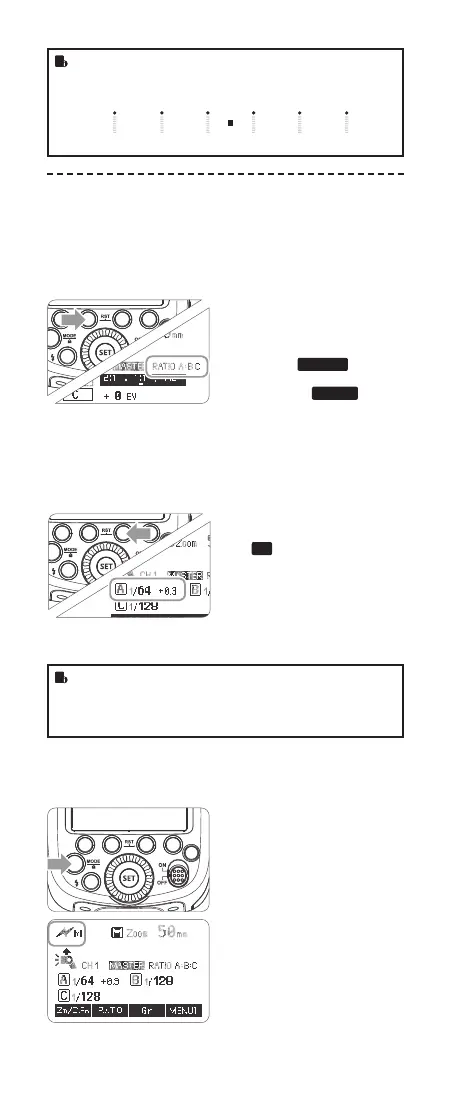
This describes wireless (multiple shooting) using manual ash. You
can shoot with a different ash output setting for each slave unit
(ring group). Set all parameters on the master unit.
1
Setting the ash mode to
<M>.
2
Setting the number of ash
groups.
• When <
MENU 1
> is
displayed, press the Function
Button 2 <
R ATIO
> to set
the groups to re.
• The setting changes as
follows each time you press
the button:
ALL (RATIO OFF)
A/B (RATIO A.B)
A/B/C (RATIO A:B:C)
3
Setting ash output.
Press Function Button 3
<
Gr
>. Turn the Select Dial
to set the ash output of the
groups. Press < SET > button
to conrm.
4
Taking the picture.
• Each group res at the set
ash ratio.
• When ALL < RATIO OFF > is set, set A, B or C as the
ring group for the slave units.
• To re multiple slave units with the same ash output,
select ALL < RATIO OFF > in step 2
Setting <M> Flash Mode
You can directly operate the slave unit to manually set the manu-
al ash or stroboscopic ash.
1
Setting the slave unit.
2
Setting ash mode to
<M>.
• Press < MODE > button so
that < M > is displayed.
• Set the manual ash
output. (Page 58)
● The flash ratio of 8:1 to 1:1 to 1:8 is equivalent to 3:1 to 1:1
to 1:3 (1/2 step increment).
● The details of the flash ratio settings are as follows.
8:1 4:1 2:1 1:1 1:2 1:4 1:8
5.6:1 2.8:1 1.4:1 1:1.4 1:2.8 1:5.6
6. M: Wireless Flash Shooting with Manual Flash
This describes wireless (multiple shooting) using manual flash. You
can shoot with a different flash output setting for each slave unit
(firing group). Set all parameters on the master unit.
Setting the number of flash
2 groups.
● When < > is
displayed, press the
Function Button 2
< > to set the
groups to fire.
● The setting changes as
follows each time you
press the button:
ALL(RATIO OFF)→
A/B(RATIO A:B)→
A/B/C(RATIO A:B:C)
Setting the flash mode to
1 <M>.
RATIO
Setting flash output.
3
● Press Function Button 3
< >. Turn the Select
Dial to set the flash output
of the groups. Press
<SET> button to confirm.
Taking the picture.
4
● Each group fires at the set
flash ratio.
● When ALL < RATIO OFF > is set, set A, B or C as the firing
group for the slave units.
● To fire multiple slave units with the same flash output,
select ALL < RATIO OFF > in step 2.
Setting <M> Flash Mode
You can directly operate the slave unit to manually set the manual
flash or stroboscopic flash.
Setting the slave unit.
1 (Page 56)
Setting flash mode to <M>.
2
● Press <MODE> button so
that <M> is displayed.
● Set the manual flash
output. (Page 51)
MENU1
Gr
7. Multi: Wireless Flash Shooting with Manual Flash
Setting <MULTI> stroboscopic
flash.
● Press <MODE> button so that
<MULTI> is displayed.
● Setting the stroboscopic flash.
(Page 52)
When using an EOS digital camera released since 2012, such as
the EOS-1DX (except for EOS 1200D), you can shoot with a
different flash mode set for each firing group, with up to 5 groups
(A/B/C/D/E).
The flash mode that can be set are ①E-TTL II autoflash and
②Manual flash. When the flash mode is ①, exposure is controlled to
result in standard exposure for the main subject as a single group.
This function is for advanced users who are very knowledgeable and
experienced in lighting.
A
B
E
B
C
D
Set the flash mode to <Gr>
1 Press the <MODE> Button
and set the flash mode to
<Gr>.
Set the firing group of the
2 slave units
● Operate and set the slave
units one by one.
● While < > is
displayed, press Function
Button 3 < > and
select <A>, <B>, <C>,<D>
or <E>.
● Set the firing group
(A/B/C/D/E) for all the
slave units.
MENU1
Gr
8. Gr: Shooting with a Different Flash Mode for Each Group
- 61 - - 62 -
● The flash ratio of 8:1 to 1:1 to 1:8 is equivalent to 3:1 to 1:1
to 1:3 (1/2 step increment).
● The details of the flash ratio settings are as follows.
8:1 4:1 2:1 1:1 1:2 1:4 1:8
5.6:1 2.8:1 1.4:1 1:1.4 1:2.8 1:5.6
6. M: Wireless Flash Shooting with Manual Flash
This describes wireless (multiple shooting) using manual flash. You
can shoot with a different flash output setting for each slave unit
(firing group). Set all parameters on the master unit.
Setting the number of flash
2 groups.
● When < > is
displayed, press the
Function Button 2
< > to set the
groups to fire.
● The setting changes as
follows each time you
press the button:
ALL(RATIO OFF)→
A/B(RATIO A:B)→
A/B/C(RATIO A:B:C)
Setting the flash mode to
1 <M>.
RATIO
Setting flash output.
3
● Press Function Button 3
< >. Turn the Select
Dial to set the flash output
of the groups. Press
<SET> button to confirm.
Taking the picture.
4
● Each group fires at the set
flash ratio.
● When ALL < RATIO OFF > is set, set A, B or C as the firing
group for the slave units.
● To fire multiple slave units with the same flash output,
select ALL < RATIO OFF > in step 2.
Setting <M> Flash Mode
You can directly operate the slave unit to manually set the manual
flash or stroboscopic flash.
Setting the slave unit.
1 (Page 56)
Setting flash mode to <M>.
2
● Press <MODE> button so
that <M> is displayed.
● Set the manual flash
output. (Page 51)
MENU1
Gr
7. Multi: Wireless Flash Shooting with Manual Flash
Setting <MULTI> stroboscopic
flash.
● Press <MODE> button so that
<MULTI> is displayed.
● Setting the stroboscopic flash.
(Page 52)
When using an EOS digital camera released since 2012, such as
the EOS-1DX (except for EOS 1200D), you can shoot with a
different flash mode set for each firing group, with up to 5 groups
(A/B/C/D/E).
The flash mode that can be set are ①E-TTL II autoflash and
②Manual flash. When the flash mode is ①, exposure is controlled to
result in standard exposure for the main subject as a single group.
This function is for advanced users who are very knowledgeable and
experienced in lighting.
A
B
E
B
C
D
Set the flash mode to <Gr>
1 Press the <MODE> Button
and set the flash mode to
<Gr>.
Set the firing group of the
2 slave units
● Operate and set the slave
units one by one.
● While < > is
displayed, press Function
Button 3 < > and
select <A>, <B>, <C>,<D>
or <E>.
● Set the firing group
(A/B/C/D/E) for all the
slave units.
MENU1
Gr
8. Gr: Shooting with a Different Flash Mode for Each Group
- 61 - - 62 -
● The flash ratio of 8:1 to 1:1 to 1:8 is equivalent to 3:1 to 1:1
to 1:3 (1/2 step increment).
● The details of the flash ratio settings are as follows.
8:1 4:1 2:1 1:1 1:2 1:4 1:8
5.6:1 2.8:1 1.4:1 1:1.4 1:2.8 1:5.6
6. M: Wireless Flash Shooting with Manual Flash
This describes wireless (multiple shooting) using manual flash. You
can shoot with a different flash output setting for each slave unit
(firing group). Set all parameters on the master unit.
Setting the number of flash
2 groups.
● When < > is
displayed, press the
Function Button 2
< > to set the
groups to fire.
● The setting changes as
follows each time you
press the button:
ALL(RATIO OFF)→
A/B(RATIO A:B)→
A/B/C(RATIO A:B:C)
Setting the flash mode to
1 <M>.
RATIO
Setting flash output.
3
● Press Function Button 3
< >. Turn the Select
Dial to set the flash output
of the groups. Press
<SET> button to confirm.
Taking the picture.
4
● Each group fires at the set
flash ratio.
● When ALL < RATIO OFF > is set, set A, B or C as the firing
group for the slave units.
● To fire multiple slave units with the same flash output,
select ALL < RATIO OFF > in step 2.
Setting <M> Flash Mode
You can directly operate the slave unit to manually set the manual
flash or stroboscopic flash.
Setting the slave unit.
1 (Page 56)
Setting flash mode to <M>.
2
● Press <MODE> button so
that <M> is displayed.
● Set the manual flash
output. (Page 51)
MENU1
Gr
7. Multi: Wireless Flash Shooting with Manual Flash
Setting <MULTI> stroboscopic
flash.
● Press <MODE> button so that
<MULTI> is displayed.
● Setting the stroboscopic flash.
(Page 52)
When using an EOS digital camera released since 2012, such as
the EOS-1DX (except for EOS 1200D), you can shoot with a
different flash mode set for each firing group, with up to 5 groups
(A/B/C/D/E).
The flash mode that can be set are ①E-TTL II autoflash and
②Manual flash. When the flash mode is ①, exposure is controlled to
result in standard exposure for the main subject as a single group.
This function is for advanced users who are very knowledgeable and
experienced in lighting.
A
B
E
B
C
D
Set the flash mode to <Gr>
1 Press the <MODE> Button
and set the flash mode to
<Gr>.
Set the firing group of the
2 slave units
● Operate and set the slave
units one by one.
● While < > is
displayed, press Function
Button 3 < > and
select <A>, <B>, <C>,<D>
or <E>.
● Set the firing group
(A/B/C/D/E) for all the
slave units.
MENU1
Gr
8. Gr: Shooting with a Different Flash Mode for Each Group
- 61 - - 62 -
R
616x0_CUlight_FR60X_BDA_Canon englisch.indd 68 24.10.2016 13:56:01



 To Next Page