72
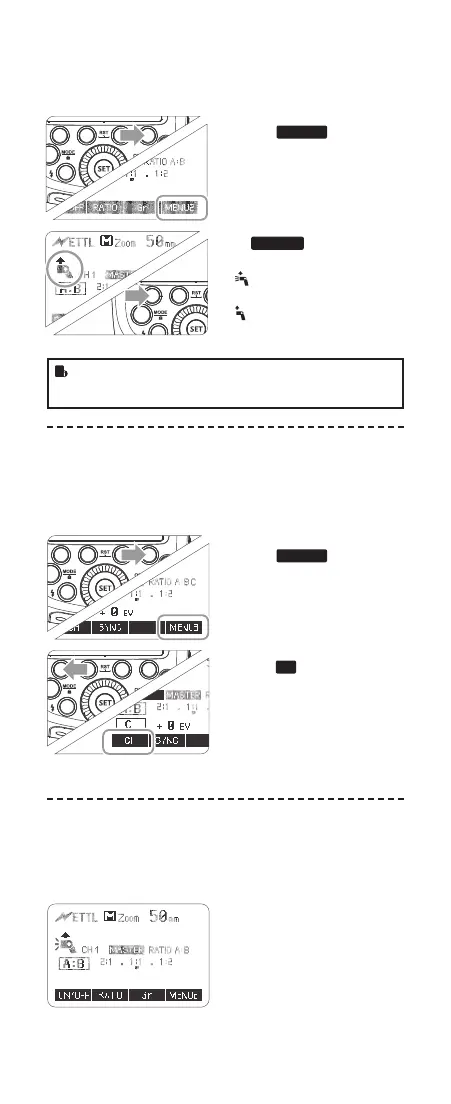
2. Master Unit’s Flash OFF
When the master unit is set to OFF, only the slave units will re
a ash.
1
Press Function Button 4 so
that <
MENU 2
> is displayed
on the LCD panel.
2
Press Function Button 1
<
ON/OFF
> to control the
ON/OFF oft he master unit.
<
> The master unit ash
ring is ON.
<
> The master unit ash
ring is OFF.
• Even if the master unit ash ring is disabled, it still res
a preash to transmit wireless signals.
3. Setting the Communication Channel
If there are other wireless ash systems nearby, you can change
the channel IDs to prevent signal interference. The channel IDs
of the master unit and the slave unit(s) must be set to the same.
1
Press Function Button 4 so
that <
MENU 3
> is displayed
on the LCD panel.
2
Press Function Button 1 so
that <
CH
> is displayed on
the LCD panel. Turn the Se-
lect Dial to choose a channel
ID from 1 to 4.
3
Press the < SET > button to
conrm.
4. ETTL: Fully Automatic Wireless Flash
Shooting
Using Automatic Wireless Flash with a Single Slave Unit
1
Master Unit Setting
• Attach a CUlight FR 60C
ash unit on the camera
and set it as the master
unit.
• As a master unit, CUlight
FR 60C can control Canon
speedlites e.g. 580EXII,
600EX-RT via wireless.
MENU2
2. Master Unit’s Flash OFF
When the master unit is set to OFF, only the slave units will fire a
flash.
Press Function Button 4 so
1 that < > is displayed
on the LCD panel.
Press Function Button 1
2 < > to control the
ON/OFF of the master unit.
< >:The master unit flash
firing is ON.
< >:The master unit flash
firing is OFF.
Even if the master unit flash firing is disabled, it still fires a
preflash to transmit wireless signals.
3. Setting the Communication Channel
If there are other wireless flash systems nearby, you can change the
channel IDs to prevent signal interference. The channel IDs of the
master unit and the slave unit(s) must be set to the same.
Press Function Button 4 so
1 that < > is displayed
on the LCD panel.
Press Function Button 1 so
2 that < > is displayed
on the LCD panel. Turn the
Select Dial to choose a
channel ID from 1 to 4.
Press the <SET> button to
3 confirm.
4. ETTL:Fully Automatic Wireless Flash Shooting
Using Automatic Wireless Flash with a Single Slave Unit
Master Unit Setting
1
● Attach a TT685C camera
flash on the camera and
set it as the master unit.
●As a master unit, TT685C
can control Canon
speedlites e.g. 580EXII,
600EX-RT via wireless.
Slave Unit Setting
2
● Set the other camera flash
as the wireless slave Unit.
● As a slave unit, TT685C
can receive wireless signals
of Canon speedlites e.g.
580EXII, 600EX-RT and
commanders of Canon
cameras e.g. 7D/60D/600D.
Check the communication
3 channel.
● If the master unit and slave
unit(s) are set to a different
channel, set them to the
same channel. (Page 65)
Position the camera and
4 flashes.
● Position the camera and
flashes as the picture
shows. (Page 64)
MENU3
CH
ON/OFF
Set the master unit’s flash
5 mode to <ETTL>.
● Set the master unit’s flash
mode to <ETTL>.
● For shooting, <ETTL> will
automatically be set for the
slave unit.
● Set the master unit flash
firing as ON to fire a flash.
Check that the flash is
6 ready.
● Check that the master flash
ready indicator is lightened.
● When the slave flash ready
indicator is ready, the AF-
assist beam lighting area
will blinks at 1 second
intervals.
Check the flash operation.
7
● Press the master unit’s
Test Button < >.
● Then, the slave unit will
fire. If not, adjust the slave
unit’s angle toward the
master unit and distance
from the master unit.
- 65 - - 66 -
MENU2
2. Master Unit’s Flash OFF
When the master unit is set to OFF, only the slave units will fire a
flash.
Press Function Button 4 so
1 that < > is displayed
on the LCD panel.
Press Function Button 1
2 < > to control the
ON/OFF of the master unit.
< >:The master unit flash
firing is ON.
< >:The master unit flash
firing is OFF.
Even if the master unit flash firing is disabled, it still fires a
preflash to transmit wireless signals.
3. Setting the Communication Channel
If there are other wireless flash systems nearby, you can change the
channel IDs to prevent signal interference. The channel IDs of the
master unit and the slave unit(s) must be set to the same.
Press Function Button 4 so
1 that < > is displayed
on the LCD panel.
Press Function Button 1 so
2 that < > is displayed
on the LCD panel. Turn the
Select Dial to choose a
channel ID from 1 to 4.
Press the <SET> button to
3 confirm.
4. ETTL:Fully Automatic Wireless Flash Shooting
Using Automatic Wireless Flash with a Single Slave Unit
Master Unit Setting
1
● Attach a TT685C camera
flash on the camera and
set it as the master unit.
●As a master unit, TT685C
can control Canon
speedlites e.g. 580EXII,
600EX-RT via wireless.
Slave Unit Setting
2
● Set the other camera flash
as the wireless slave Unit.
● As a slave unit, TT685C
can receive wireless signals
of Canon speedlites e.g.
580EXII, 600EX-RT and
commanders of Canon
cameras e.g. 7D/60D/600D.
Check the communication
3 channel.
● If the master unit and slave
unit(s) are set to a different
channel, set them to the
same channel. (Page 65)
Position the camera and
4 flashes.
● Position the camera and
flashes as the picture
shows. (Page 64)
MENU3
CH
ON/OFF
Set the master unit’s flash
5 mode to <ETTL>.
● Set the master unit’s flash
mode to <ETTL>.
● For shooting, <ETTL> will
automatically be set for the
slave unit.
● Set the master unit flash
firing as ON to fire a flash.
Check that the flash is
6 ready.
● Check that the master flash
ready indicator is lightened.
● When the slave flash ready
indicator is ready, the AF-
assist beam lighting area
will blinks at 1 second
intervals.
Check the flash operation.
7
● Press the master unit’s
Test Button < >.
● Then, the slave unit will
fire. If not, adjust the slave
unit’s angle toward the
master unit and distance
from the master unit.
- 65 - - 66 -
MENU2
2. Master Unit’s Flash OFF
When the master unit is set to OFF, only the slave units will fire a
flash.
Press Function Button 4 so
1 that < > is displayed
on the LCD panel.
Press Function Button 1
2 < > to control the
ON/OFF of the master unit.
< >:The master unit flash
firing is ON.
< >:The master unit flash
firing is OFF.
Even if the master unit flash firing is disabled, it still fires a
preflash to transmit wireless signals.
3. Setting the Communication Channel
If there are other wireless flash systems nearby, you can change the
channel IDs to prevent signal interference. The channel IDs of the
master unit and the slave unit(s) must be set to the same.
Press Function Button 4 so
1 that < > is displayed
on the LCD panel.
Press Function Button 1 so
2 that < > is displayed
on the LCD panel. Turn the
Select Dial to choose a
channel ID from 1 to 4.
Press the <SET> button to
3 confirm.
4. ETTL:Fully Automatic Wireless Flash Shooting
Using Automatic Wireless Flash with a Single Slave Unit
Master Unit Setting
1
● Attach a TT685C camera
flash on the camera and
set it as the master unit.
●As a master unit, TT685C
can control Canon
speedlites e.g. 580EXII,
600EX-RT via wireless.
Slave Unit Setting
2
● Set the other camera flash
as the wireless slave Unit.
● As a slave unit, TT685C
can receive wireless signals
of Canon speedlites e.g.
580EXII, 600EX-RT and
commanders of Canon
cameras e.g. 7D/60D/600D.
Check the communication
3 channel.
● If the master unit and slave
unit(s) are set to a different
channel, set them to the
same channel. (Page 65)
Position the camera and
4 flashes.
● Position the camera and
flashes as the picture
shows. (Page 64)
MENU3
CH
ON/OFF
Set the master unit’s flash
5 mode to <ETTL>.
● Set the master unit’s flash
mode to <ETTL>.
● For shooting, <ETTL> will
automatically be set for the
slave unit.
● Set the master unit flash
firing as ON to fire a flash.
Check that the flash is
6 ready.
● Check that the master flash
ready indicator is lightened.
● When the slave flash ready
indicator is ready, the AF-
assist beam lighting area
will blinks at 1 second
intervals.
Check the flash operation.
7
● Press the master unit’s
Test Button < >.
● Then, the slave unit will
fire. If not, adjust the slave
unit’s angle toward the
master unit and distance
from the master unit.
- 65 - - 66 -
616x0_CUlight_FR60X_BDA_Canon englisch.indd 72 24.10.2016 13:56:17



 To Next Page