EasyManua.ls Logo

Cumberland Evolution 1200 Series - Connecting PC Network to Evolution 1200; Connecting Alarm Device to Evolution 1200

Default Icon
65 pages
Print Icon
To Next Page IconTo Next Page
To Previous Page IconTo Previous Page
Loading...
Part No. 4801-5331 Rev 2-2015 Evolution 1200 46 of 65
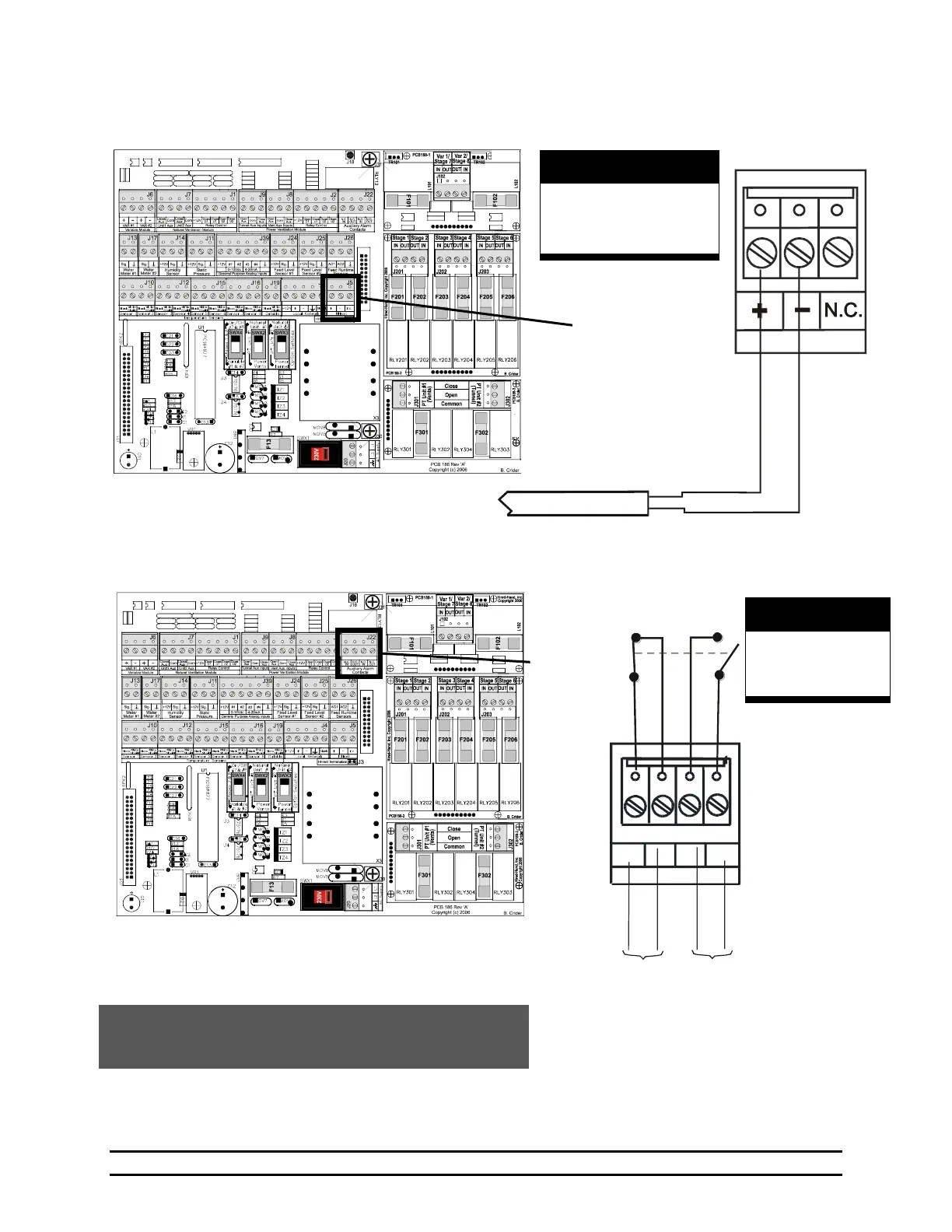
8.6 Connecting PC Network to Evolution 1200
8.7 Connecting Alarm Device to Evolution 1200
N.C.
IN
N.O.
IN
N.O.
OUT
N.C.
OUT
Auxiliary Alarm
Switch Positions
Inset A
Twisted Pair
Cable
WARNING!
LOW VOLTAGE!
Keep Separate From
High Voltage Wires!
Inset A
NOTE: The internal wiring shows the condition of the relay
during normal conditions (no alarm present). During an
alarm condition, the contact positions will be reversed.
For parallel alarm
connection
For series alarm
connection
WARNING!
LOW VOLTAGE!
Keep Separate From
High Voltage Wires!
PCB 186
Inset A
PCB 186
Inset A

Table of Contents

Related product manuals