Part No. 4801-5307 Rev 2-15 Evolution 3000 and 3001 52 of 70
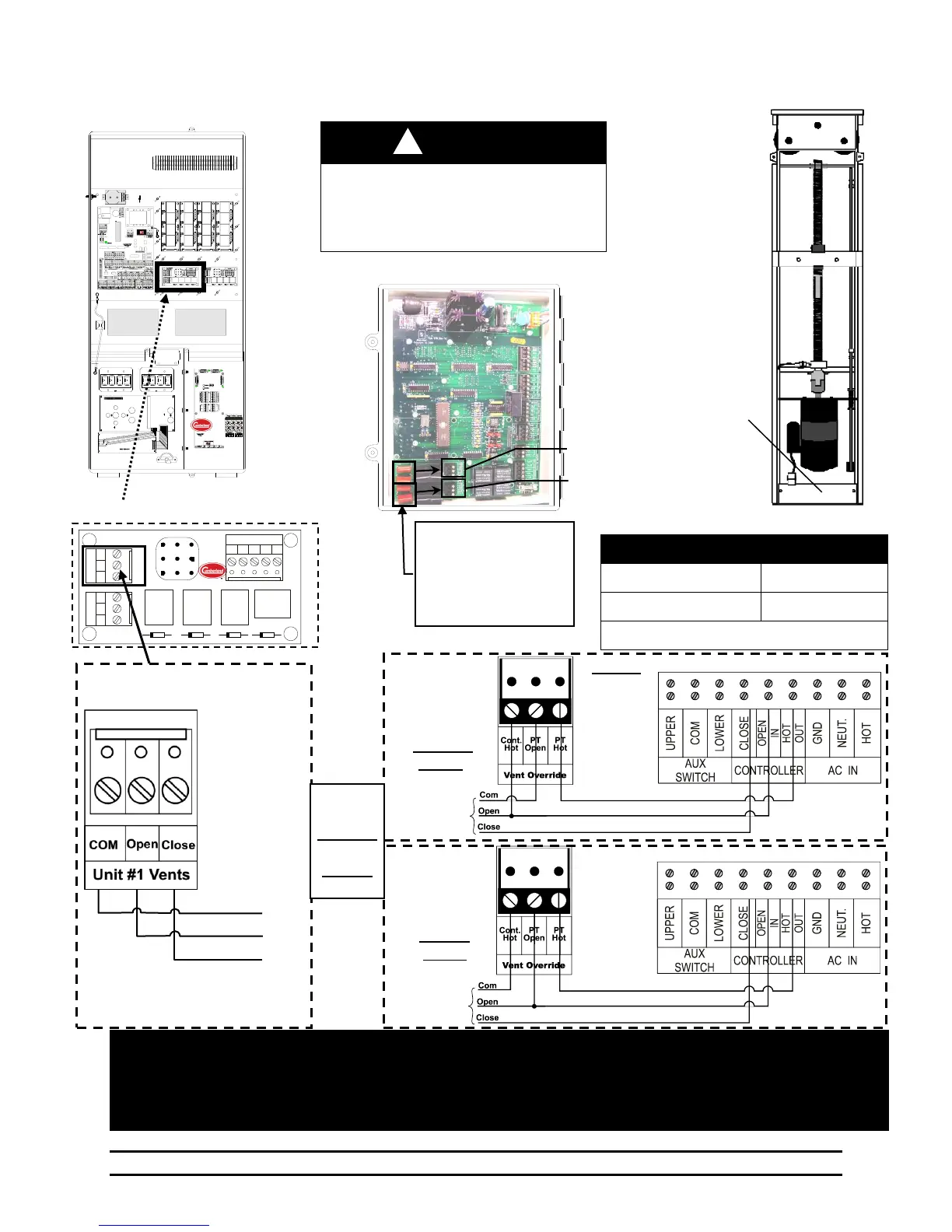
9.11 Connecting the PowerTrak and S-3 Back-Up to the Evolution 3000 & 3001
Keep High Voltage (Or AC) Separate
From Low Voltage Wires!
Do not perform modifications or wiring
with voltage applied!
Inset B
S-3 Vent
Override
for
Fail-Safe
Action
Vents & Tunnel Will Wire The Same
Inset B
S-3 Vent
Override
for
Normal
Action
NOTE:
Refer to the
S-3 Manual
4801-2997 for
additional P5
& P6
S-3 Setting
Instructions
PCB – 167 Power Ventilation
NOTE: If curtain is setup to pull curtain up to open, then reverse wires connected to "OPEN" and "CLOSE" terminals.
NOTE: Only 1 Power Trak can be connected to each Power Trak outlet. If Additional Power Traks are needed,
Then use of relay boxes is necessary to separate the load.
NOTE: All PowerTrak units will connect the same.
Wire for
Either
Fail-Safe
OR
Normal
Action
NOTE:
If connecting the Back-Up
to a relay box instead of
PowerTrak, Cut and
discard the specific two or
four components shown as
needed.



 To Next Page