- Communication Options: Wired vs Wireless
Cummins INLINE™ 7 Data Link Adapter Installation and Setup Manual 17
For instructions on connecting the INLINE™ 7 Data Link Adapter and your PC
using Mini Access Point Mode, see Connect Using Wi-Fi, in Chapter 3 of this
manual.
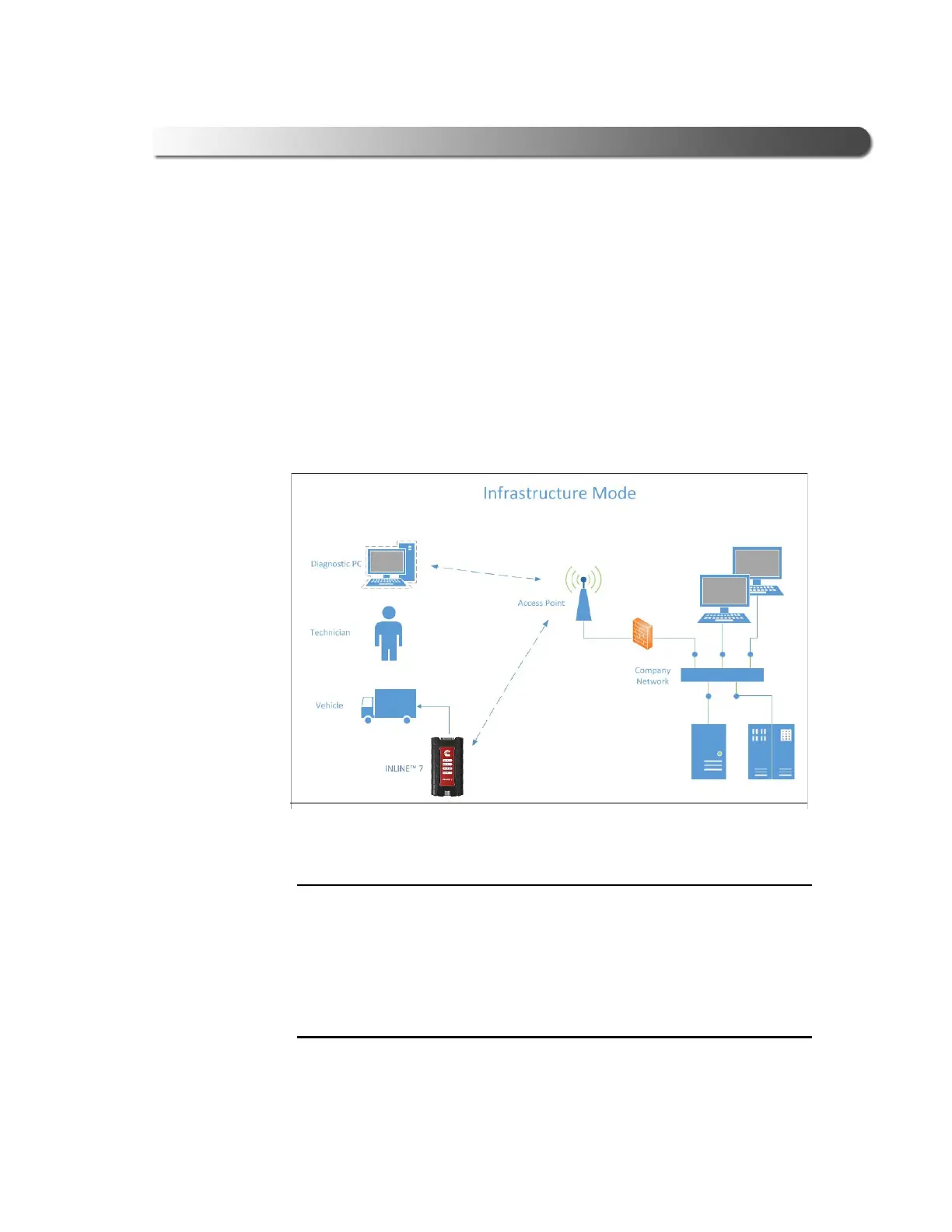
Infrastructure Mode (Connecting to your Company’s Network)
In Infrastructure mode, your PC communicates with your company’s computer
network through a Wireless Access Point (not included), which acts as a bridge
between the wireless network and the wired network. In this mode, the INLINE™
7 is conf
igured to communicate with the same access point. All communication
between
the PC and the INLINE™ 7 passes through the access point.
Figure 2.4 Infrastructure Mode
i The settings for connecting to your company network may differ from one
installation to another. To ensure network security
, your Information Tech-
nology (IT) administrator will need to overse
e the installation and specify
the appropriate configuration parameters. Your IT administrator should be
able to
properly configure the INLINE™ 7 for infrastructure mode, using
the INLINE™ 7 Explorer utility (see Switching Modes: Mini Access Point
and Infrastructure in Chapter 3 of this manual).



 To Next Page