15
Chapter 3
C
ONFIGURING THE AXN SYSTEM
Configuring the AXN system with DAS Studio 3
DAS Studio 3 is the Curtiss-Wright configuration software for Acra KAM-500 and AXN based systems. For more
information on using the software, see the DAS Studio 3 User Manual document
(DAS_Studio_3_User_Manual.pdf) on the desktop.
Automatic discovery of AXN
Discover is used to build a system configuration by detecting existing Curtiss-Wright hardware. Detected hardware
is analyzed and a XidML task file is generated with default hardware settings and parameters.
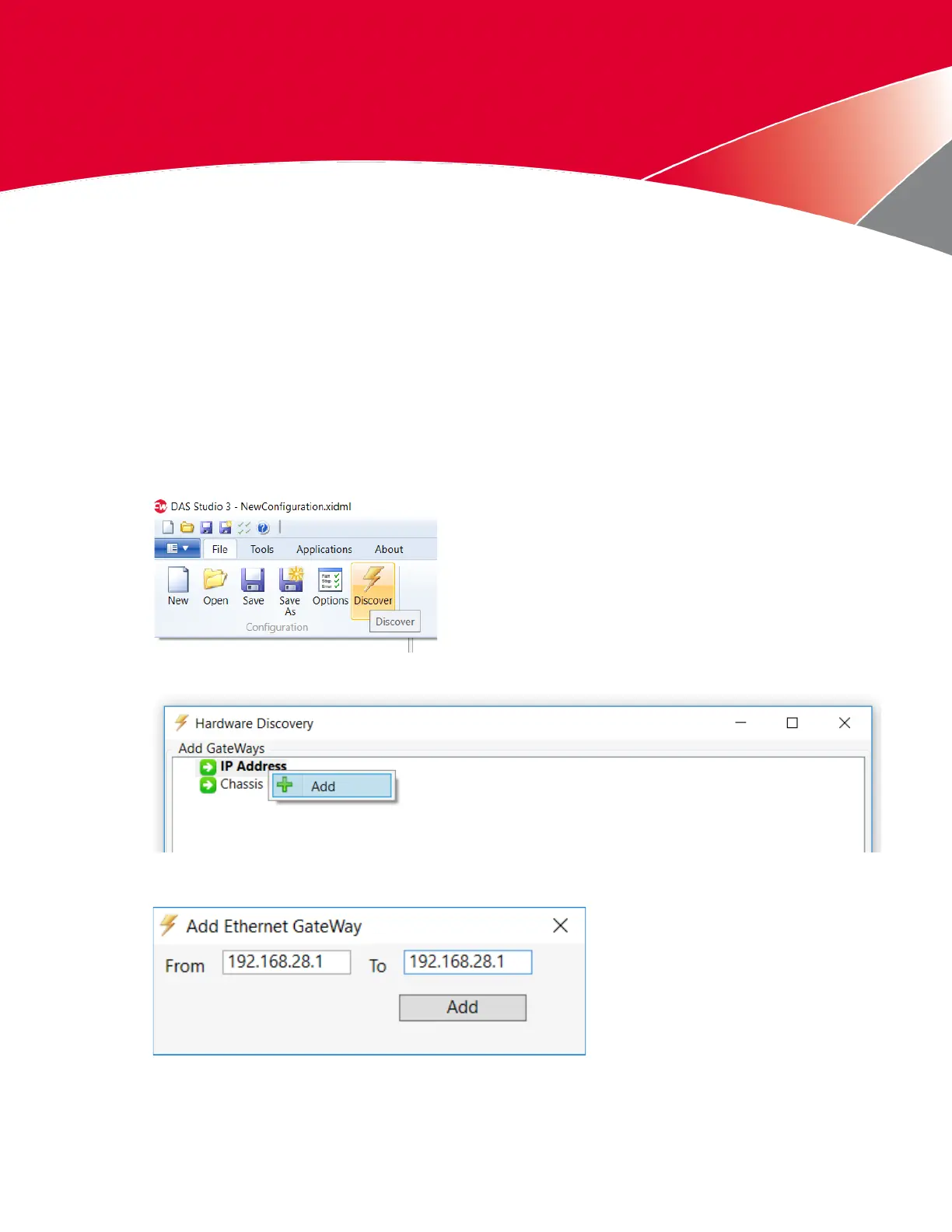
1. Open DAS Studio 3 from the desktop.
A new XidML® 3.0 file named NewConfiguration.xidml is automatically created.
2. On the File menu, click Discover.
3. In the Hardware Discovery dialog box, select IP Address, then right-click and select Add.
4. In the From and To fields of the Add Ethernet Gateway dialog box, type the factory default IP address
192.168.28.1 and then click Add.



 To Next Page