CHAPTER 3: CONFIGURING THE AXN SYSTEM 57
Installing the Axonite
The Axonite (AXN/ITE/01U) and extender card (AXN/EXT/401) are transparent to the setup software and require
no configuration. (Refer to “Using the Axonite” on page 7 before connecting the Axonite.)
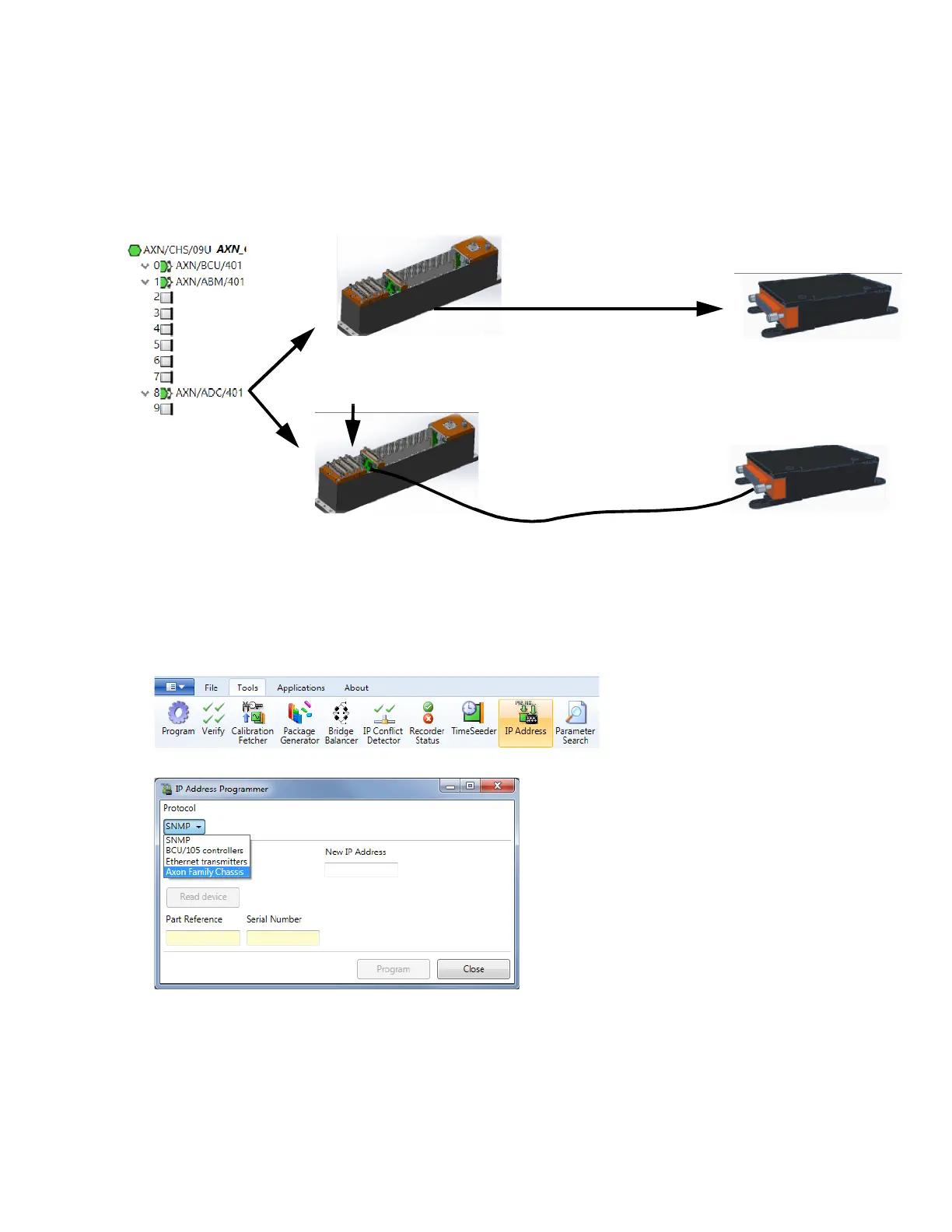
For example, in the following figure, a module is first installed in slot 8 of the chassis. Then the module is moved to
the Axonite—which is connected to the extender card in slot 8. In both cases, when running Discover, the software
detects the module as being installed in slot 8 of the chassis.
Figure 15: Moving module from chassis to Axonite
Setting the IP address of the AXN controller
Refer to the following to update the IP address of the AXN/BCU/40x controller module. The present IP address and
the new IP address are required to update the module.
1. On the Tools menu, click IP Address.
The IP Address Programmer dialog box opens.
This tool supports reprogramming IP addresses across the entire range of Acra KAM-500, switches and AXN
products by selecting the corresponding protocol. For AXN, select Axon Family Chassis from the Protocol
drop-down list.
Move AXN/ADC/401 from slot
8 of chassis to Axonite
Install AXN/EXT/401
in slot 8
Connect
AXN/CAB/001/01M from
extender card to Axonite



 To Next Page