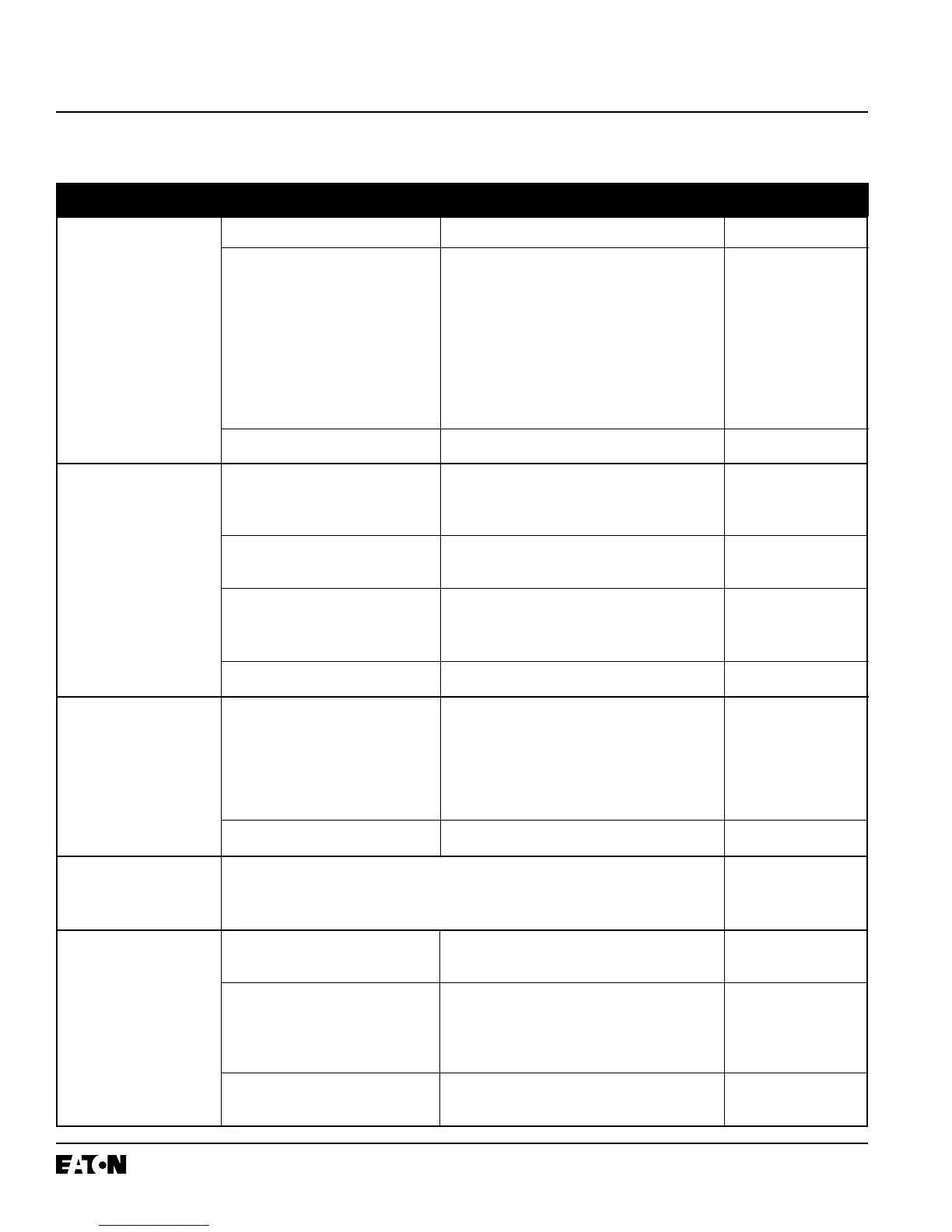
Breaker trips on ground There actually is a ground fault Find the location of the fault and remove it. N.A.
fault.
On four wire systems the neutral Check the connections at terminals at D6 and D7 Table A.1
current sensor may not have the on RD and SPB breakers or 19 and 20 on DSII Wiring Diagrams
correct ratio or be properly con- breakers. Check that the neutral current sensor
nected. ratio matches the breaker. Check that connec-
tions from the neutral current sensor to the
breaker are not reversed. Check that the short-
ing straps on the four point ground fault term-
inal block on RD and SPB breakers are connected
D5 - D6 and D7 - D8.
Trip unit may be the problem. Replace trip unit Para. 5-3
Breaker trips too rapidly Connections from C4 to C5 and/or Add connections Table A.1
on ground fault or short D9 to D10 missing on RD or SPB Wiring Diagrams
delay (zone selective breakers.
interlocking not used).
Connections from Z2 to Z3 and/or Z4 Add connections Table A.1
to Z5 missing on DSII breakers. Wiring Diagrams
Trip unit settings are not correct Change settings I.B. 29C892, Section 3
or
I.B. 29C893, Section 4
Trip unit may be the problem. Replace trip unit Para. 5-3
Breaker trips too rapidly Powered thermal memory can cause If powered thermal memory is not required, I.B. 29C892, Para. 3-6
on long delay. breaker to trip too soon. turn it off with the OPTIMizer.
Trip unit settings are not correct Change settings I.B. 29C892, Section 3
or
I.B. 29C893, Section 4
Trip unit may be the problem. Replace trip unit Para. 5-3
Zone selective interlocking
on ground fault and/or See directions for checking zone selective interlocking Appendix B
short delay does not work.
Communication over Address incorrect Verify both the IMPACC address and trip unit Review Section 3
IMPACC is not working. address are properly setup. of IB 29C890
(Direct with BIM not
involved) No auxiliary power If possible, open breaker or reduce breaker Symptom: “Unit
current to <20% of frame rating. Then check Status LED is not
that unit status LED is blinking. If not, see first blinking.”
symptom in this portion of the table.
Open INCOM connection Check connections at terminals C11 and C12 on Table A.1
(Continues on next page) RD and SPB breakers or C6 and C7 on DSII Wiring Diagrams
I.B. 29C891B
Page 50
Effective 11/98
Table 5.1 Troubleshooting Guide (continued from previous page)
Symptom Probable Cause Possible Solution(s) References


 To Next Page