Cybex Pro Treadmill Owner’s & Service Manual
Page 7-10
from each side. NOTE: Pivot the bolt, washers, spring and nut holder out together. See
Figure 6.
C. Lift one side of the rear roller and slide the roller out of the running belt. See
Figure 6.
7. Loosen the deck.
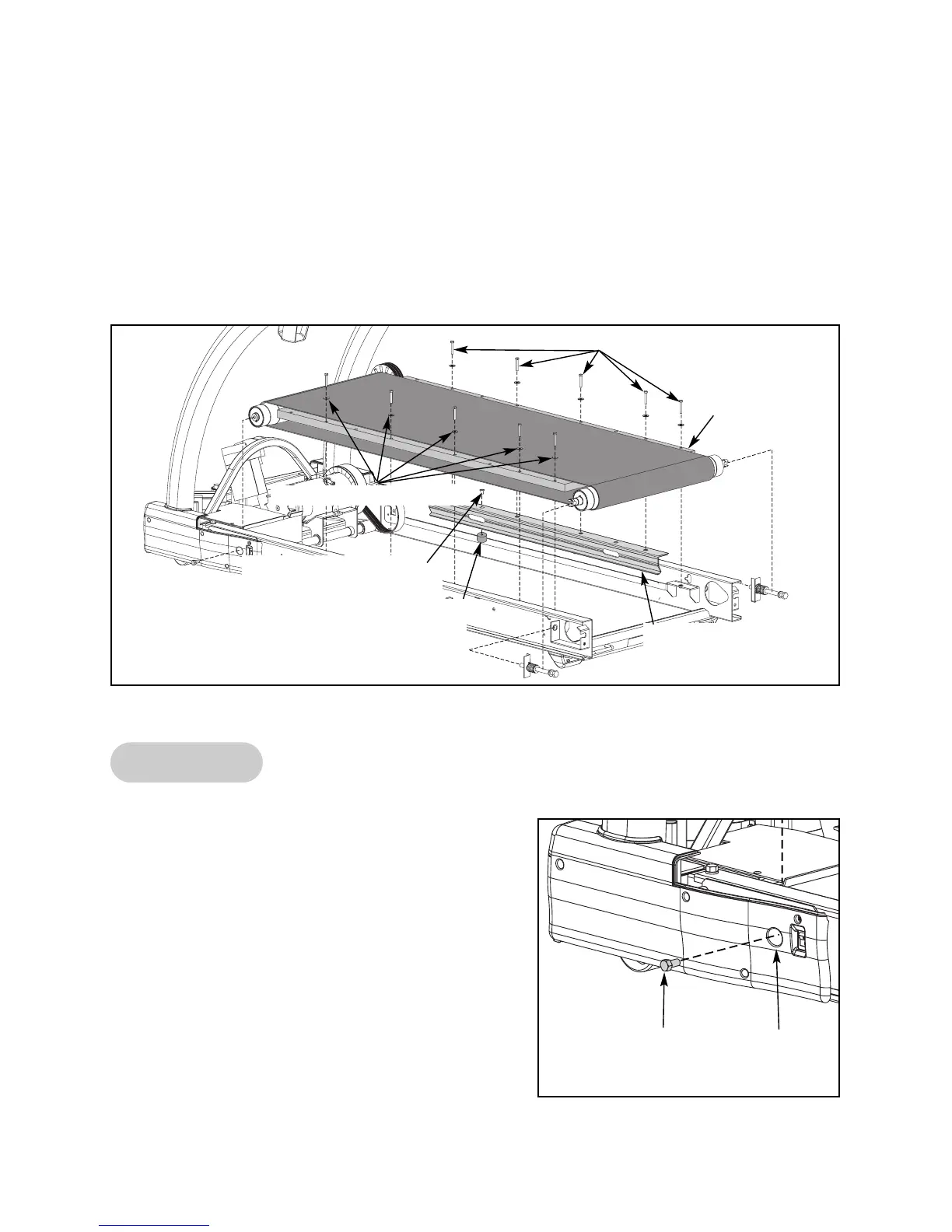
A. Using a 7/16” open-end or socket wrench, remove the ten screws and ten washers
that hold the deck in place. See Figure 7. NOTE: Leave the deck in place until step 9B.
Front Roller
8. Loosen the front roller.
A. Place a 9/16” socket wrench with a 3”
extension in the right front roller access hole.
Loosen but do not remove the right front roller
screw. See Figure 8. NOTE: The right screw
will stay on the front roller. You do not need
to remove it for this procedure.
B. Place a 9/16” socket wrench with a 3”
extension in the left front roller access hole.
Remove the left front roller screw. See Figure 8.
NOTE: Leave the front roller in place until
step 9B.
Figure 7
Screws (5 on Each Side)
Washers (5 on Each Side)
Figure 8
Screw
Front Roller
Access Hole
Deck
Screw Securing Deck
Stiffener (1 on Each Side)
Deck Stiffener
(1 on Each Side)
Rubber Mount
(1 on Each Side)



 To Next Page