DIR-100 Triple Play Router
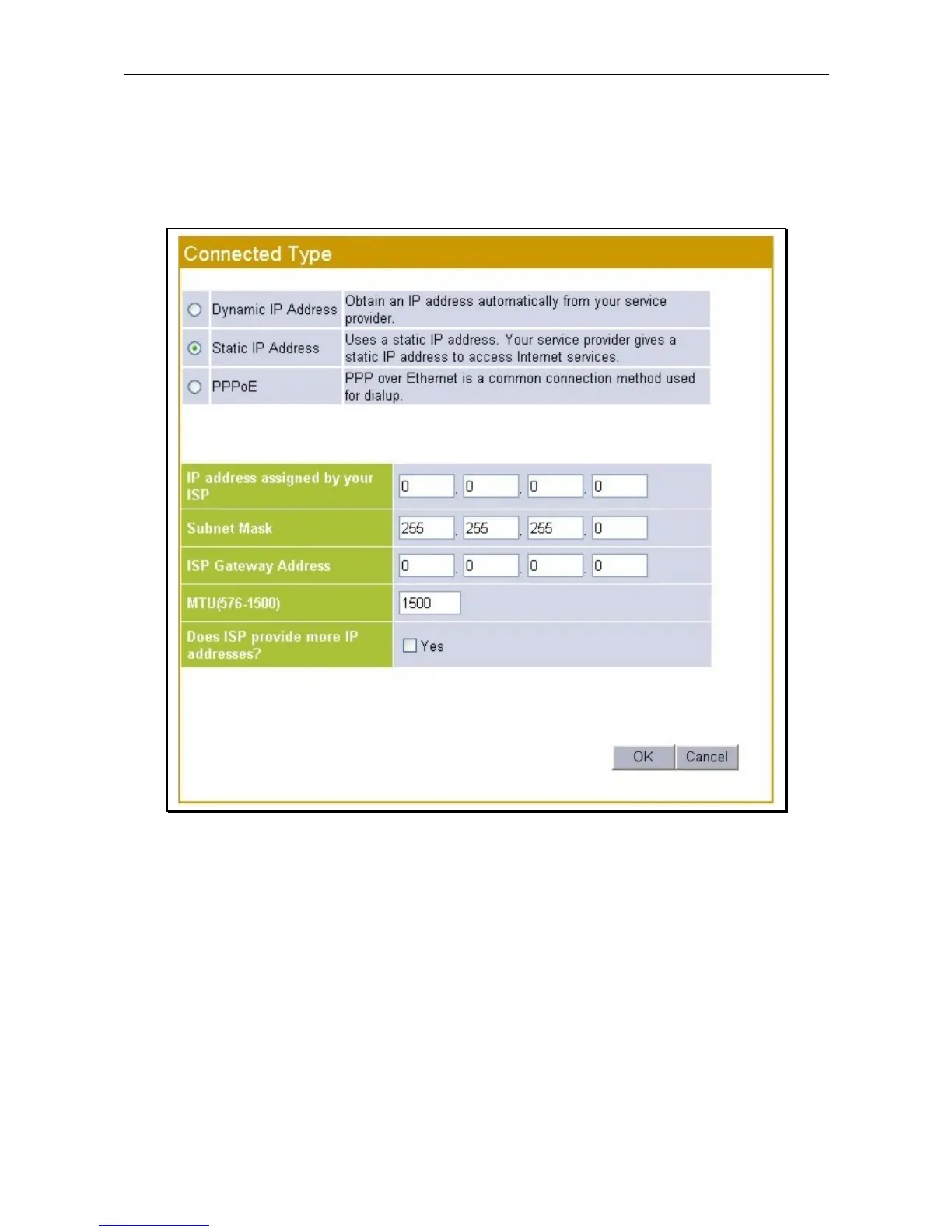
Static IP Address
When the Router is configured to use Static IP Address assignment for the Internet connection, you must
manually assign a global IP Address, Subnet Mask, and ISP Default Gateway IP address. Most users will
also need to configure DNS server IP settings. Follow the instruction below to configure the Router to use
Static IP Address assignment for the Internet connection.
Static IP Address connection setup menu
To configure a Static IP type Internet connection, follow these steps:
1. Select the Static IP option.
2. Type an IP Address, Subnet Mask and ISP Gateway Address as supplied by the ISP.
3. Leave the MTU value at the default setting (default = 1500) unless you have specific reasons to
change it.
4. If using multiple static IP addresses, select the Yes option to answer the question Does ISP provide
more IP addresses? An additional entry field appears to add another IP address. Enter additional
static IP addresses and click the Add button to add the IP address to the addresses available to the
Router.
5. Click on the OK button to save and apply the new Internet connection settings.









 To Next Page