DVG-N5412SP User’s Manual SETUP
D-Link Systems, Inc. 31
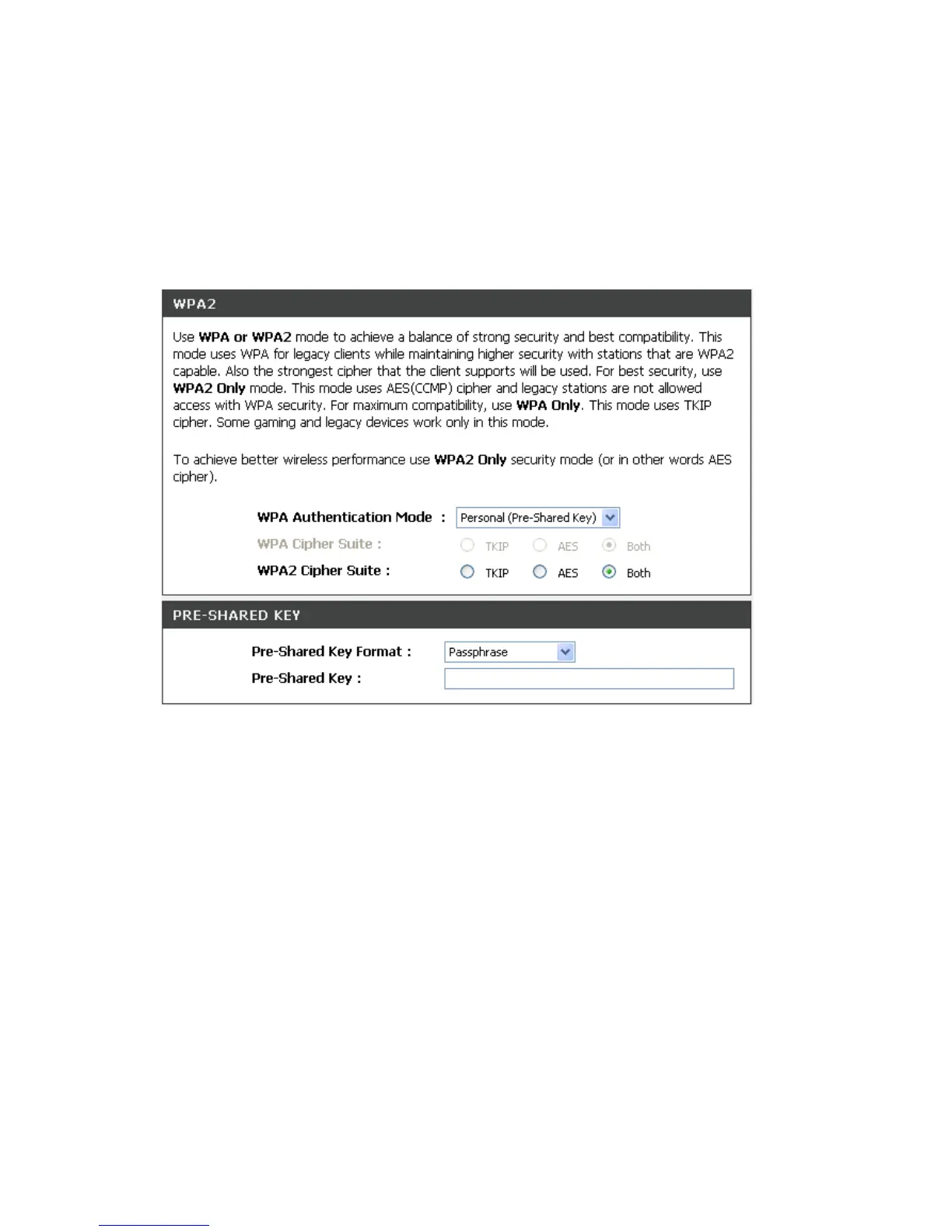
WPA Authentication Mode
The wireless network can use WPA Authentication to verify whether a wireless device is allowed to access
your Access Point or not. You can choose to use Enterprise (RADIUS) method or Personal (Pre-Shared
Key). The encryption mechanism used for RADIUS and WPA-PSK is the same. The difference between the
two is that WPA-PSK uses a specific characters sting like password instead of a user-authentication.
SETUP -> Wireless Setup -> Wireless Security (WPA-PSK)
Select the type of WPA-PSK (WPA-PSK, WPA2-PSK, WPA2 Mixed-PSK), choose the proper security
mode according to your wireless network.
WPA Authentication Mode: Select Personal (Pre-Shared Key).
WPA Cipher Suite: WPA Cipher Suite is used for the configuration of WPA or WPA2 Mixed.
TKIP - TKIP is the security protocol used in WPA. The length of TKIP encryption is longer than WEP
encryption that increases the complexity of decoding for crackers.
AES - The most powerful encryption algorithm that is commonly used in WPA.
WPA2 Cipher Suite: WPA2 Cipher Suite is used for the configuration of WPA2 or WPA2 Mixed.
TKIP - TKIP is the security protocol used in WPA. The length of TKIP encryption is longer than WEP
encryption that increases the complexity of decoding for crackers.
AES - The most powerful encryption algorithm that is commonly used in WPA.
Pre-Shared Key Format: Select the Format of Pre-Shared Key. You can select Passphrase or Hex (64
characters) by entering a character string ranging from “A-Z” and “0-9”.
Pre-Shared Key: Enter a key of 8-64 characters long in the Pre-Shared Key filed. Make sure this key is
exactly the same on all other wireless stations.


 To Next Page