DVG-N5412SP User’s Manual ADVANCED
D-Link Systems, Inc. 49
3-2-1-4 Codec
ADVANCED → VoIP → Codec
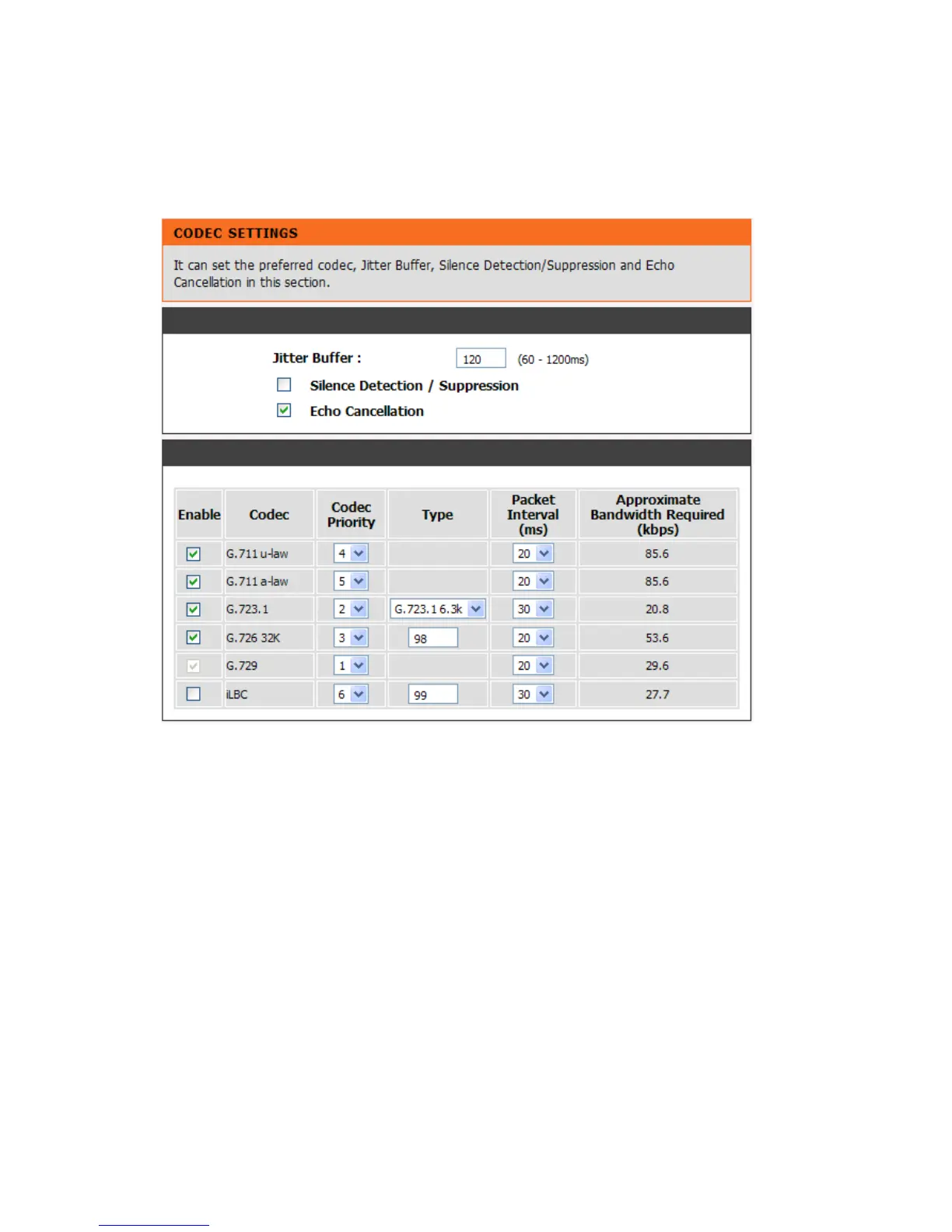
Jitter Buffer: Enter the jitter of receiving packets.
Silence Detection / Suppression: Check the box to enable the silence packets and send less voice data
(package) during the silent period while talking.
Echo Canceling: Check the box to remove echo and improve voice quality during conversation.
RTCP-XR: Enable RTCP-XR(RFC-3611) to report network quality.
Codec: Check the box to codec for the VoIP Gateway to support. All codecs are selected and supported by
default. You can un-check the box that is not used.
Codec Priority: The priority of code for communication.
Type: To set dynamic payload types of codec.
Packet Interval: Select the frame size of voice package from different codec. It defines the time interval for
the VoIP Gateway to send a RTP packet or voice packet to the receiving side. The smaller the value, the
greater the bandwidth takes, and larger values might cause voice delay.
Approximate Bandwidth Required: It shows the bandwidth required from different codec and packet
interval.


 To Next Page