37D-Link M32 User Manual
Section 3 - Conguration
Wireless
Wi-Fi
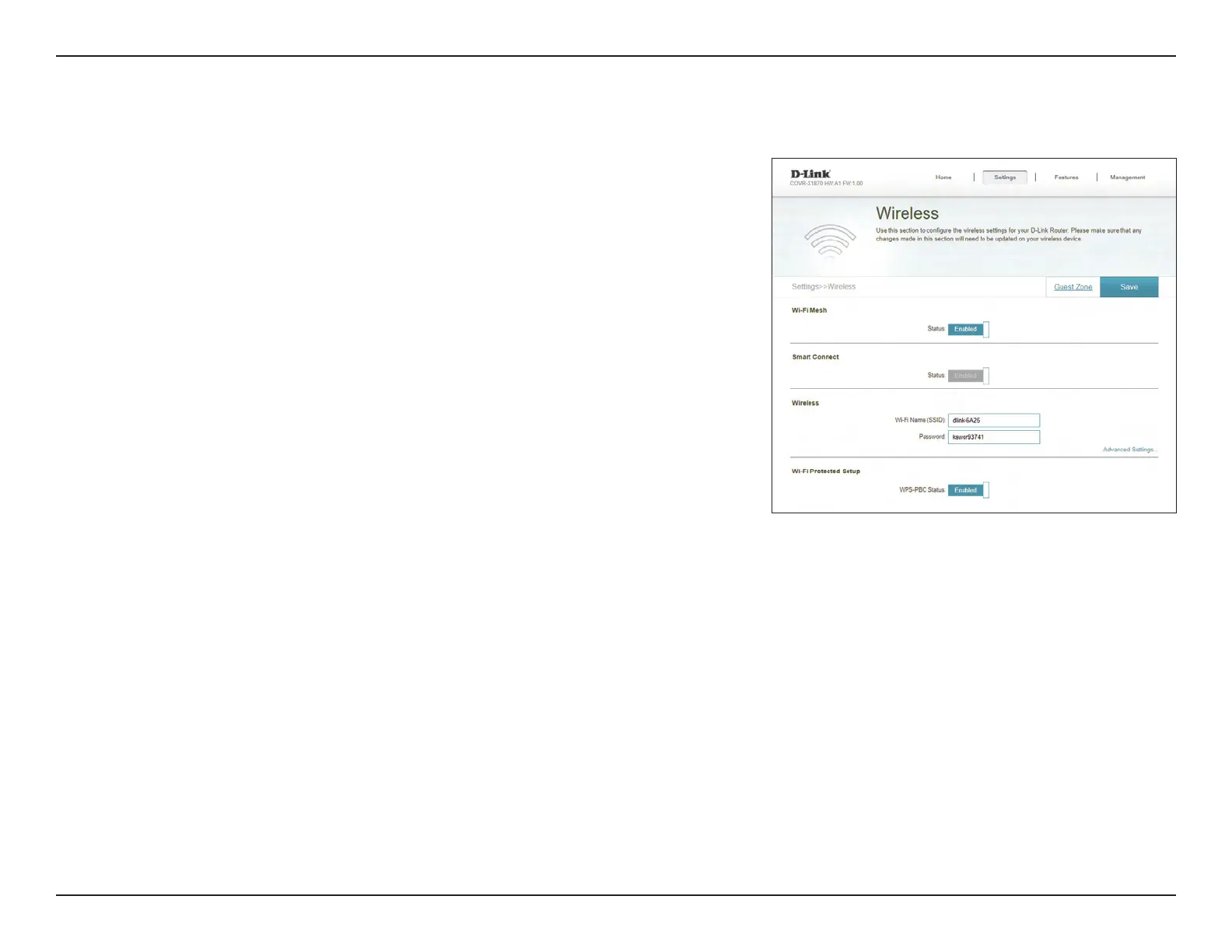
Wi-Fi Mesh
Status: Indicates the status of the seamless Wi-Fi mesh system.
Smart Connect
Status: Indicates the status of Smart Connect. This will be enabled by default
if Wi-Fi Mesh is enabled.
Wireless
Wi-Fi Name (SSID): Enter a name for your Wi-Fi network.
Password: Create a password for your Wi-Fi network. Wireless clients will need
to enter this password to successfully connect to the network.
Advanced Settings - Wireless
Security Mode: Choose None, WPA2/WPA3-Personal or WPA/WPA2.
Transmission
Power:
Select the desired wireless transmission power.
Wi-Fi Protected Setup
The easiest way to connect your wireless devices to your Mesh Points is with Wi-Fi Protected
Setup (WPS).
WPS-PBC Status: Enable or disable WPS Push Button Conguration (PBC) functionality.
Enabling this feature allows wireless clients to connect to the Wi-Fi
through an encrypted connection by using the WPS button.
Click Save when you are done.
From this page you can congure your Wi-Fi settings.



 To Next Page