59D-Link M32 User Manual
Section 3 - Conguration
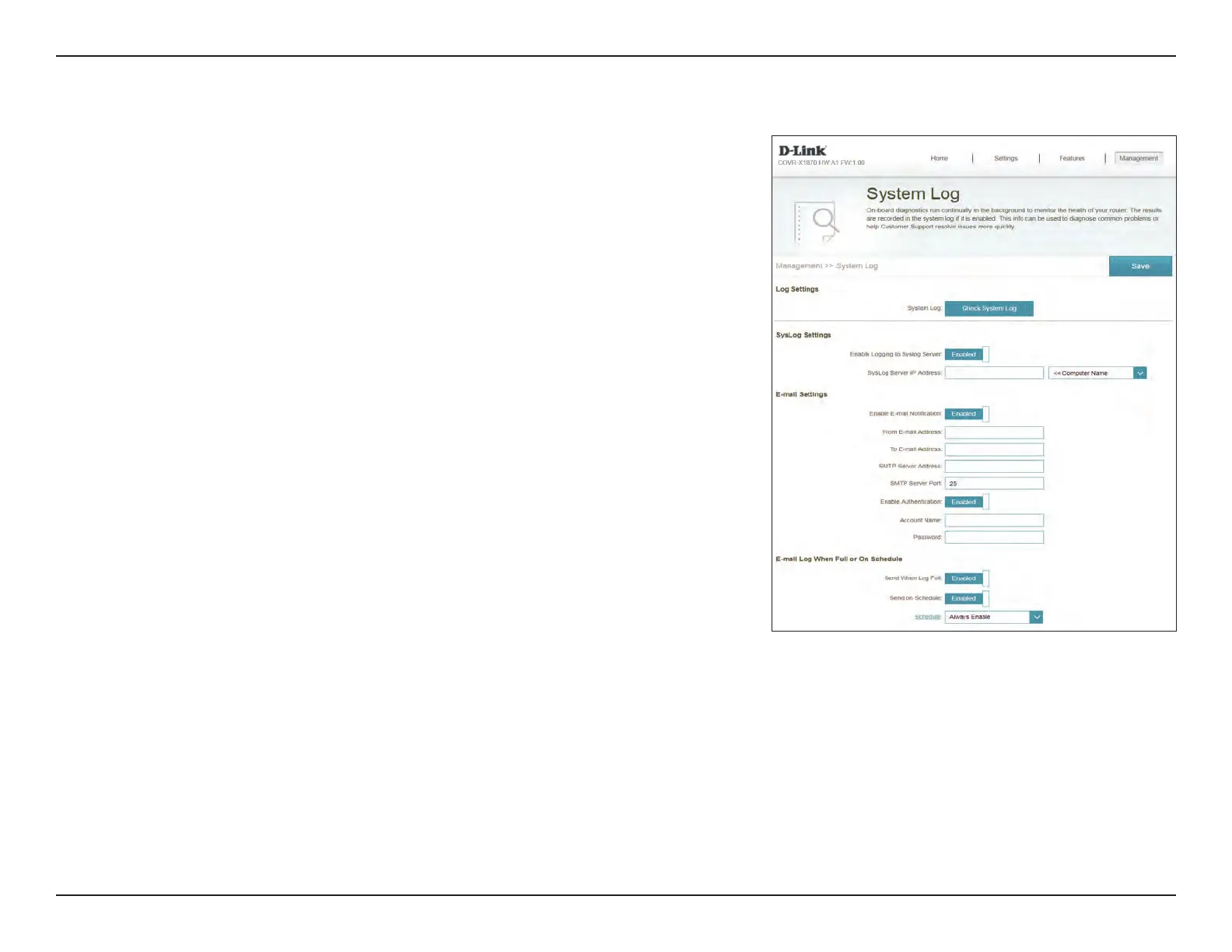
System Log
Mesh Point A keeps a running log of events. This log can be sent to a Syslog
server, or be sent to your email address.
In the Management menu on the bar on the top of the page, click System
Log.
Log Settings
System Log: Click the Check System Log to download a copy of the system log to
your hard drive.
SysLog Settings
Enable Logging to
Syslog Server:
Check this box to send the Mesh Point logs to a SysLog Server.
If Logging to the Syslog Server is Enabled:
Syslog Server IP
Address:
Enter the IP address for the Syslog server. If the Syslog server is
connected to Mesh Point A, select it from the drop-down menu to
automatically populate the eld.
Email Settings
Enable E-mail
Notication:
Enable this option if you want the logs to be automatically sent to
an email address.
If E-mail notication is Enabled:
From E-mail
Address:
Enter the email address your SysLog messages will be sent from.
To E-mail Address: Enter the email address your SysLog messages will be sent to.



 To Next Page