23
② Practice Swing
(PAN) or (TILT) ¨
③ Stopping Swing
Just press button or touch the Joystick
to stop it. (It will go back to operation after few
seconds.)
※ When it is being used as ‘Auto Pan’ of CCTV Receiver, you are required to push ‘SWING’ key and
you can’t stop it with Joystick.
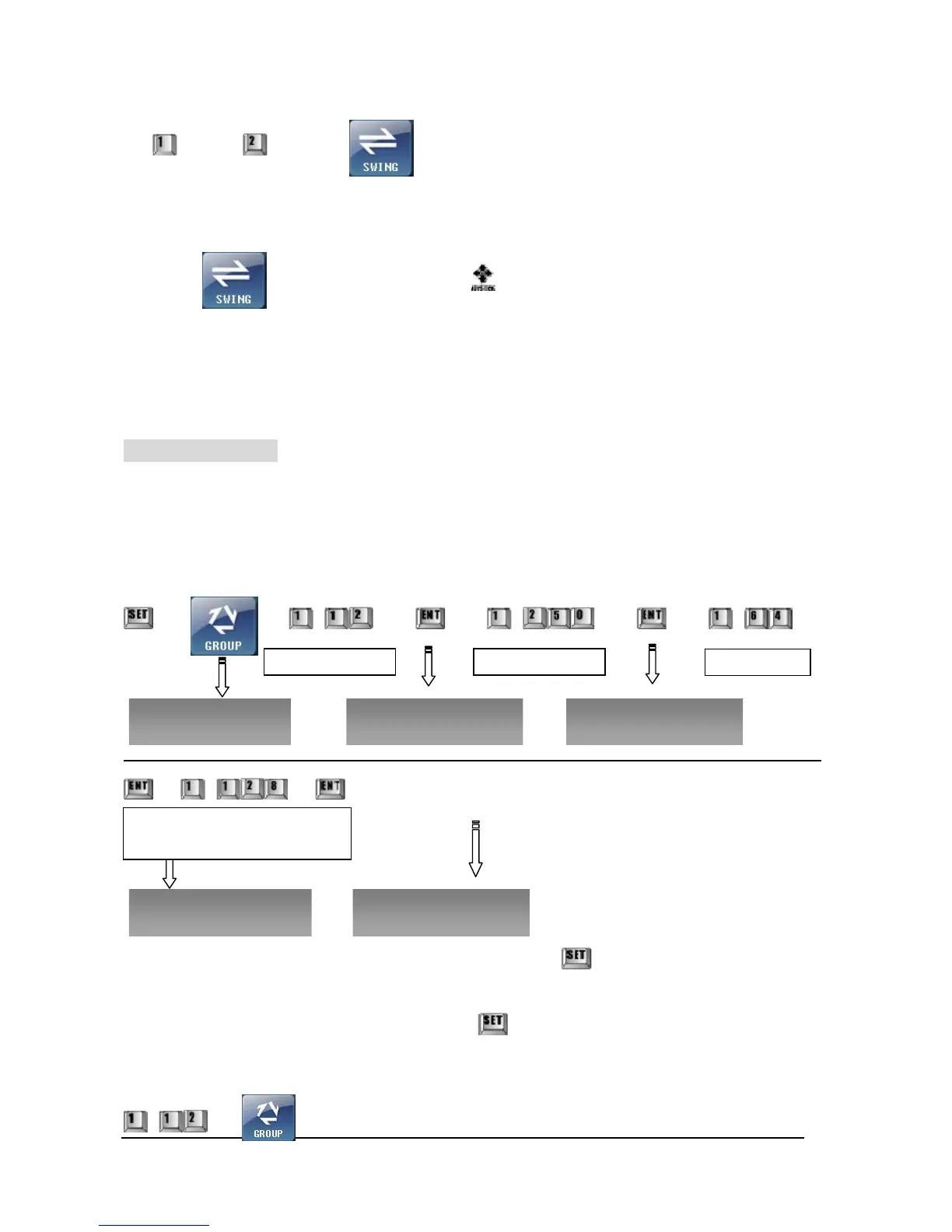
③ Set-Up GROUP
Maximum 12 Preset Points can be set in one GROUP. You can make up to 12 GROUPs
setting speed, dwell time.
① Inputting GROUP
¨ ¨ ~ ¨ ¨ ~ ¨ ¨ ~ ¨
¨ ~ ¨ ¨ (Preset No.~ Repeat)
※ In order to finish one GROUP and set other GROUPs, press
key after you finish procedures of
inputting PRESETs.
※ After you finish all inputting procedures, press key and enter Normal Mode.
② Executing GROUP
~ ¨
Press GROUP No. Press PRESET No. Moving Speed
Group No.? 1-12 Preset No.? 1-250 Move Speed? 1-64
Dwell Time? 1-128sec Preset No.? 1-250
Dwell Time: The time that the camera
stays from preset point to the next
point.



 To Next Page