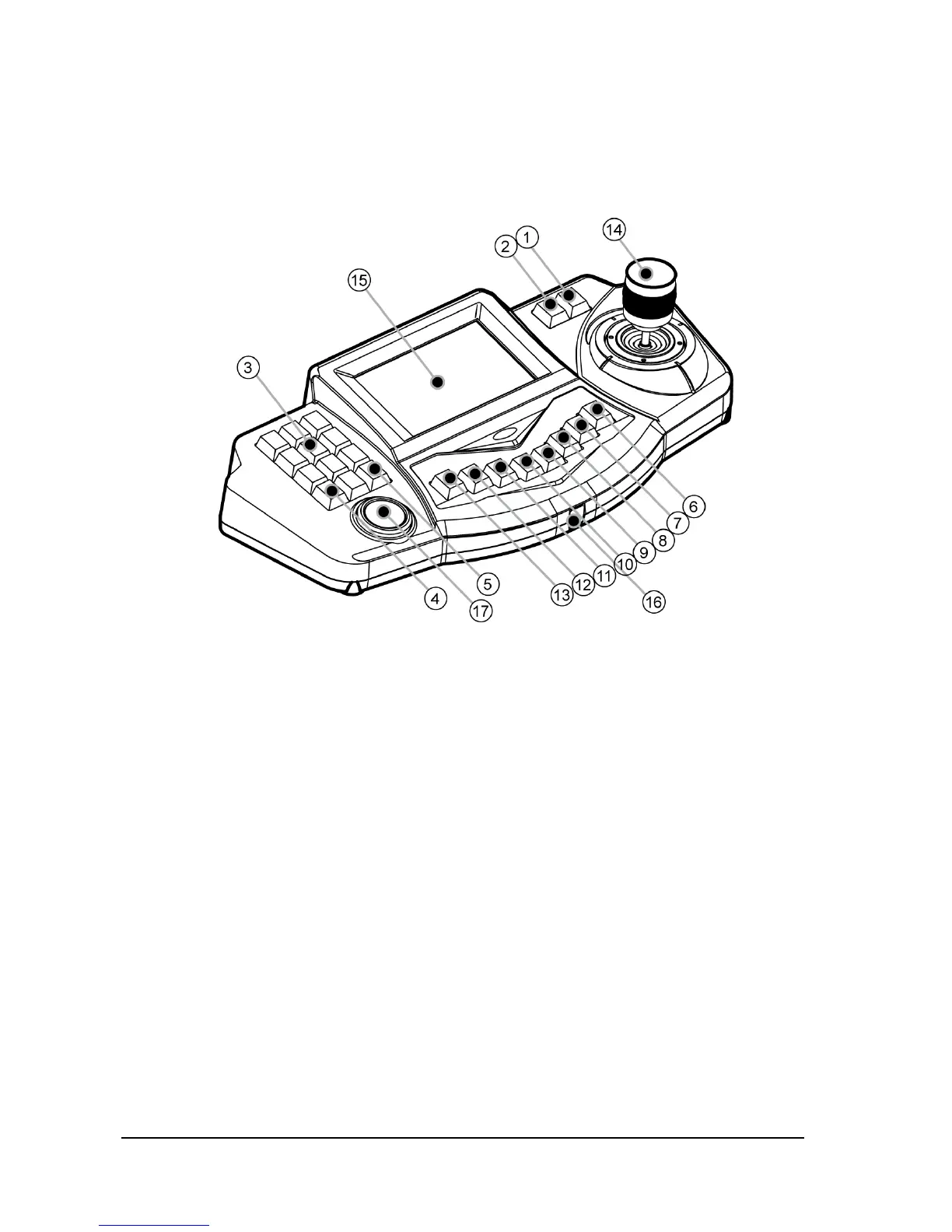
3). Keyboard Functional Keys
1. Upper Section
1) F/N : “Zoom In” function when use Zoom camera and “ESC (Escape)” function
2) F/F : “Zoom Out” function when use Zoom camera and “Confirm” function when set menu
3) Numeric keypad : used to input numerical value or other functions
4) CLR (CLEAR) : Used to cancel input command or number.
5) ENT (ENTER) : press this key to input command or save, run designated commands
6) SET : Use this key for camera Setup or Keyboard User’s Setup Mode.
7) P-SET : Used to set “PRESET”. Please study explanation of each section for more
detailed function.
8) MENU : This button is use to setup the function with number button. (Refer to function
guidance)
9) ALARM : activate or release the alarm when gearing dome camera with ARU (alarm
receiver unit)
10) WEB-MONITOR: If an Internet Option Board was installed into Matrix System, DVI signal
would be outgoing. In the future, it would be added the Control function of this.
11) DVR : Press this key to enter “DVR Control Mode” or select DVR by using numeric key
together.
12) MON : Selects monitor



 To Next Page