BRC1E51
Remote controller
4PW52905-1
Quick reference
8
10.Test operation method (SkyAir only)
For the Test Operation procedure, please refer to the
Installation Manual of the unit.
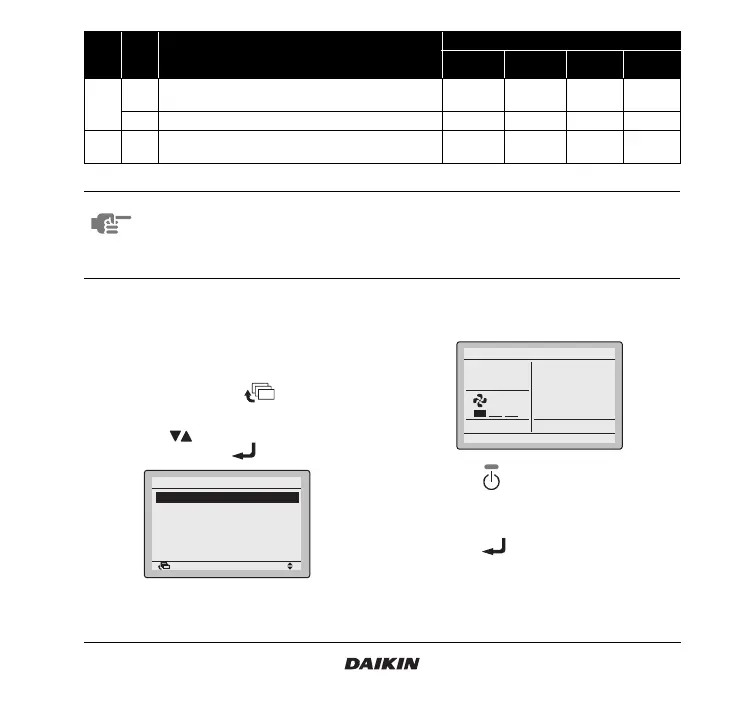
10.1 How to activate test operation
1 Press and hold the button for four
seconds to enter the Field setting menu.
2 Use the buttons to select Test operation
ON/OFF and push the button.
3 Test oper ation is displayed on the bottom of the
screen.
4 Push the button within 10 seconds to start
the test operation.
10.2 How to check air flow direction
1 Push the button to enter the MainMenu.
1c
1
Thermostat sensor in remote controller (for limit
operation and Home leave function only)
Not use Use — —
3
Permission level setting
Level 2 Level 3 — —
1e 2
Home leave function
Not
permitted
Permitted — —
Mode
Note 1
FIRST
CODE
NO.
Description of setting
SECOND CODE NO. Note 2
01 02 03 04
NOTE 1. Second code No. at factory shipment is set to “01”. However in the following cases it is set to “02”.
• Airflow direction range (except round flow cassette)
• Thermostat sensor in remote controller (SkyAir only)
• Thermostat sensor in remote controller for limit operation and Home leave function only
2. Any function that is not available on the indoor unit is not displayed.
Return Setting
Field setting
Test operation ON/OFF
Register Service Contract
Field setting list
Group No. setting
Indoor unit Airnet No. set
Outdoor unit Airnet No. set
1/2
Set temperature
28°C
Cool
Test Operation



 To Next Page