BRC1E51
Remote controller
4PW52905-1
Quick reference
10
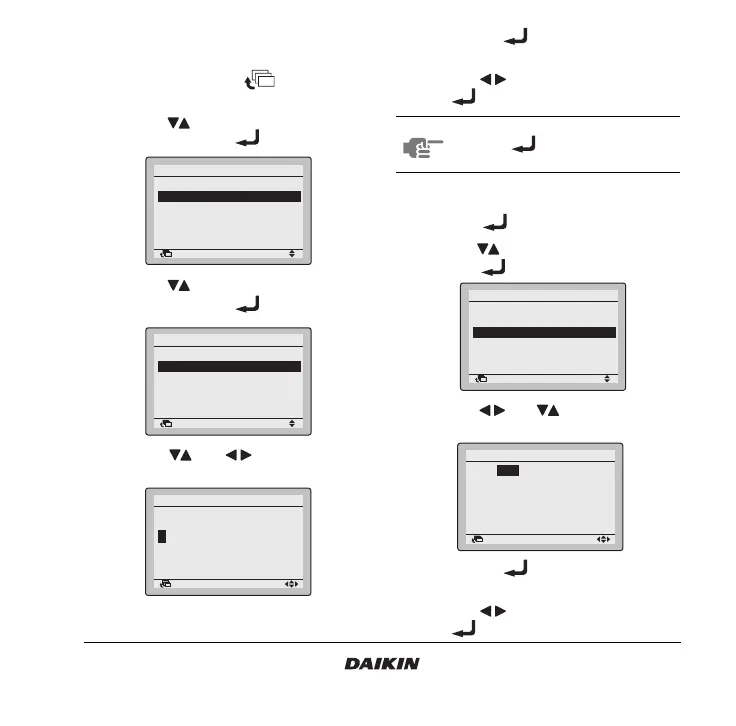
12. Registration method of the service
contact
1 Press and hold the button for four
seconds to enter the Field setting menu.
2 Use the buttons to select Register Service
Contract and push the button.
3 Use the buttons to select Register Service
Contract and push the button.
4 Use the and buttons to enter the
telephone number.
5 Push the button to display the
confirmation screen.
6 Use the buttons to select Yes and push
the button.
13. Clock setting
1 Push the button to enter the MainMenu.
2 Use the buttons to select Clock setting and
push the button.
3 Use the and buttons to select and
set Year, Month, Day, and time.
4 Push the button to display the
confirmation screen.
5 Use the buttons to select Yes and push
the button.
Return Setting
Field setting
Test operation ON/OFF
Register Service Contract
Field setting list
Group No. setting
Indoor unit Airnet No. set
Outdoor unit Airnet No. set
1/2
Return Setting
Register Service Contract
None
Register Service Contract
Return Setting
Register Service Contract
Register Service Contract
––––––––––––––––
1/2
NOTE To check the registered service contact,
push the button and select Service
Contact/Model Info in the MainMenu.
Return Setting
MainMenu
Convenient functions
Setting status list
Clock setting
Language changeover
2/2
Return Setting
Clock setting
Year 2008
Month 01
Day 01
Tuesday
00:00



 To Next Page