Quick reference
9
BRC1E51
Remote controller
4PW52905-1
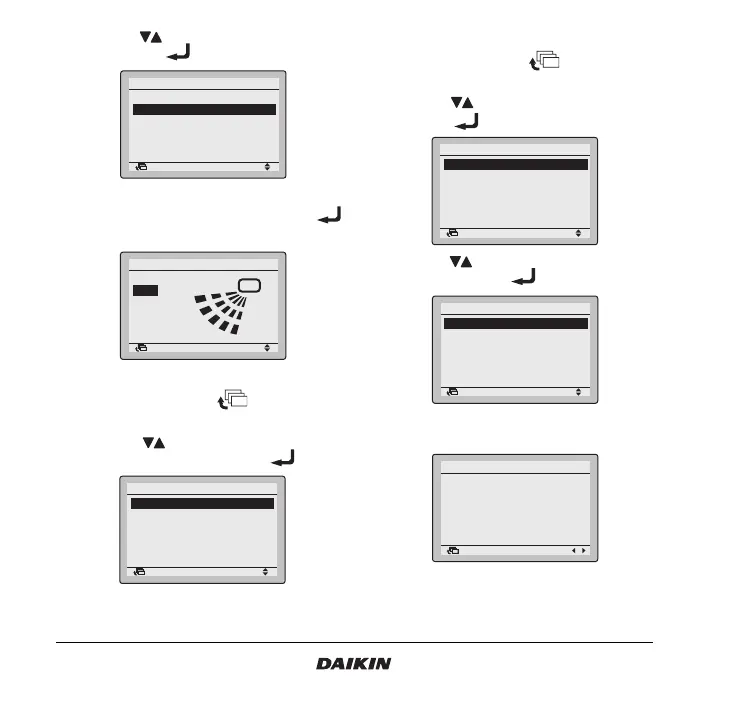
2 Use the buttons to select Airflow direction
and push the button.
3 Check that the air flow direction is actuated
according to the setting and push the
button.
10.3 How to deactivate test operation
1 Press and hold the button for four
seconds to enter the Field setting menu.
2 Use the buttons to select Test operation
ON/OFF in the menu and push the button.
11.Checking of error records
1 Press and hold the button for four
seconds to enter the Field setting menu.
2 Use the buttons to select Error record and
push the button.
3 Use the buttons to select Remote controller
record and push the button.
4 The 10 latest errors and their Unit No. are
displayed in order.
Return Setting
MainMenu
Set temp mode changeover
Airflow Direction
Quick Cool/Heat On/Off
Ventilation
Timer setting
Service Contact/Model Info
1/2
Return Setting
Airflow Direction
Swing
Return Setting
Field setting
Test operation ON/OFF
Register Service Contract
Field setting list
Group No. setting
Indoor unit Airnet No. set
Outdoor unit Airnet No. set
1/2
Return Setting
Field setting
Error record
Indoor status display
Outdoor status display
Fan forced operation ON
Main/Sub changeover
Filter element sign OFF
2/2
Return Setting
Error record
Remote controller record
Indoor unit record
2/2
Return Setting
Remote controller record
Unit Error Date Time
01
–– –– ––
/
––
/
–– ––:––
02
–– –– ––
/
––
/
–– ––:––
03
–– –– ––
/
––
/
–– ––:––
04
–– –– ––
/
––
/
–– ––:––
1/3



 To Next Page