Quick reference
17
BRC1E51
Remote controller
4PW52905-1
6. Basic operation method
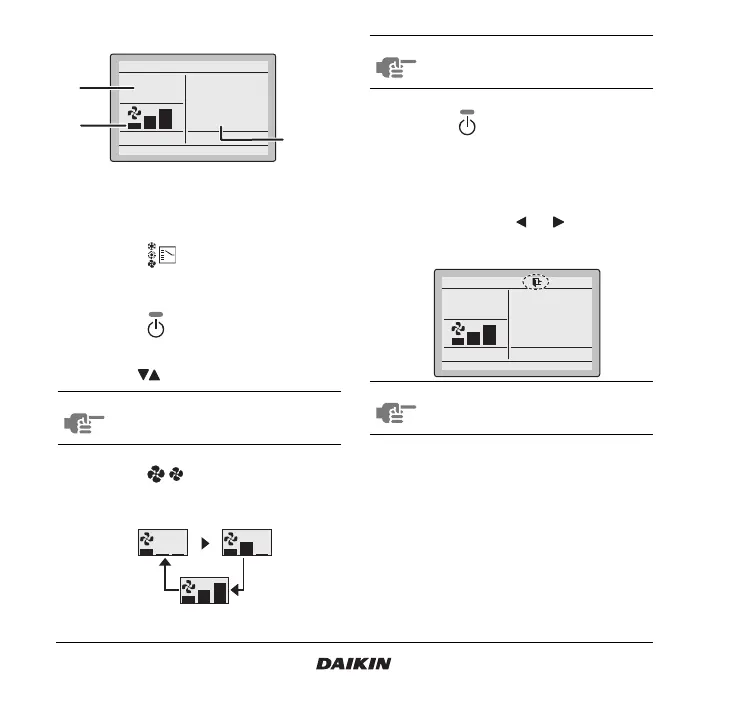
1 Push the button several times until the
desired operation mode Cool, Heat, Vent, Fan, Dry,
or Auto is selected.
2 Push the button. The operation lamp will
light and the system starts operating.
3 Use the buttons to set the temperature.
4 Push the button to select the desired
fan speed from Low, Middle, or High.
5 Push the button. The operation lamp will
turn off and the system stops operating.
Additional features of the controller:
1HOME LEAVE
1 Push and hold the or button for four
seconds to enable the Home leave mode. The
Home leave icon is displayed.
a Operation mode
b Temperature
c Fan speed
NOTE When in Fan, Dry, or Vent mode, the
temperature can not be set.
Set temperature
28°C
Cool
Return Setting
a
c
b
NOTE When in Dry or Vent mode, the fan speed
can not be set.
NOTE Redo this procedure to disable the Home
leave mode.
Set temperature
28°C
Cool
Return Setting



 To Next Page