ESIE09-05 Field Setting
Test Operation 93
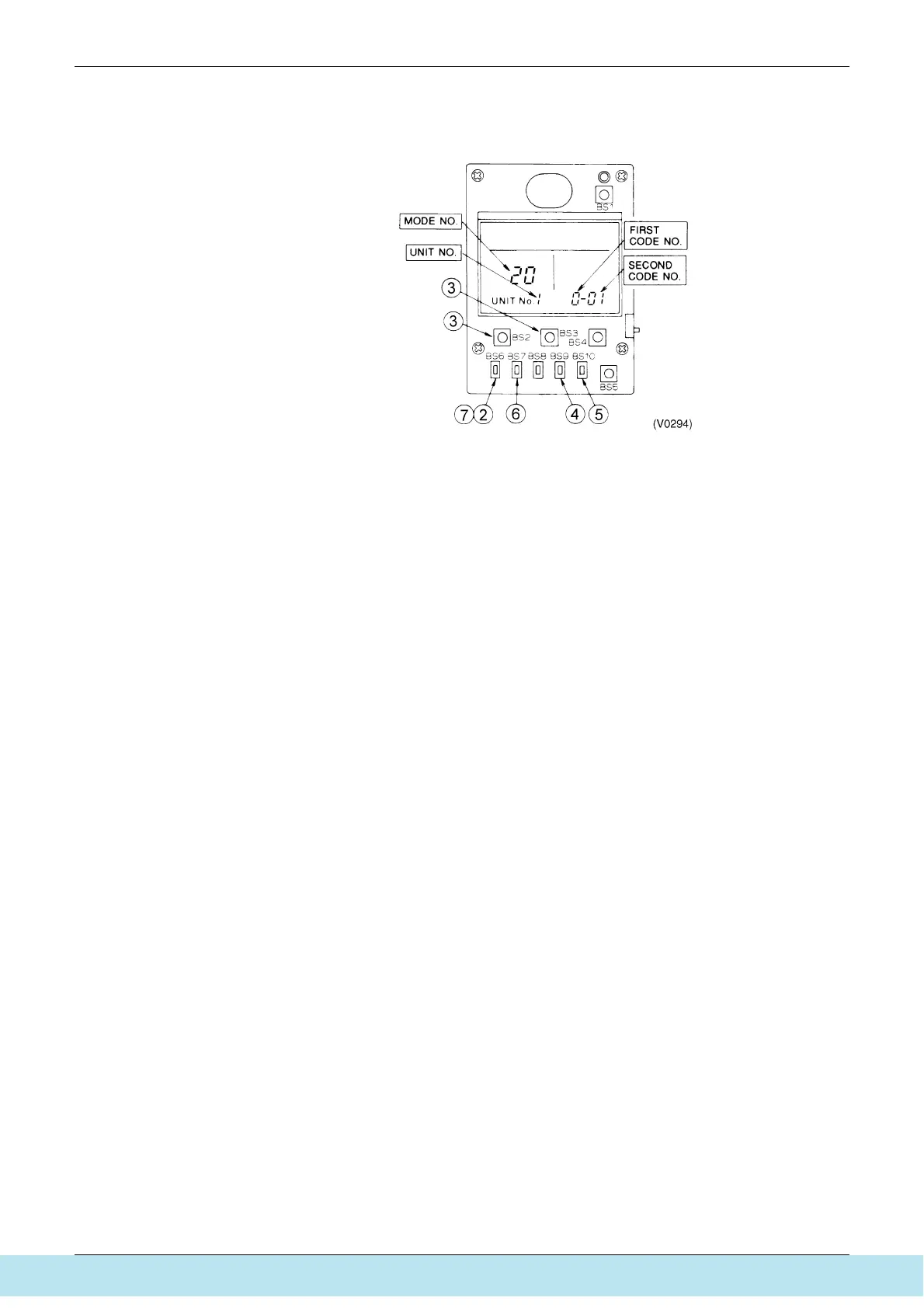
3.1.2 Simplified Remote Controller
BRC2C51
1. Remove the upper part of remote controller.
2. When in the normal mode, press the [BS6] BUTTON (2) (field set), and the FIELD SET
MODE is entered.
3. Select the desired MODE No. with the [BS2] BUTTON (3) (temperature setting V) and the
[BS3] BUTTON (3) (temperature setting W).
4. Push the [BS9] BUTTON (4) (set A) and select FIRST CODE NO.
5. Push the [BS10] BUTTON (5) (set B) and select SECOND CODE NO.
6. Push the [BS7] BUTTON (6) (set/cancel) once and the present settings are SET.
7. Push the [BS6] BUTTON (7) (field set) to return to the NORMAL MODE.
Все каталоги и инструкции здесь: http://splitoff.ru/tehn-doc.html



 To Next Page