ESIE09-05 Troubleshooting by Remote Controller
Troubleshooting 155
2.2 Self-diagnosis by Wired Remote Controller
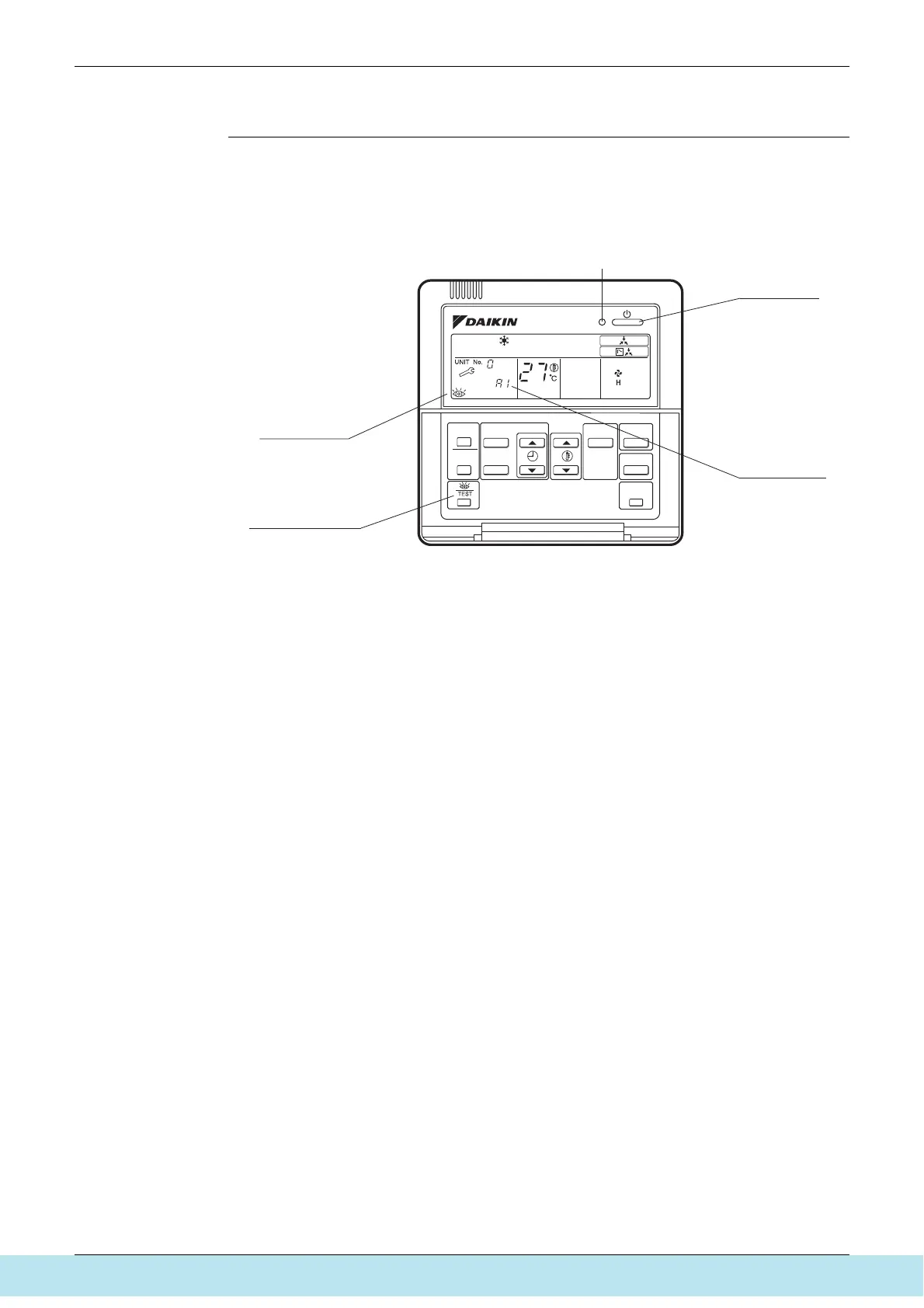
Explanation If operation stops due to malfunction, the remote controller’s operation LED blinks, and
malfunction code is displayed. (Even if stop operation is carried out, malfunction contents are
displayed when the inspection mode is entered.) The malfunction code enables you to tell what
kind of malfunction caused operation to stop. See page 159 for malfunction code and
malfunction contents.
Note:
1. Pressing the INSPECTION/TEST button will blink the check indication.
2. While in check mode, pressing and holding the ON/OFF button for a period of five seconds or
more will clear the failure history indication shown above. In this case, on the codes display,
the malfunction code will blink twice and then change to “00” (=Normal), and the operation
mode will automatically switch from check mode to normal mode (displaying the set
temperature).
Operation LED
ON/OFF button
Malfunction code
Inspection display
Inspection/Test button
Все каталоги и инструкции здесь: http://splitoff.ru/tehn-doc.html



 To Next Page