Dane Technologies, Inc. WheelChair Mover Owners Manual 41
7105 Northland Terrace, Minneapolis, MN 55428 / 888-544-7779 / 763-544-7779 / Fax 763-544-4234
www.danetechnologies.com 970-068 6/19/17 Rev F
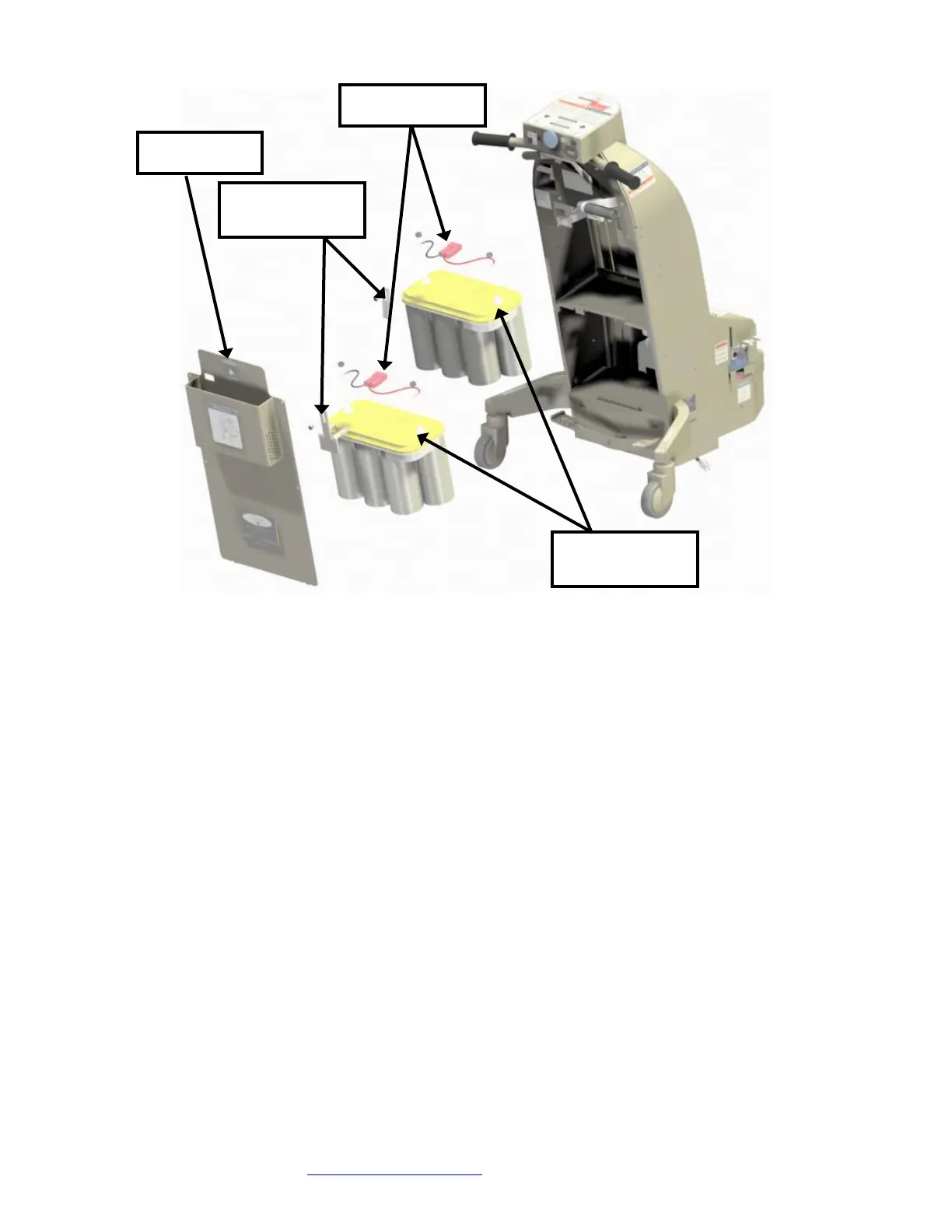
Disconnect the red battery connectors.
Remove the bracket holding each battery and remove the batteries by lifting one
corner of the battery above the shelf edge and sliding them out.
Remove the cables from the old batteries and install on the new batteries. Make
sure to do them one at a time to avoid installing the wires incorrectly. The battery
boots can stay positioned on the battery wires. Connect the red wire to + and the
black wire to -. Position the battery boots covering the terminals.
Reinstall the batteries by setting one corner of the battery on the battery shelf and
slowly sliding the battery into position. Reinstall the brackets holding the batteries.
Reconnect the red battery connectors.
Insert the red service maintenance key and turn on the switch. Turn the “O/I”
(on/off) switch to on. Verify machine moves forward and backward. If machine does
not operate call Dane Technologies for service.
Turn the “O/I” (on/off) switch to off.
Turn off the red service maintenance switch and remove the key.
Complete the reassembly by installing the back cover.
Insert the red service maintenance key and turn on the switch. Turn on the machine
and test it for correct operation.


 To Next Page