4. CONTROLS
16
4.3 Quick Access Menu
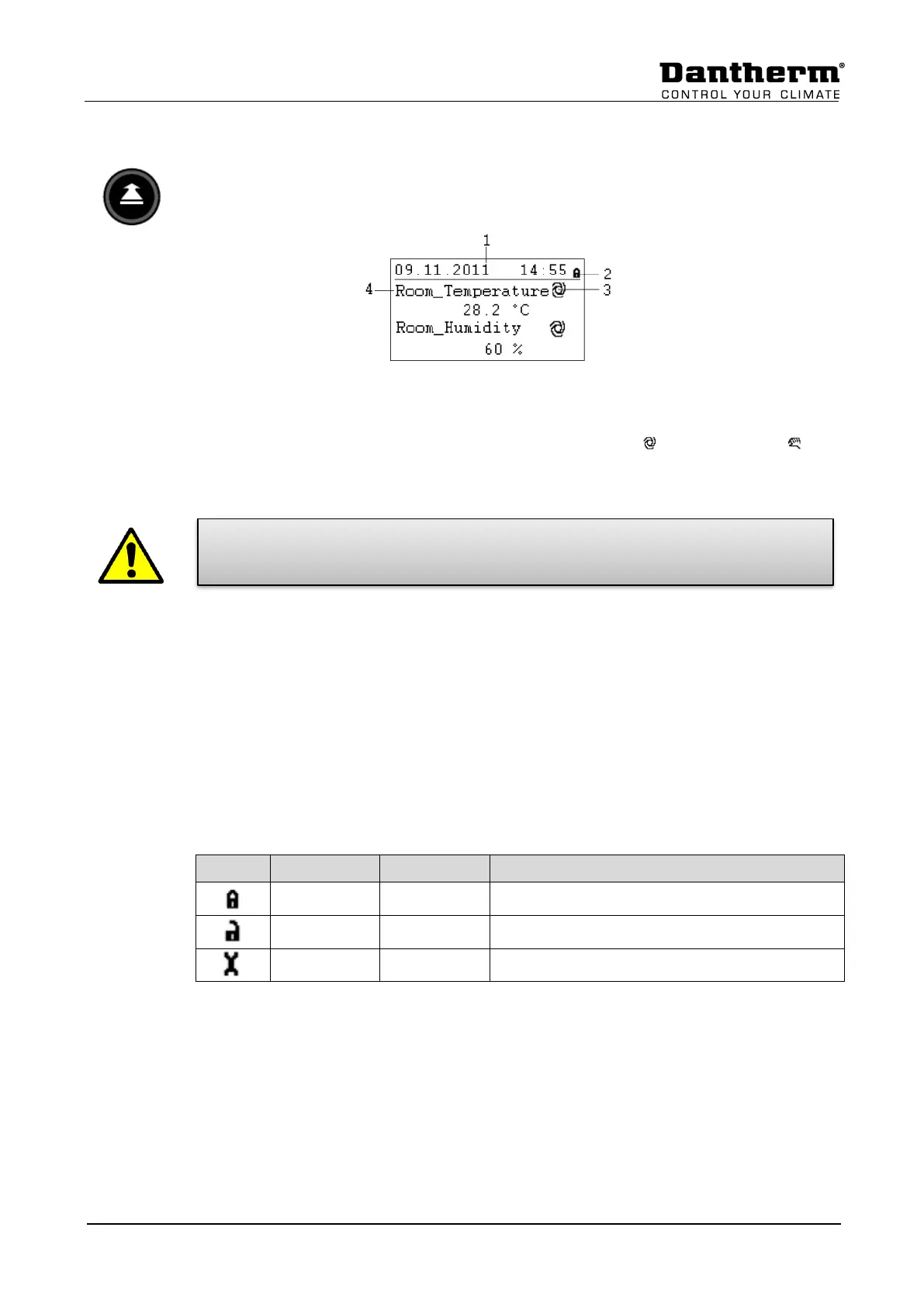
When no keys are pressed the display will show the following information. For easier reading
press the Rotate button to light up the display.
1) Shows the actual day, month, year and time.
2) Shows if the program is secured by a password.
3) Shows if the actual shown point is running in AUTO mode or MANUAL mode
4) Shows the actual pool hall conditions (Temperature and Humidity).
As the user of the unit you should normally not change a point from Auto mode
into Manual mode. This should only be done by professional service technicians!
The only exception is the Function_Switch point (see 4.3.2).
4.3.1 Password handling
There are three different access levels in the program. In Level 1 values can be changed
without using a password. This is possible in the Time Program and for the switch point
(Function_Switch) in the Start Display.
To change set points in the Set Point menu, you must use the level 2 password to get
access. All other points are on access level 3 and can only be changed by entering a service
password, which your Dantherm service technician has*.
It is possible to change the password under the service menu, but it is not recommended by
Dantherm, as new software must be uploaded to the controller if the password has been
forgotten.


 To Next Page