Selecting Radio Stations
In this menu you can select the found DAB+ radio stations.
Press the VOLUME +/FORWARD button (B) and the VOLUME –/BACKWARD button (G) to select one of
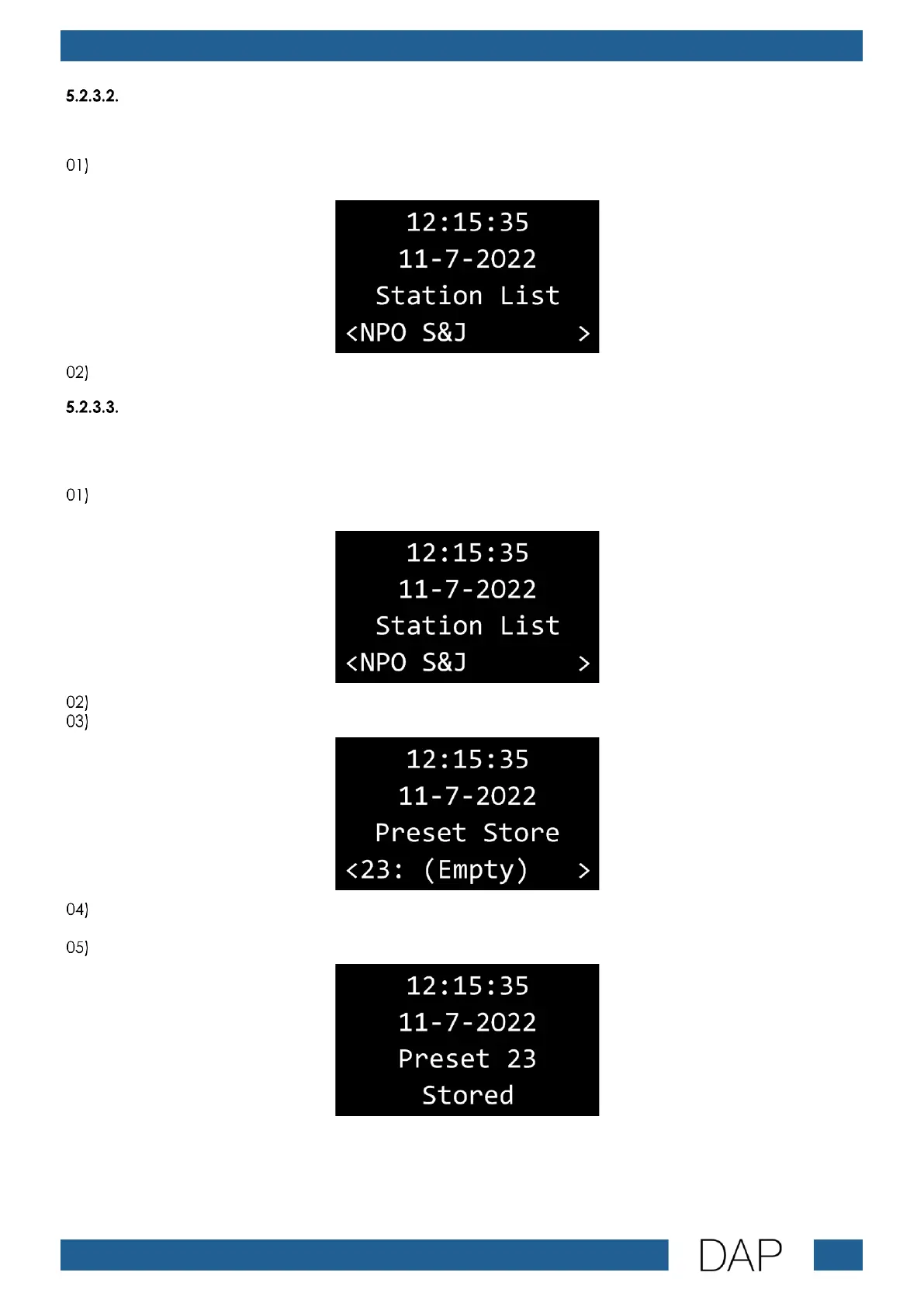
the found DAB+ radio stations. The display shows:
Press the PLAY/PAUSE button (D) to confirm. The device will activate the selected DAB+ radio station.
Saving Presets
If you want to listen to only a few DAB+ radio stations, you can save them as presets, for easy access.
The device can save up to 30 DAB+ presets.
Press the VOLUME +/FORWARD button (B) and the VOLUME –/BACKWARD button (G) to select one of
the found DAB+ radio stations. The display shows:
Press the PLAY/PAUSE button (D) to confirm. The device will activate the selected DAB+ radio station.
Press and hold down the REPEAT button (E) for 2 seconds. The display shows:
Press the VOLUME +/FORWARD button (B) and the VOLUME –/BACKWARD button (G) to select one of
the 30 preset slots.
Press the PLAY/PAUSE button (D) to confirm. The changes are saved and the display shows:


 To Next Page