DM4270 – Installation Guide
204.4331.03 - October/2019
Link Down (inactive port)
Data sending and/or receiving activity
Port operating in 1000Base-T mode
Port operating in 10Base-T or 100Base-TX
Table 5 – MGMT Interface LEDs
3.9 DATA INTERFACE
3.9.1 DM4270 48XS+6CX
3.9.1.1 10 Gigabit Ethernet optical SFP+ (10GBase-X) Interfaces
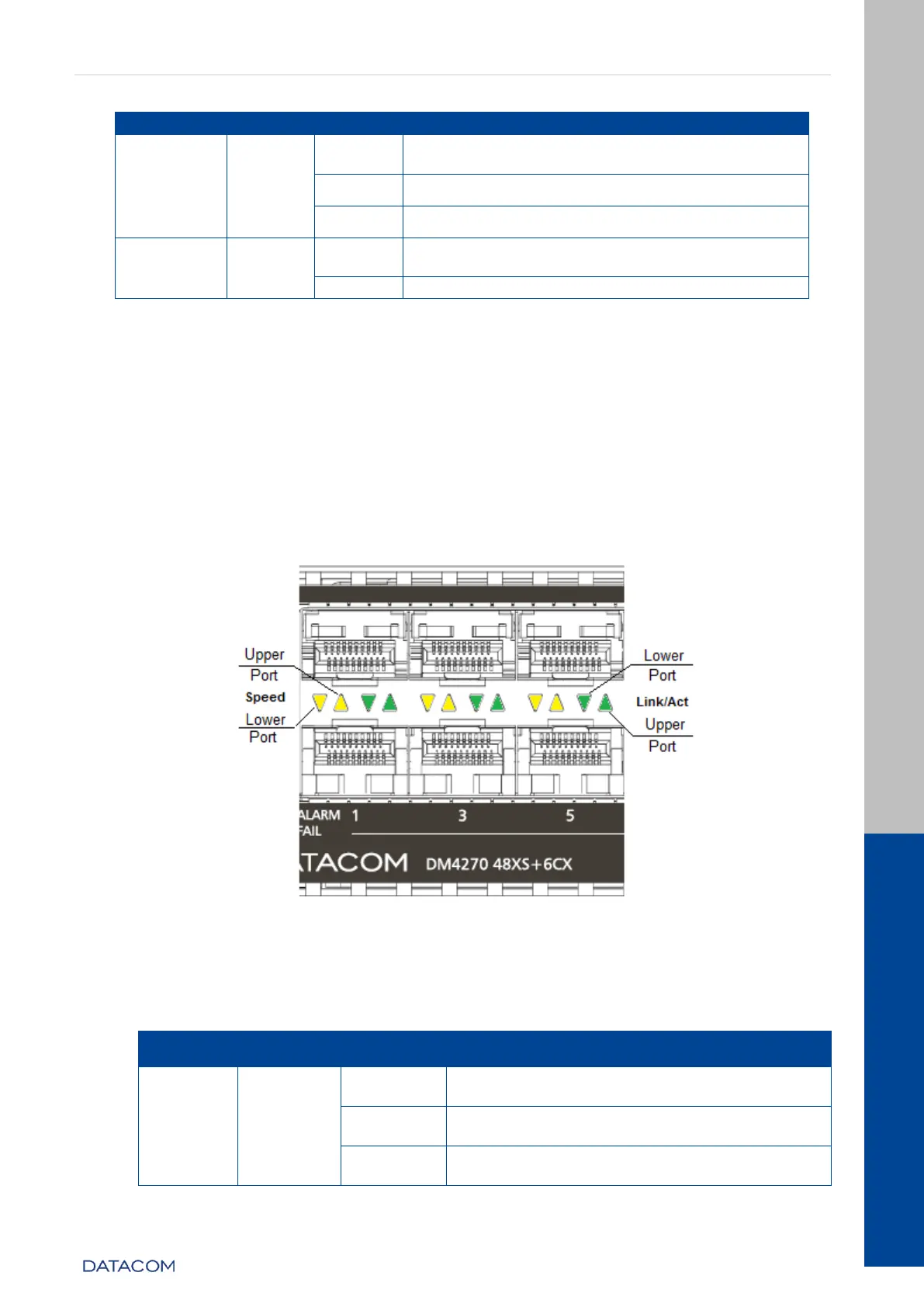
The DM4270 48XS+6CX has 48 10 Gigabit Optical Ethernet interfaces using an SFP+
connector. There are LINK/ACT and SPEED indicator LEDs that are built into the
connectors corresponding to each. The ports are identified by the numbers printed on
the front panel, however, only odd ports (lower ports) are numbered. The numbering of
the other ports follows the order according the figure below:
Figure 9 - 10GbE SFP Ports+ LEDs (DM4270 48XS+6CX)
3.9.1.2 Interface LED indicators 10 Gigabit Optical Ethernet
The convention to indicate the operation and mode of operation of the 10GbE SFP+
interfaces is described in the table below:
Link Down (inactive port)
Data sending and/or receiving activity


 To Next Page