DM4270 – Installation Guide
204.4331.03 - October/2019
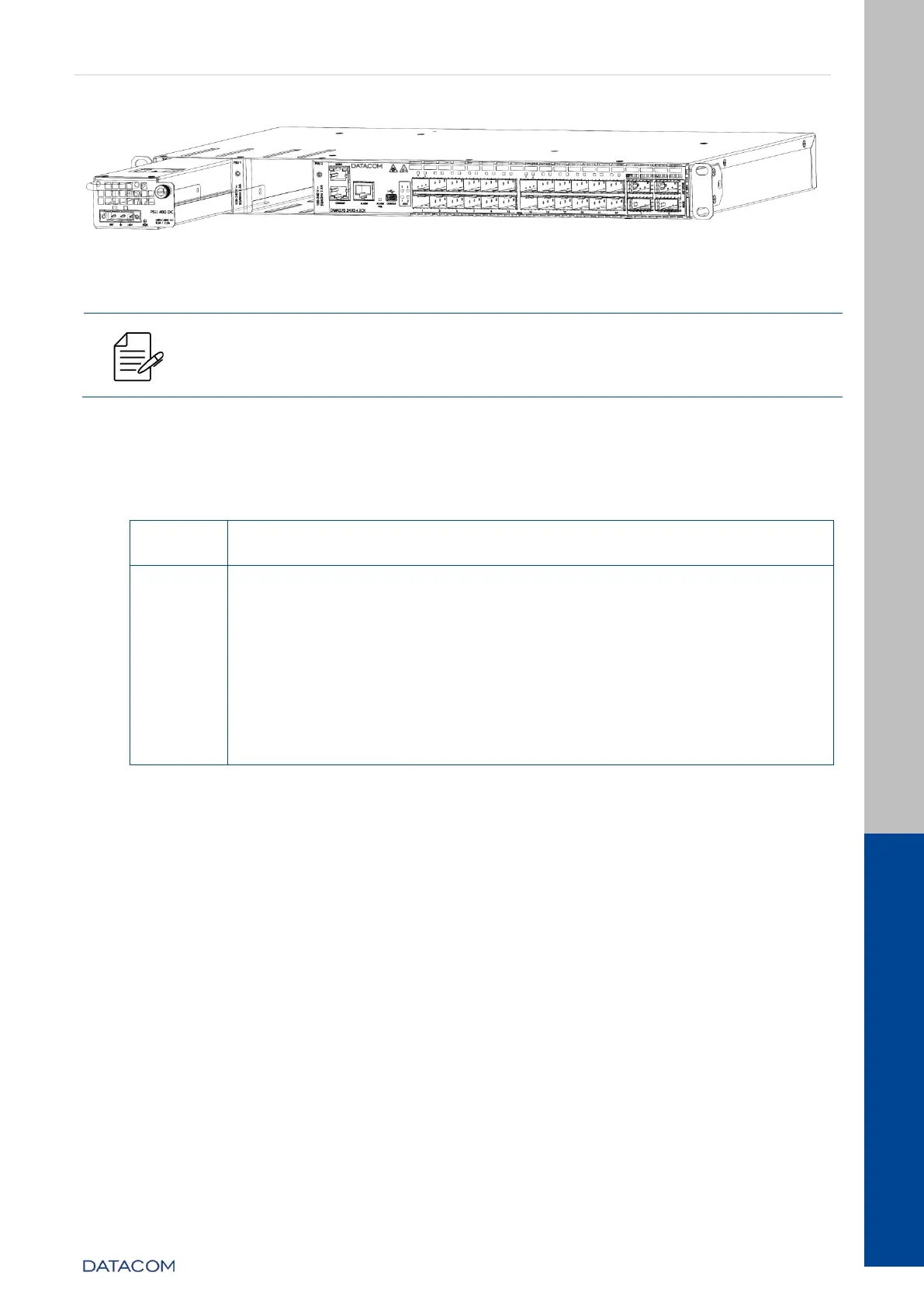
Figure 30 – Inserting the PSU 400 into the DM4270 24XS+2CX
Each PSU slot has an independent power input; the PSUs 400 have a
front power supply. The equipment will only power on if there is at least
one PSU that is properly powered.
4.8 CHECKING THE PRODUCT’S OPERATION
Considering that the DM4270 was installed according to the guidelines in this guide, the
steps below indicate whether the equipment is operating normally.
Immediately after the unit is powered by either of the power
inputs, the power-on PSU PWR indicator will light up.
After the startup has finished, observe the ALARM/FAIL indicator:
OFF: indicates that the equipment has been initialized and
is operating correctly.
RED ON (FAIL): indicates that the equipment has
encountered an internal failure. Technical Support must
be contacted.
YELLOW/AMBER ON (ALARM): indicates that the
equipment has been initialized correctly, but an alarm is
enabled. If you have any questions, please contact
Technical Support.
Table 17 – Checking DM4270 operation
Once the startup process has been successfully completed, the operator must configure
the equipment management as indicated in the Logging in for First Time section.


 To Next Page