DI-2008 Hardware Manual
Controls, Indicators, and Connections
13
3. Select Voltage in the Input Type selection box.
4. Click on the desired gain setting for that channel.
5. Click the Next b
utton to access channel settings for the next channel or click the OK button to close the dialog
box.
Thermocouple Measurements
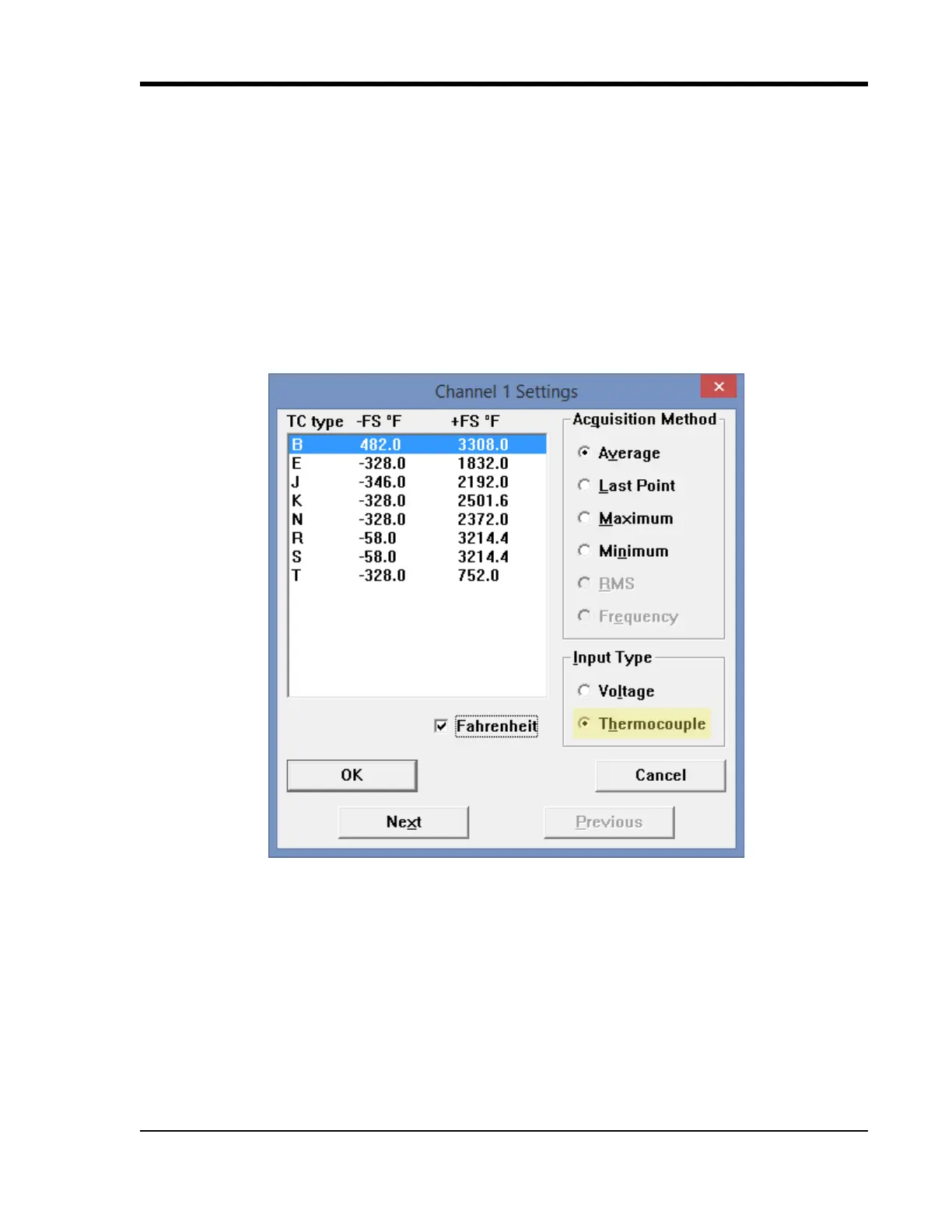
Each analog input channel on the DI-2008 may be programmed for one of 8 possible thermocouple types (B, E, J, K,
N, R, S, or T). Change the thermocouple type for each channel individually:
1. Select the channel (click on the channel box in the left hand side of the waveform screen).
2. Open the Channel Settings dialog box. Select Edit > Chan
nel Settings in the menu or press F10.
3. Select Thermocouple in the Input Type selection box.
4. Select the desired thermocouple type for that channel.
5. Click the Next b
utton to access channel settings for the next channel or click the OK button to close the dialog
box.
Temperature scale may be changed to Celci
us by un-checking the Fahrenheit check box. This changes the scale for
all thermocouple temperature measurements.


 To Next Page