DI-2008 Hardware Manual
Controls, Indicators, and Connections
20
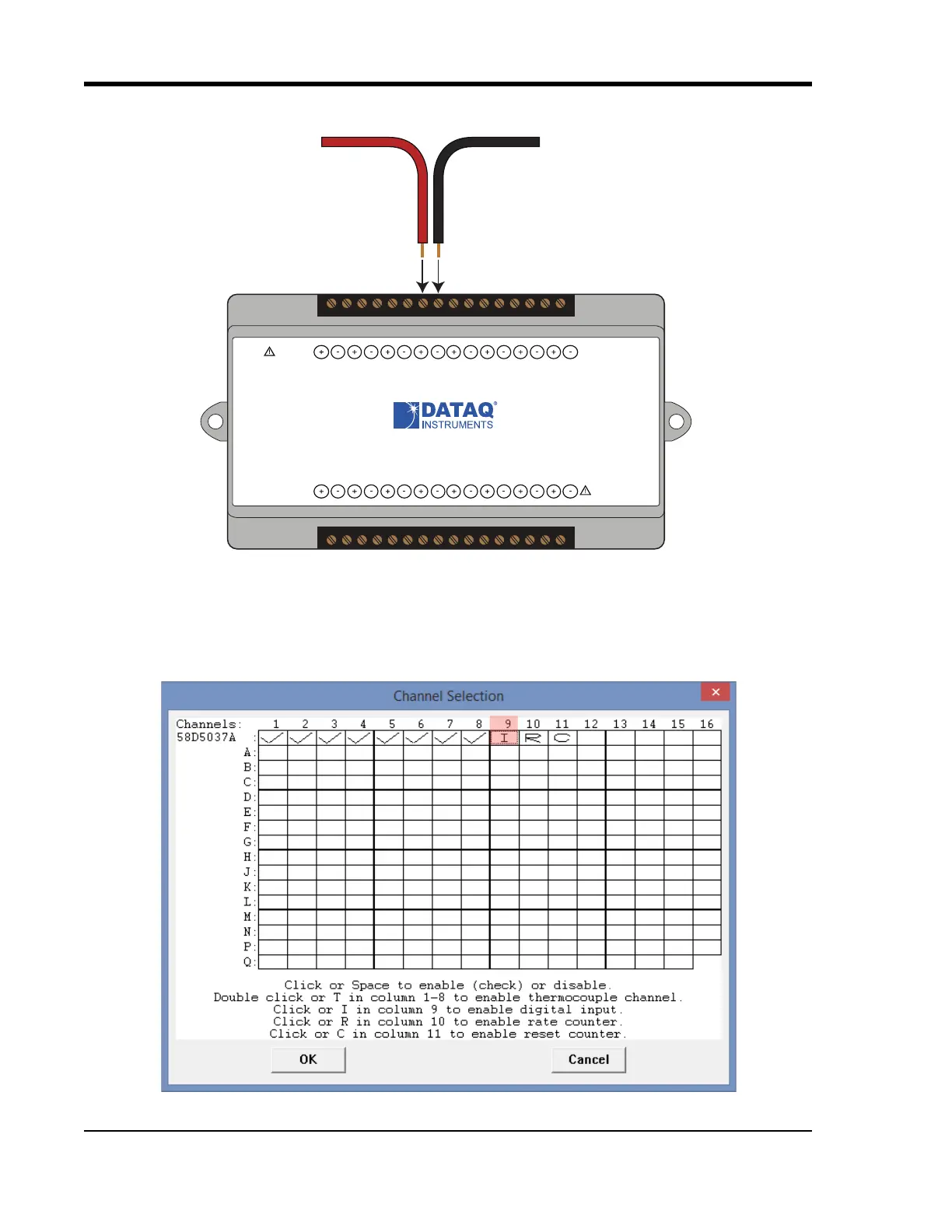
Connect any TTL pulse stream (30 VDC max) to the D3 Count channel on the DI-2008.
General Purpose Digital Inputs
Enable Channel 9 for general-purpose digital input functions. Click on Edit > Channels in the WINDAQ Acquisition
menu to open the Channel Selection grid. Channel 9 is the designated Digital Input channel. Click on the Channel 9
channel box to enable/disable the digital inputs. The Channel 9 channel box will display an “I” when enabled.
Signal +
Signal -
www.dataq.com
USB
CH8
CH7CH6
CH5CH4CH3CH2CH1
Download software at run.dataq.com
+15V GnD
60mA max
D0 D1 D2 D3 D4 D5 D6
DI-2008 Voltage, Thermocouple, and Pulse DAQ
Button
LED
0-30V Max
CountRateRecordEvent
120V rms max


 To Next Page