DI-2008 Hardware Manual
Controls, Indicators, and Connections
26
Sample Rate
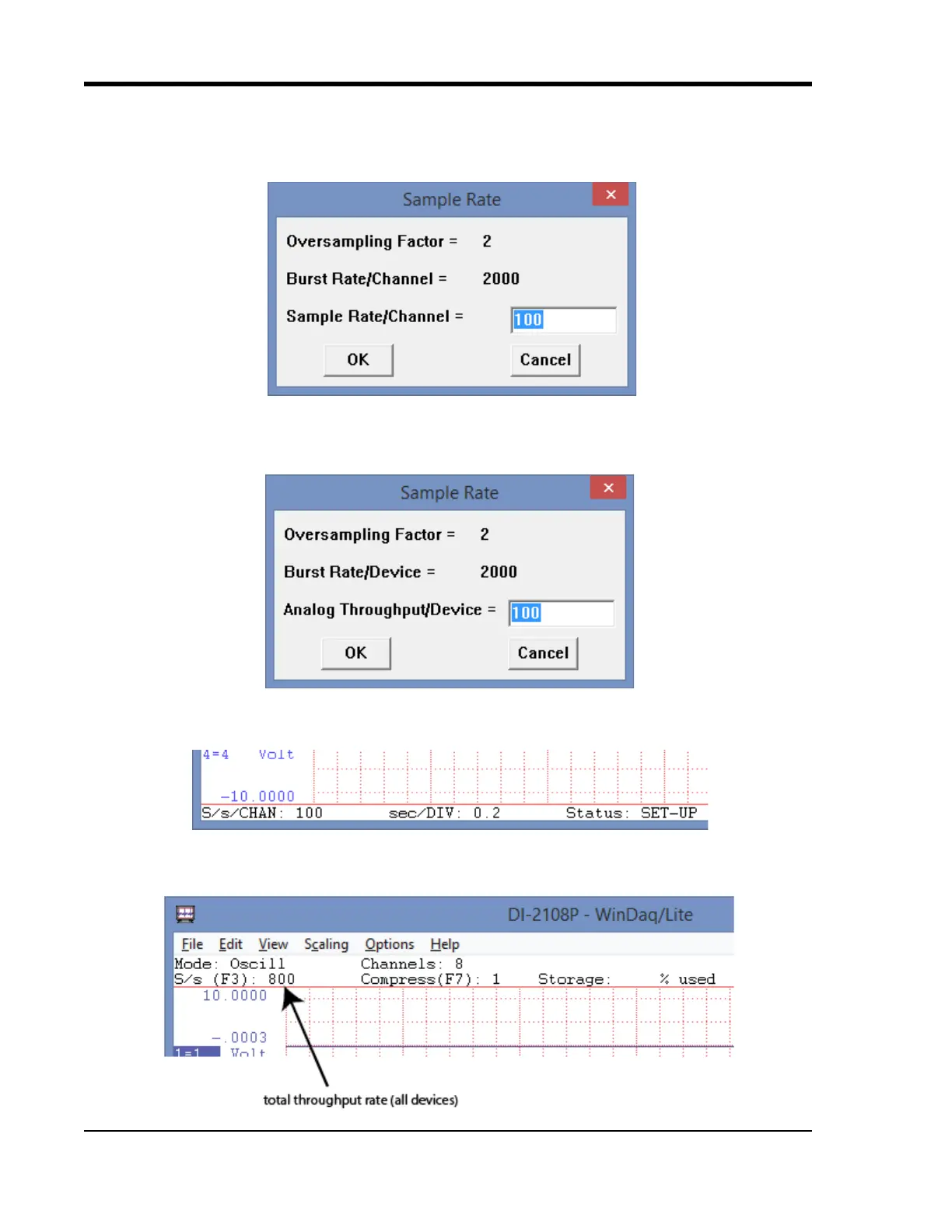
The sample rate for DI-2008 devices when only a single analog channel or less per device is enabled is set as a per
channel sample rate or “Sample Rate/Channel.” Select Edit > Sample Rate in the main menu or press F3.
The sample rate for DI-2008 devices when two or more analog channels are enabled is set as a per device analog
throughput rate or “Analog Throughput/Device” as the digital channels do not affect the sample rate. Select Edit >
Sample Rate in the main menu or press F3.
The sample rate per channel is displayed in the lower left corner of the WinDaq screen at S/s/CHAN: (samples per
second per channel).
Total throughput rate is displayed in the top-left portion of the WinDaq screen at S/s (F3). For example, if two
devices are connected and the Sample Rate/Device is 400, S/s would be 800.


 To Next Page